ACT-5002Quick Start Guide
ENG-9
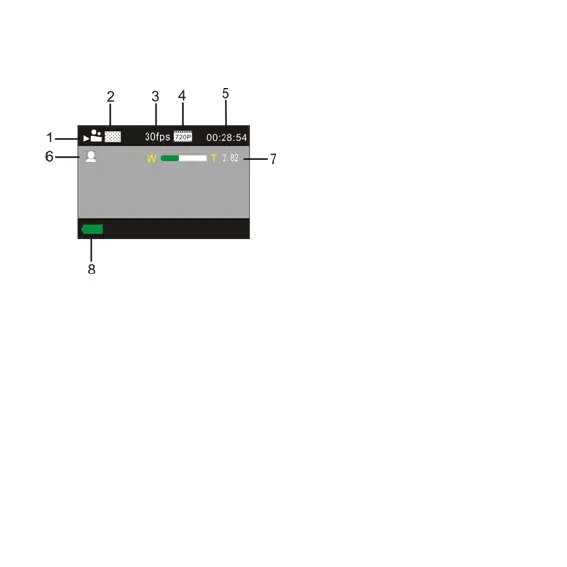
6.2 Screen display in recording mode
1. Video mode
2. Video quality
3. Video framerate
4. Video resolution
5. Available time to record
6. Face detect
7. Icon of digital zoom
8. Battery state
Note:
1. When using the HD size or FHD video, you must use the TF high-speed
card at class 4 or above.
2. Automatic screen-off will be performed during recording for saving power.
User may short press Power key or shutter key to enable the screen for
displaying.
7. Menu Setting Mode
7.1 Menu display
In photo, recording and playback mode, press Menu key to open the menu, and
then press Up/Down key to select menu, press the Shutter key to enter submenu.


 To Next Page