Sedentary:
Vibrates and displays icon when there is a lack of activity per period, set in personal info.
Vibration:
Switch On/Off to enable/disable vibration function on band for notifications.
Warn tips for Android users:
Allow Yoho Sports to run in backstage when uses Notifications and add it to trusted supplier in your privilege
management.
Main APP Features and Settings
Smart Alarm
Up to 3 alarms with user-friendly vibration. Supports an offline Clock alarm.
Band Display Setting
Choose display interfaces when button is pushed.
Abnormal Disconnection
Vibrates and displays icon if the band is disconnected abnormally. (Not disconnected by use or system)
Find Band
Click “Find band”, band will vibrate when connected with phone.
Shake to Take Selfie
Enter the interface and shake the band, camera on phone will take a picture after a 3s countdown.
Symbol Description
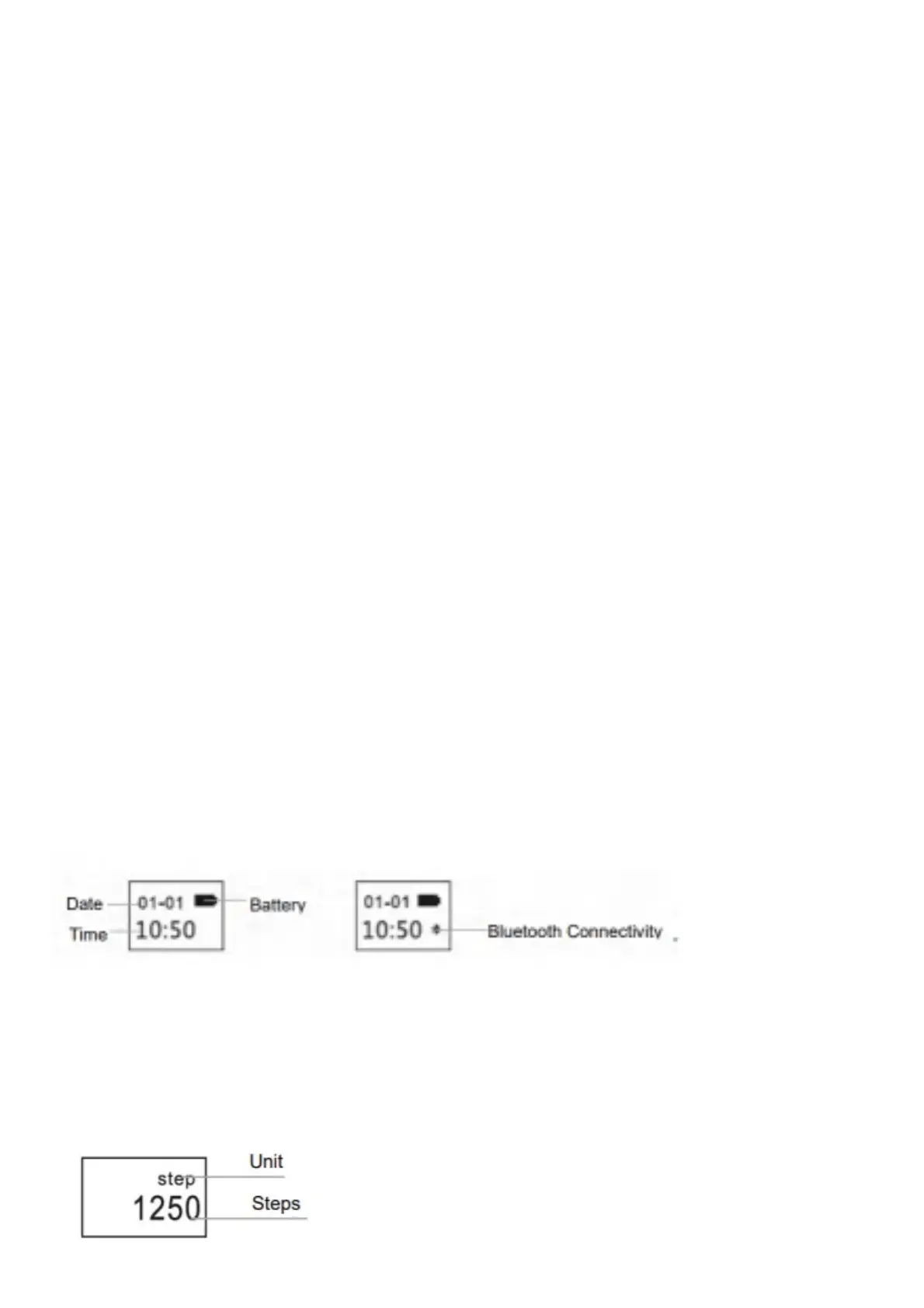
Clock Interface
Bluetooth Icon Lights stays on, indicating it is connected with phone successfully. Icon disappears otherwise. Time is
calibrated automatically after syncing to phone
Steps Interface
Wear band to record steps every day.
Check out real-time steps constantly



 To Next Page