ENG-3
Product Description
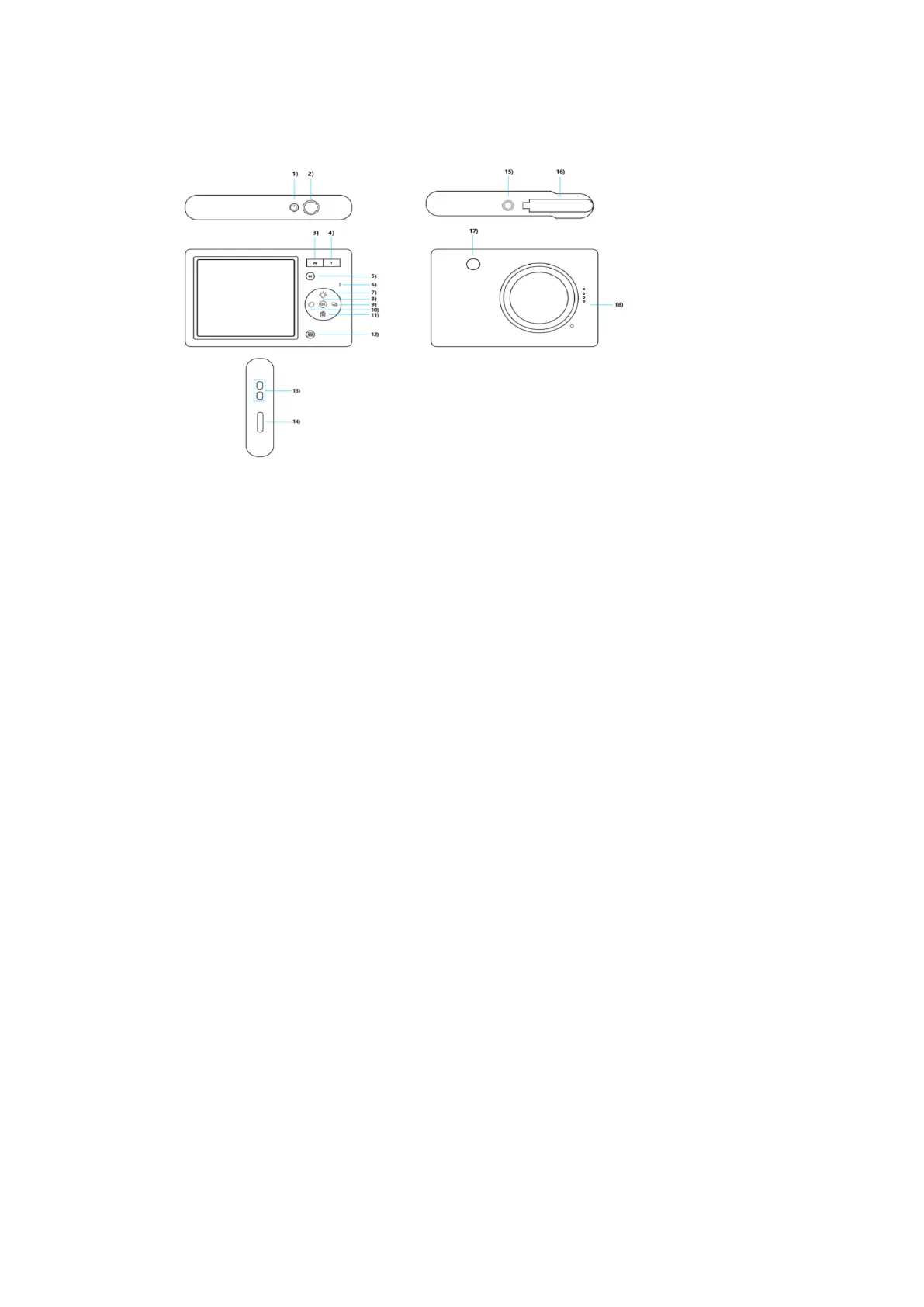
2) Shutter button
4) T button
6) Indicator light
8) OK button
10) Left button
12) Menu button
14) USB port
16) Battery cover
18) Speakers
Buttons and Ports
1. Power Button
1) Press and hold to turn the device on/off.
2) Short press to bring up the main menu to select the mode.
2. Shutter button
In Photo/Video mode short press to take a photo/video.
3. W button
1) In Photo/Playback (Photo view) mode press and hold to narrow the focus.
2) Short press to reduce the volume while viewing the video in playback mode.
4. T button
1) In Photo/Playback (Photo view) mode press and hold to magnify the focus.
2) Short press to increase the volume while viewing the video in playback mode.
5. M (Mode) button
Short press to switch between modes (Photo/Video/Playback/Settings).
6. Indicator light
7. Up button
1) In Photo mode short press to turn the fill light on or off.
2) In Playback mode short press to call up Delete All.


 To Next Page