EasyManua.ls Logo

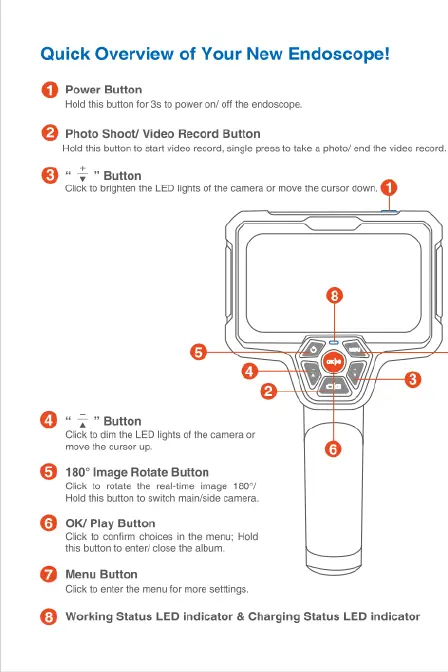
Depstech DS500 - Quick Overview of Your New Endoscope; Power Button Operation; Photo and Video Recording; LED Brightness and Cursor Control

Depstech DS500
6 pages
Print Icon
To Next Page IconTo Next Page
To Previous Page IconTo Previous Page
Loading...
Quick
Overview
of
Your
New
Endoscope!
@
Power
Button
Holdthis
buton
for
35
0
power
on/
off
he
endoscope.
@
Photo
Shoot
Video
Record
Button
Hok
ihis
bution o
start
video
record,
single
press
o
fake
a
photo
end
th
video ecord.
v
"
Button
ik
fo
brghten
the
LED
lights
of
the
camera
or
move
the
cursor
donn.
<
"
Button
Cickto
dmthe
LED
ghts
of
the
camera
or
move
the
cursor
.
180°
Image
Rotate Button
Ciick
to
rotate
the
real-ime
image
180°/
e
o
et
e,
©
owpiay
Button
O
et
o
i
h
s
okt
e
oo
s
Menu
Button
Giick
o
enter
the
menu
for
more
seftings.
@
Working
Status
LED
indicator
&
Charging
Status
LED
indicator

Related product manuals