Need help?
Do you have a question about the Depstech WF020X and is the answer not in the manual?
Download the Multi-Language E-User Manual from the official website for updated information.
Contact customer service via email or Facebook for suggestions or support needs.
Search for and download the 'DEPSTECH-View' app from the App Store or Google Play Store.
Download the advertisement-free 'DEPSTECH-View' application from the official website.
Note regarding necessary app permissions for camera, album, and WiFi settings.
Push the power button to 'ON' to activate the WF020X/025/028 inspection camera.
Learn the meaning of red and blue LED indicators for power and WiFi module status.
Turn on WiFi on your device, search for 'DEPSTECH ******' SSID, and select it.
Enter the factory setting WiFi password '12345678' to establish the connection.
Open the downloaded 'DEPSTECH-View' application to get real-time camera images.
For Android users, select 'WiFi' as the connection type within the app.
Identification of key components like power button, indicators, and charging port.
Details about the Micro-USB charging port and compatible power sources.
Charge the endoscope using power adapters, power banks, or PCs via USB-A to Micro USB cable.
Understanding the green LED indicator status during and after charging.
Instructions for attaching side-mirror, hook, and magnet accessories to the camera.
Description of Rotate, Photo, Record, Gallery, Setting, and Camera Switch buttons.
Learn how to hide or wake buttons by tapping the screen.
How to zoom in and out of the real-time image using two fingers.
Option to choose different video resolutions for the inspection camera.
Modify WiFi SSID and Password; remember to click the reset button after setup.
Switch channels if too many 2.4G/5G WiFi signals disturb the nearby environment.
Comparison of specifications across WF020X, WF025, WF028, and WF028 Dual Cam models.
Details on sensor, resolution, viewing angle, depth of view, diameter, and WiFi frequency.
Information on waterproof grade (IP67) and LED indicator status meanings.
Steps to connect the WiFi endoscope to the DEPSTECH-View application.
Solutions for issues with no real-time image or a black screen on the mobile device.
Troubleshooting connection issues by using airplane mode and reconnecting WiFi.
Notes on required app permissions and iOS-specific settings for data and network.
Steps to resolve issues where WiFi signal is found but connection fails.
Turn off device after use, store in dry environment, clean lens with soft cloth.
Recommended storage (32-158℉) and working (32-113℉) temperatures; adult guidance for children.
Keep away from fire, liquids, acids; avoid high impacts; understand water resistance limitations.
Guidance on WEEE battery disposal and note that the camera may get hot during use.
Maintain WiFi distance (33ft) and avoid areas with strong WiFi interference for stable connection.
Device complies with FCC Part 15 rules and radiation exposure limits.
Product marked with 'CE' complies with harmonized European standards.
Information on proper disposal of products and batteries according to EU directives.
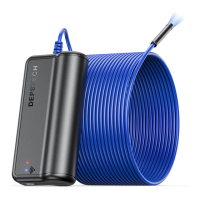
The Depstech® HD Inspection Camera is a wireless inspection tool designed for tasks such as car maintenance and pipeline repair. This user manual provides comprehensive instructions for its operation, from initial setup to advanced features and maintenance.
The Depstech® HD Inspection Camera functions as a wireless endoscope, allowing users to view real-time images in hard-to-reach areas. It connects to smart devices (iOS, Android, or Windows) via Wi-Fi, displaying the camera feed through the "DEPSTECH-View" application. The camera is equipped with LED lights for illumination, and its brightness can be adjusted. It supports capturing photos and recording videos, which can be stored and reviewed within the app's gallery. The device is designed to be efficient, helping users save time and explore intricate environments.
APP Downloading:
Device Activation:
WiFi Connection:
First Trial:
Accessories Installation:
APP Introduction (Interface Features):
APP Settings:
 General
| Brand | Depstech |
|---|---|
| Model | WF020X |
| Category | Digital Camera |
| Language | English |

 To Next Page