www.desatech.com
111986-01F 29
OPERATION
Continued
MANUAL LIGHTING
PROCEDURE
1. Remove glass door (see Removing/Re-
placing Glass Door, page 24).
2. Follow steps 1 through 7 under Lighting
Instructions, page 28.
3. Press gas control knob and light pilot with
match.
4. Keep gas control knob pressed in for
30 seconds after lighting pilot. After 30
seconds, release gas control knob. Fol-
low steps 9 through 12 under Lighting
Instructions, page 28.
5. Replace glass door (see Removing/Re-
placing Glass Door, page 24).
OPTIONAL HAND-HELD
REMOTE OPERATION
Note:
All remote control accessories must be pur-
chased separately (see Accessories, page 37). Fol-
low instructions included with the remote control.
-
Lighting
Instructions
After lighting, let pilot ame burn for about
one minute. Turn control knob to ON position.
Adjust ame adjustment knob anywhere be-
tween HI and LO. Slide the selector switch to
the REMOTE position (see Figure 53).
Note: The burner may light if hand-held re-
mote was on when selector switch was last
turned off. You can now turn the burner on and
off with the hand-held remote control unit
O
F
F
P
I
L
O
T
L
O
I
H
ON
OFF
REMOTE
ON
OFF
O
N
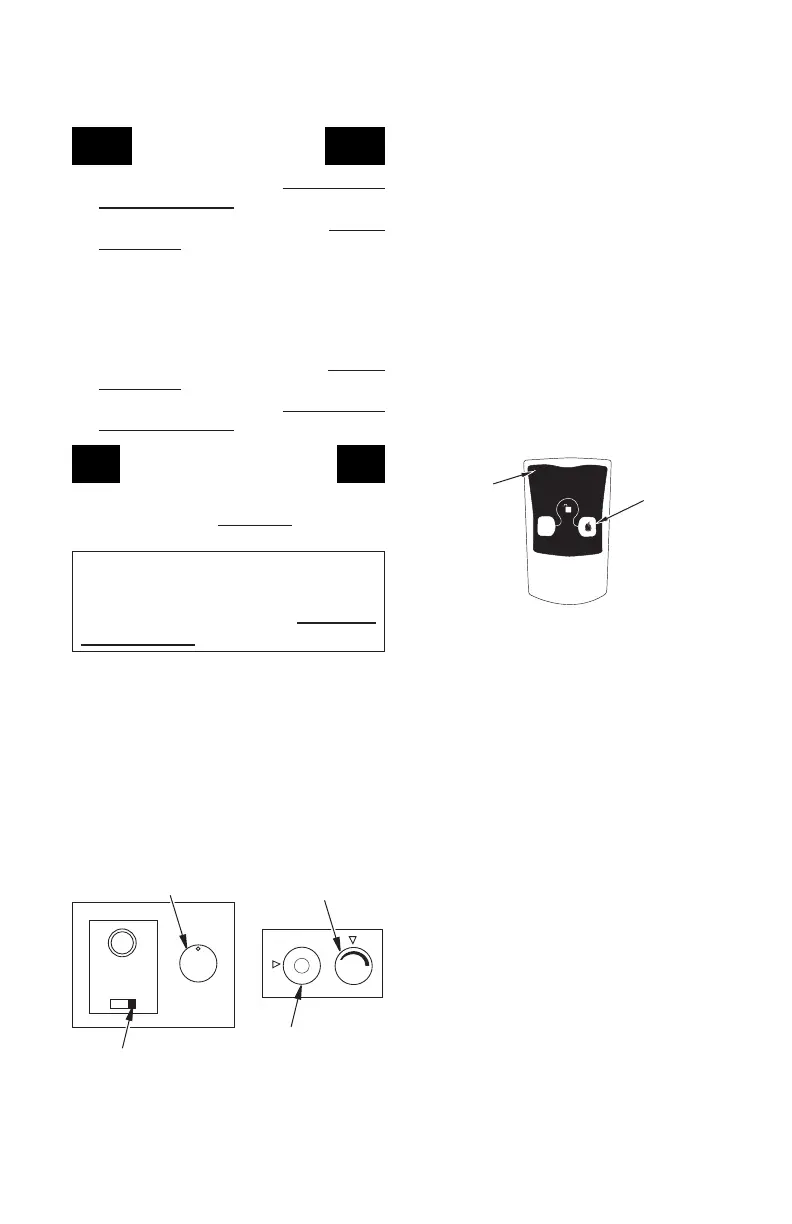
Selector Switch in
Remote Position
Figure 53 - Setting the Selector Switch,
Gas Control Knob and Variable Control
Knob for Remote Operation
Blower Control Knob
(Optional Accessory)
Gas Control Knob in
ON Position
Variable
Control Knob
Figure 54 - On/Off Hand-Held Remote
Control Unit HRC100
Control
Button
Indicator
Light
IMPORTANT: Do not leave the selector switch
in the REMOTE or ON position when the pilot
is not lit. This will drain the battery.
ON/OFF SERIES
Hold the control button on the hand-held
remote until burner turns on. Hold the con-
trol button again until burner turns off (see
Figure 54).
press both buttons on hand-held
remote control until light stops ashing. Hand-
held remote control is now locked. If the re
is on it will be turned off automatically. In the
locked state, the light will not light up when
any button is pressed.
press both buttons together
on hand-held remote control until the light
stops ashing. The hand-held remote is now
unlocked.
THERMOSTAT SERIES
The hand-held remote can be operated
using either the manual mode (MANU) or
thermostatic mode (AUTO) (see Figure 55,
page 30). To select Fahrenheit/Centigrade
mode display, carefully press the ˚C/˚F mode
button with the end of a paper clip or similar
blunt object.
Manual Mode
1. Press POWER and LOCK buttons togeth-
er to turn on hand-held remote control.
2. Press the MANU button to turn on re-
place.
3. Press POWER and LOCK buttons to-
gether to turn off replace.
1. Press POWER and LOCK buttons togeth-
er to turn on hand-held remote control.
2. Press AUTO button to select this mode.
3. Set desired room temperature by pressing
the TEMP + or - buttons.
4. Press POWER and LOCK buttons to-
gether to turn off replace


 To Next Page