53
7.3.10. ADJUSTING LATCH RETRACTION PERIOD (FOR SOME MODELS ONLY)
According to type of your lock and usage, you would need to adjust the time period which the motorized cylinder will keep
latch of the lock inside when it unlocks the lock. To adjust latch retraction period, follows the steps below:
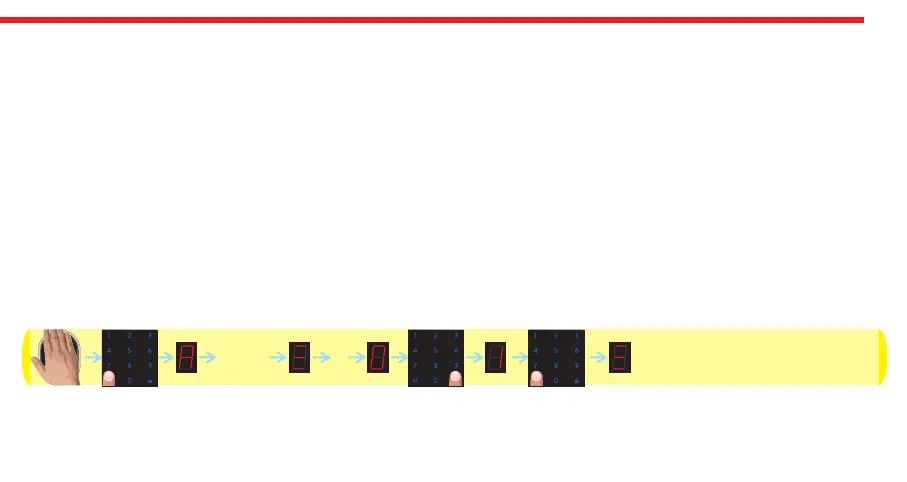
- Wake the keypad up by putting your palm to the touch keys and then touch “M” button. “A” appears on the display.
- Enter 5 digit master password. After display animation, touch “9” button.
- Touch “LOCK" button to toggle between;
“0” - Short Period (latch will be kept inside the lock around 1 second and then released)
“1” - Middle Period (latch will be kept inside the lock around 3 second and then released)
“2” - Long Period (latch will be kept inside the lock around 6 second and then released)
“3” - Longest Period (latch will be kept inside the lock around 9 second and then released)
- When desired choice is displayed, touch “M" button.
After first locking or unlocking operation done by keypad, selected settings will be applied to the system. Schematic
representation of adjusting latch retraction period to 3 seconds is as follows:rized cylinder via master controller.
DESi
12345
9


 To Next Page