59
8.1. ADMINISTRATIVE ACTIONS / SETTINGS
8.1.1. ENROLLING NEW CONTROLLER
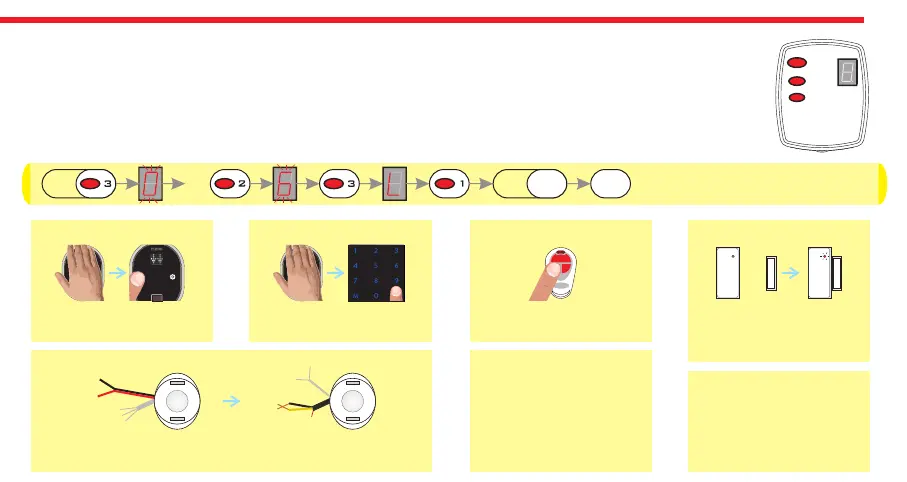
- Press and hold 3rd button till “0" flashes on the display.
- Press 2nd button four times. “6" will be flashing on the display.
- Press 3rd button. “L” will be appeared on the display and press 1st button.
- The cylinder will give a long and a short warning tone. Schematic representation of operation is as follows:
3s 4X 5s Bp Bp
For fingerprint reader;
wake it up and touch the
locking button.
For auto-locking module;
take the magnet closer to
triangle sign and wait
indicator is lit.
For keypad;
wake it up and touch the
locking button.
For remote controller;
press and hold any
button.
1
2
3
DESi DESi
For home automation interface;
power up the device and short-circuit and then open-
circuit yellow and black cables.
3-12 V
DC
For other controllers,
send locking or unlocking
signal via related
controller.
For enrolling a new
mobile phone, please
check next page.
Just after the short warning tone;


 To Next Page