6
95-87513.1
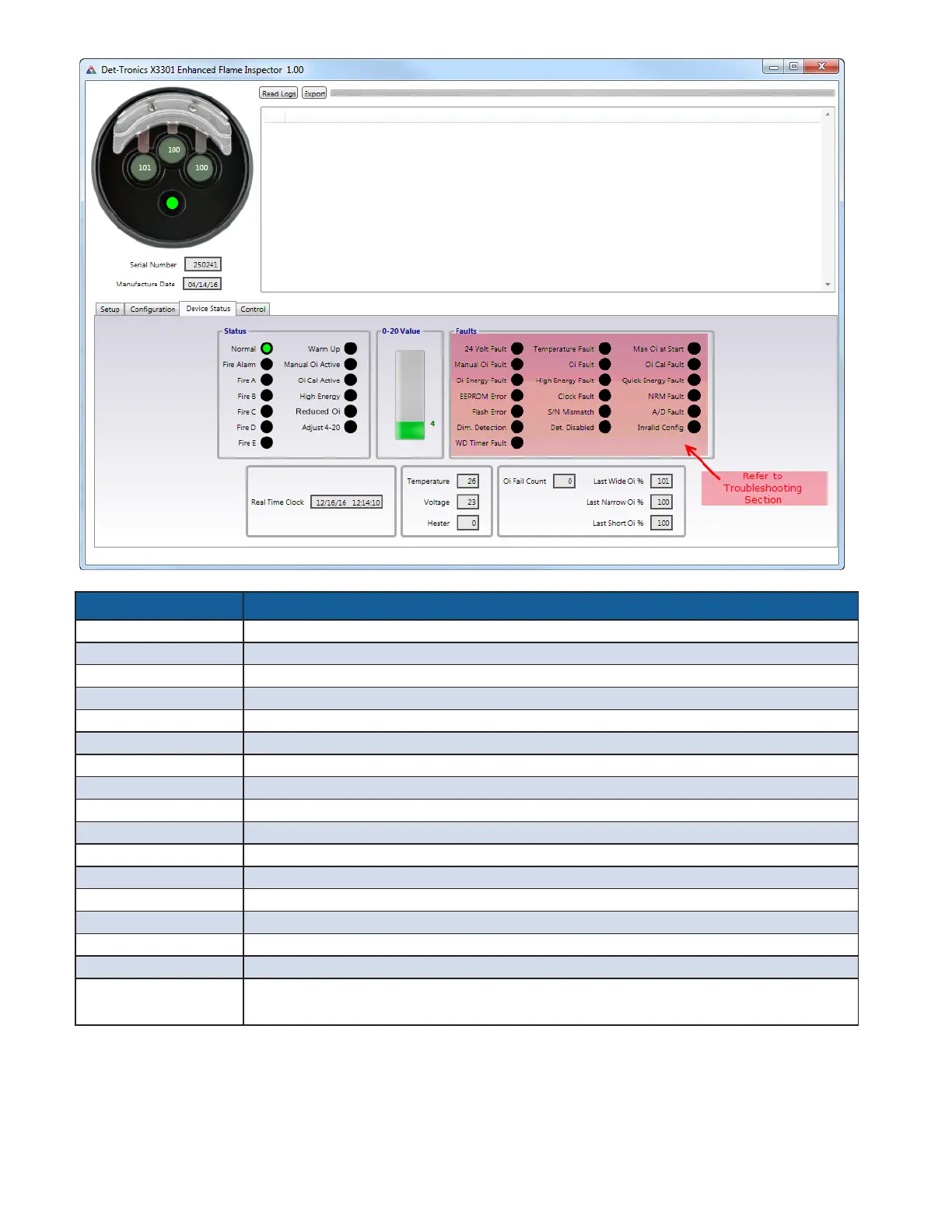
Figure8— X3301, X3302 Device Status tab
Device Status Options Description
Normal Power is applied and no faults are occurring.
Fire Alarm
A fire condition has been detected. This indicator also turns on to signal a successful manual
o
i
test.
Fire A, B,C, D, E See X3301/X3302 Event Log Descriptions section (page 13).
Warm Up Detector is in the power-up time delay mode.
Manual
o
i
Active Manual
o
i
test in progress.
o
i
Cal Active
o
i
calibration is in progress.
High Energy Background IR energy detected
Reduced
o
i
One or more of the IR sensors is receiving 80% or less
o
i
signal
.
Adjust 4-20 4-20mA calibration active
0-20 Value Signal level of 4-20 mA output (signal is displayed even if detector has no 4-20 mA output).
Faults Refer to Troubleshooting section of this manual
Real Time Clock Current date and time used by the detector when logging events.
Temperature Actual internal temperature of the detector (in degrees C).
Voltage Actual supply voltage at the detector.
Heater Actual heater output (in percentage of full output).
o
i
Fail Count Current number of consecutive automatic
o
i
failures counted.
Last wide
o
i
%
Last narrow
o
i
%
Last Short
o
i
%
**Percent of calibrated
o
i
test signal received by the corresponding sensor should be 90 to 110%.
Note: All information displayed on this window is read only. X3301 window shown.
* If fault remains, reference the “Troubleshooting” section of this manual.
** If % level is not between 90% to 100%, clean detector windows and
o
i
reflector plate, then recheck the % level. If % level remains out of range, calibrate the
o
i
(the detector should be covered to limit any IR interference that might affect the calibration process).




 To Next Page