18
V75
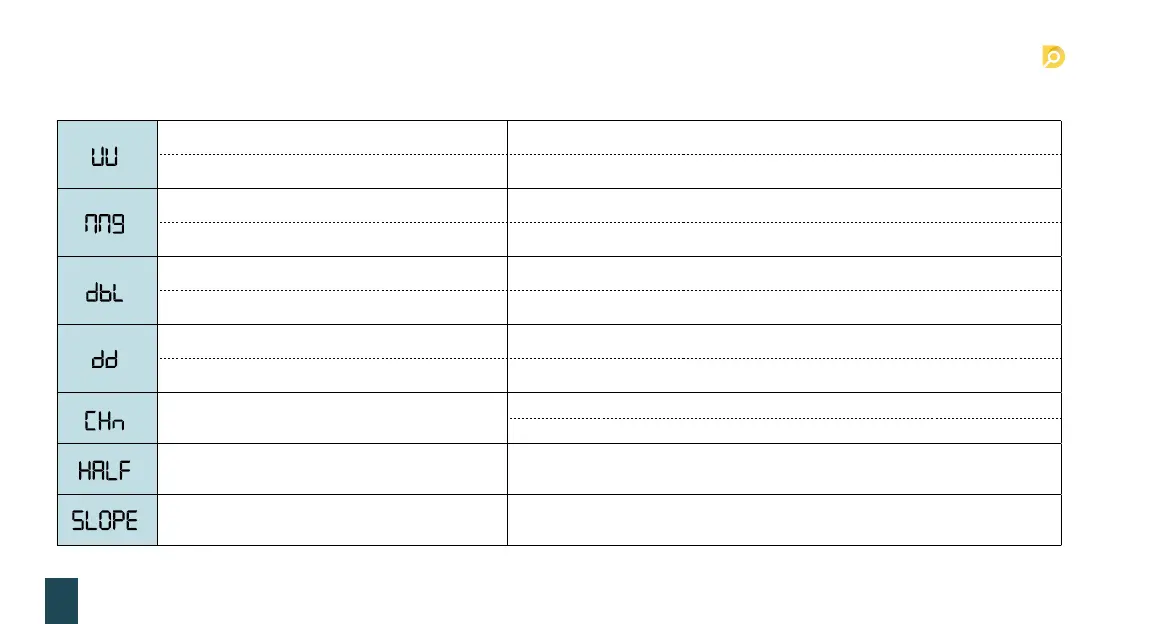
Fault code Reason Solution
Suspicious notes checked by UV detection.
Take away the suspicious banknote, and press ”ENTER” to continue.
Problem with the UV detection.
Lower the UV sensitivity level.
Suspicious notes checked by MG detection.
Take away the suspicious banknote, and press ” ENTER” to continue.
Problem with the MG detection.
Lower the MG sensitivity level.
Suspicious notes checked by IR detection.
Take away the suspicious banknote, and press ” ENTER” to continue.
Problem with the IR detection.
Lower the IR sensitivity level.
Suspicious notes checked by DD detection.
Take away the suspicious banknote, and press ” ENTER” to continue.
Problem with the DD detection.
Lower the DD sensitivity level.
Chain not.
Remove all the banknotes from the stacker and press “ENTER” to continue.
Adjust the banknote clearance screw (detail ref.4.2).
Half note.
Remove all the banknotes from the stacker and press “ENTER” to continue.
Slope note.
Remove all the banknotes from the stacker and press “ENTER” to continue.
And putting notes in correct way.
9. Error code and solution


 To Next Page