69
V75
7. Einstellung der Erkennungsfunktion
7.7 Einstellung der Maschinenempfindlichkeitsparameter
• Drücken Sie MENU, um das Setup-Menü zu öffnen, und drücken Sie dann erneut IR oder HD, um die Einstellung zu ändern.
• Drücken Sie +1/+10, um die Empfindlichkeitseinstellung zu erhöhen oder ADD, um sie zu verringern, und drücken Sie ENTER, um die Änderung
zu speichern und zur vorherigen Schnittstelle zurückzukehren.
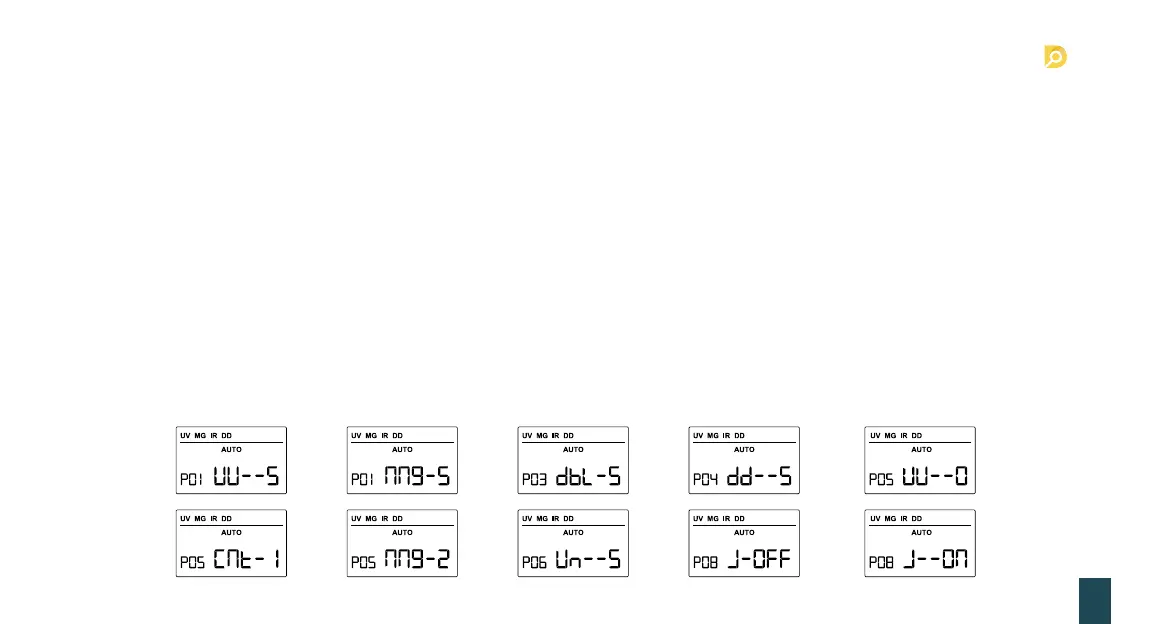
1. P01/UU--* UV-Empfindlichkeit: 0 ist “aus”, 9 ist maximal, Standardwert ist 5 (ref. Foto 6-1).
2. P02/nng-* MG-Empfindlichkeit: 0 ist “aus”, 9 ist maximal, Standardwert ist 5 (ref. Foto 6-2).
3. P03/dbL-* DOPPELTE Empfindlichkeit: 0 ist “aus”, 9 ist maximal, Standardwert ist 5 (ref. Foto 6-3).
4. P04/dd--* SD-Empfindlichkeit: 0 ist “aus”, 9 ist maximal, Standardwert ist 5 (ref. Foto 6-4).
5. P05/*-*** Formeinstellung: 0-UU entspricht UV, 1-CNT entspricht COUNT, 2-nng entspricht MG (ref. Foto 6-6~7).
Note: Ce réglage est basé sur la situation réelle de la machine.
6. P06/Un-5* Referenzwert UV: 0 ist “aus”, 9 ist maximal, Standardwert ist 5 (ref. Foto 6-8).
7. P08/J-*** Zählung zweifelhafter und unzuverlässiger Banknoten: J-OFF ist die zweifelhafte Note, die nicht gezählt wird, J-ON ist die zweifelhafte
Note, die gezählt wird; der Standardwert ist J-OFF (ref. Foto 6-9~10).
6-1
6-6
6-3
6-8
6-2
6-7
6-4 6-5
6-9 6-10


 To Next Page