ineo 223/283/363/423 3-23
3.9 Binding with staples and punching holes in copies
3
Reference
- If the Finishing Program button is used, you can configure the registered finishing functions at one time.
- The following paper can be used with the Staple settings.
Paper weight:
When Finisher FS-527 is installed
Plain Paper (15-15/16 lb to 23-15/16 lb (60 g/m
2
to 90 g/m
2
))
Thick paper 1/2 (24-3/16 lb to 55-5/8 lb (91 g/m
2
to 209 g/m
2
))
When Finisher FS-529 is installed
Plain Paper (15-15/16 lb to 23-15/16 lb (60 g/m
2
to 90 g/m
2
))
Thick paper 1/2 (24-3/16 lb to 55-5/8 lb (91 g/m
2
to 209 g/m
2
))
*
*Can be used only as a cover page.
Paper sizes:
When Finisher FS-527 is installed
11 e 17 w to 8-1/2 e 11w/v, A3 w to A5 v
When Finisher FS-529 is installed
11 e 17 w to 8-1/2 e 11w/v, A3 w to B5 v
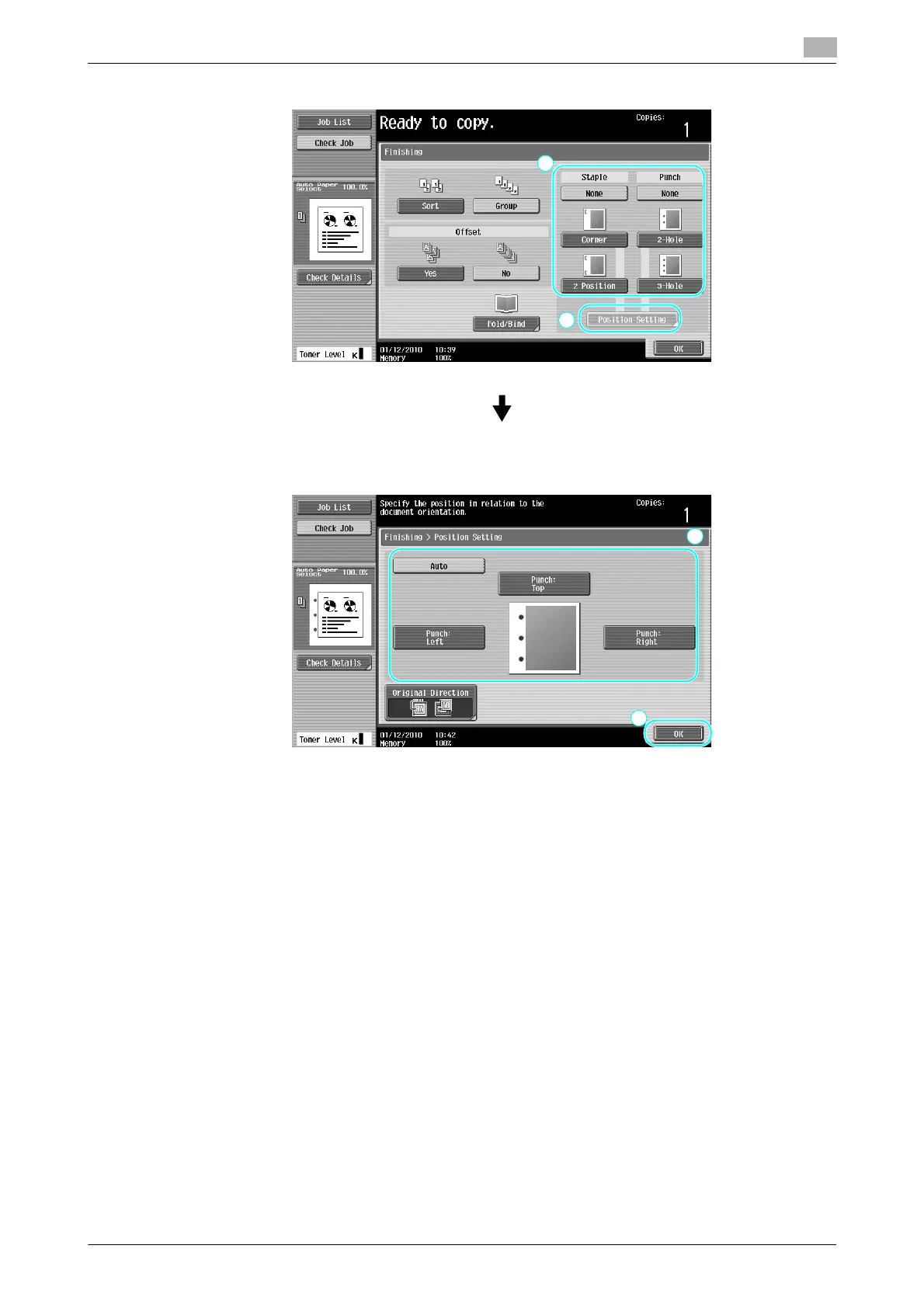
When select the Punch setting, specify the position where holes are to be punched.
The number of punched holes varies depending on the country you are in.



 To Next Page