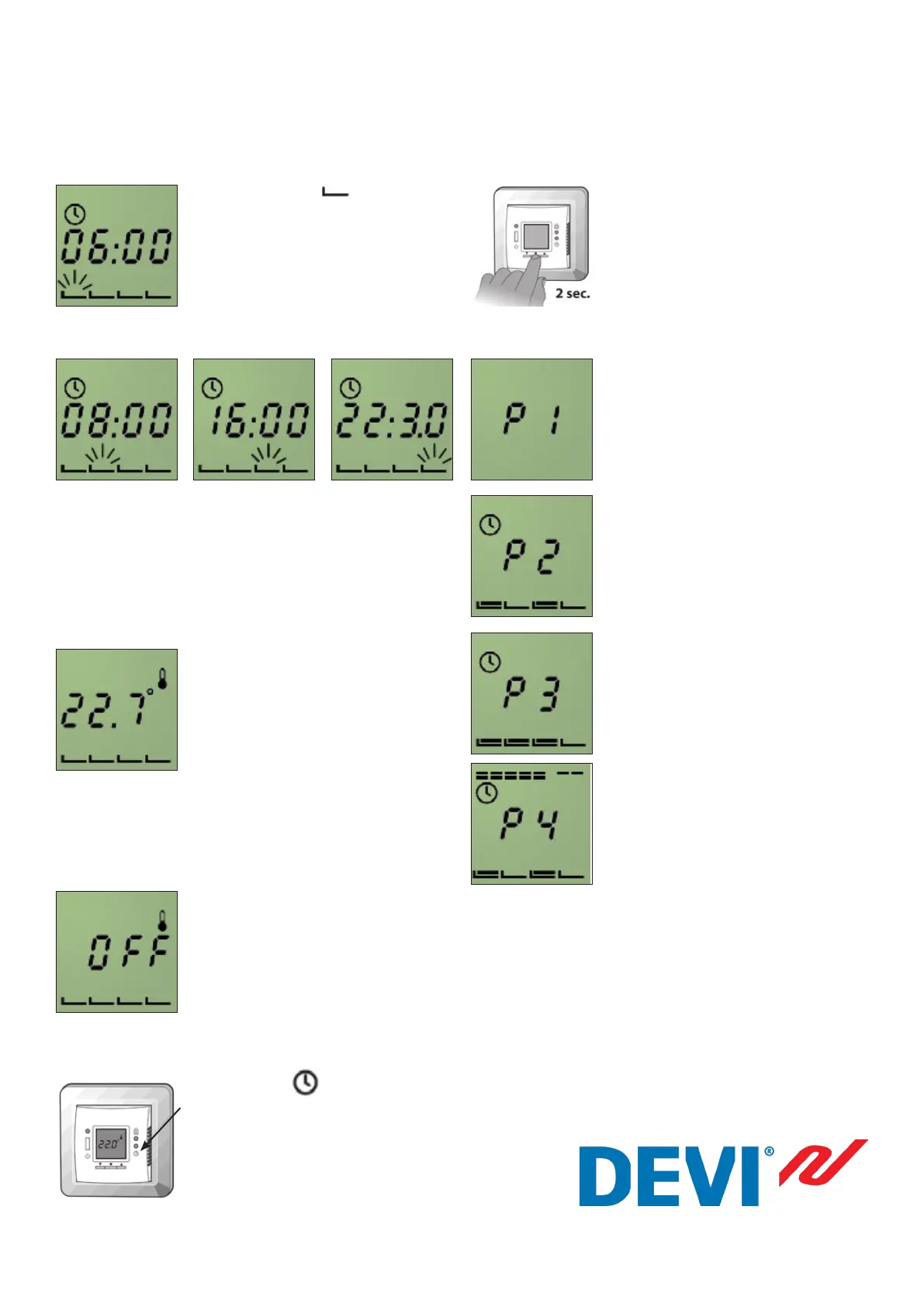
Setting the timer periods
The rst period bar ashes
indicating this is the morning period.
By pressing the l, the start time of
the period starts ashing. You can
change it with the arrow buttons
in increments of 15 minutes.
Press the l to accept.
The second (day), third (evening) and
fourth (night) period bars are set as
mentioned above.
Setting the comfort temperature
By pressing the l, the preset comfort
temperature starts ashing.
You can change it with the arrow
buttons
Press l to accept, then press
Setting the set back temperature
(second and fourth period)
By pressing the l, the preset comfort
temperature starts ashing, normally
this is set to OFF.
You can change it with the arrow
buttons
Press l to accept.
Then press the pinhole with a
small screwdriver or pencil.
Changing timer program
To change the program:
Keep the l button pressed for 2
seconds.
The actual program starts to flash.
It is now possible to change the
program by using the buttons
Press the l to accept.
P1 - Manual mode
On constantly 24 hours 7 days a week
at set temperature.
P2
Set temperature - twice a day.
P3
Set temperature all day.
P4
Set temperature Monday - Friday
twice a day.
Saturday - Sunday all day.
Part no.: 001v01 07.04.2011





 To Previous Page