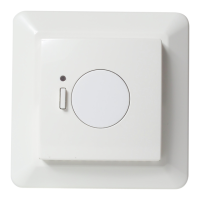
The DEVIreg™ Touch is an electronic thermostat specifically designed for floor heating systems, offering a range of features for efficient and user-friendly temperature control.
Function Description:
The DEVIreg™ Touch serves as a central control unit for floor heating systems, allowing users to set and manage room and floor temperatures. Its primary function is to maintain desired comfort levels while optimizing energy consumption through intelligent scheduling and various operational modes. The thermostat features a touchscreen display with backlight for easy interaction and a menu-driven operation for intuitive navigation.
Usage Features:
- Touchscreen Display: The device is operated via a touchscreen, making it easy to access and adjust settings. When inactive, the display shows the actual measured room temperature. When activated, it shows the set target temperature. Flashing up arrows indicate that the system is actively heating.
- Temperature Setting: Users can easily lower or raise the temperature by touching the display to activate it and then pressing the up or down arrows on the right side of the screen.
- Time and Date Setting: The thermostat allows for precise setting of the current time and date, which is crucial for its scheduling functions. This involves navigating through menu options and using arrows to adjust hours, minutes, day, month, and year.
- Energy-Saving Schedule (Timer Function): This is a core feature that enables the thermostat to automatically switch between periods of lower (economy) temperature and comfort temperature.
- Predefined Comfort Periods: By default, the thermostat is set with comfort periods for Monday-Friday (6:00-8:00 and 16:00-22:30) and Saturday-Sunday (7:00-22:45).
- Customizable Schedule: Users can adjust these predefined comfort periods by defining start and end times for up to two comfort periods per day. This allows for a fully flexible day and time pattern to preset temperatures to energy-saving levels (e.g., while at work or asleep).
- Forecast Function: When activated, the thermostat calculates the optimal heating start time to reach the desired temperature at the specified time, enhancing energy efficiency.
- Economy Periods: All time intervals outside the defined comfort periods are automatically considered economy periods.
- Copy Schedule: Defined comfort periods can be copied to other days of the week, simplifying setup.
- Timer Activation/Deactivation: The timer function can be temporarily turned off, for instance, if a short extension of the comfort period is needed. When off, a hand icon indicates manual temperature regulation.
- Away Function (Vacation Setting): This feature allows users to suspend the normal program schedule for specified periods. A set temperature will be maintained 24 hours a day for the selected number of days. After this period, normal temperature settings resume. A suitcase symbol appears on the display when away mode is active. It can be deactivated earlier if needed.
- Minimum Floor Temperature: This feature ensures that the floor temperature does not drop below a specified minimum, providing frost control and preventing the floor from becoming too cold. This function requires both a room sensor and a floor sensor to be available. The default frost protection temperature is 5°C. A frost symbol appears on the display when active.
- Safety Lock: The safety lock prevents undesirable changes to the thermostat settings by locking the screen display. This is particularly useful in environments frequented by small children. A lock symbol appears when the display is locked.
- Language Selection: Users can choose their preferred language for the thermostat interface.
- Backlight Level Adjustment: The backlight intensity of the display can be adjusted, or turned off completely, to suit user preference and save energy.
- Thermostat On/Off: The thermostat can be turned on or off, indicated by a power symbol on the display when off.
Maintenance Features:
- Energy Consumption Meter: The thermostat includes a consumption meter that allows users to check energy usage for the last 7 days, last 30 days, or total consumption since installation. This feature helps in monitoring and managing energy efficiency.
- Restore Default Temperature Settings: Users can easily restore the thermostat to its default temperature settings, which can be useful for troubleshooting or resetting customized schedules.
Important Technical Specifications (Inferred from the manual, specific values are examples):
- Temperature Range: Adjustable comfort and economy temperatures (e.g., comfort 22.0°C, economy 17.0°C).
- Frost Protection Temperature: Default 5.0°C, adjustable.
- Sensors: Compatible with both room and floor sensors for comprehensive temperature control. Minimum floor temperature function requires both.
- Display: Touchscreen with backlight.
- Power: The device is an electronic thermostat, requiring a power supply.
- Installation: Must be installed by an authorized and qualified installer according to local regulations.
Safety Instructions:
- Do not cover the thermostat, as this impairs its ability to sense and adjust temperature correctly.
- Do not spill liquids into the thermostat.
- Do not open, disassemble, or tamper with the thermostat.
- Use the safety lock if the thermostat is in a place frequented by small children.
- Do not interrupt the power supply to the thermostat.
Warranty:
The DEVIreg™ Touch comes with a 5-year warranty.
Disposal Instruction:
The manual includes symbols indicating proper disposal instructions for electronic waste and batteries, emphasizing environmentally responsible handling.
Physical Maintenance:
The front part of the thermostat can be removed from its mounting base for tasks like painting or wallpapering. It is important not to press on the display screen when removing or reattaching the front part. Users should pull the front part by placing fingers under its side.

 Need help?
 General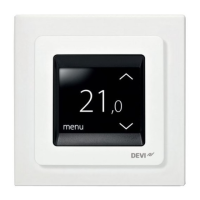

 To Next Page