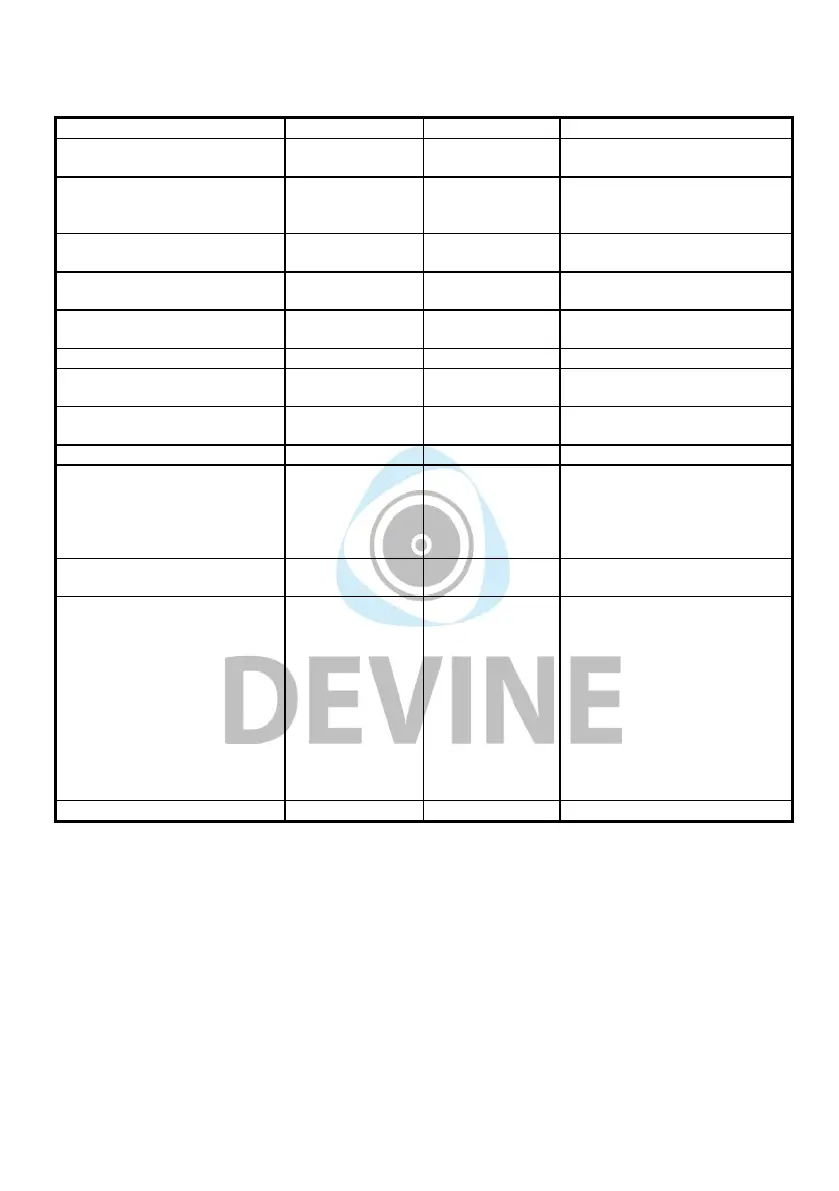
Appendix A ——MIDI IMPLEMENTATION CHART
Function Transmitted Recognized Remarks
Basic Default
Channel Changed
1-16
1-16
X
X
Mode Default
Messages
Altered
Mode 3
0
*****
X
Note
Number True Voice
0-127
*****
X
Velocity Note ON
Note OFF
0
X
X
X
After Key’s
Touch Channel
X
0
X
X
Pitch Bend 0 X
Control 0-119
Change 120-127
0
0
X
X
Program
Change True#
0-127
****
X
System Exclusive 0* 0* *GM,GM2,MMC,
System Song Position
Pointer
SongSe
Tune
Request
X
X
X
X
X
X
System Clock
Real Time Commands
X
X
X
X
Aux All Sounds Off
Messages Reset All
Controllers
Local
ON/OFF
All Notes
OFF
Active
Sensing
System
Reset
0
0
0
0
X
X
X
X
X
X
X
X
Notes
Mode 1: OMNI ON, POLY Mode 2: OMNI ON, MONO 0: Yes
Mode 3: OMNI OFF, POLY Mode 4: OMNI OFF, MONO X: No
The information included in this user manual is subject to change at any time and without notification:
Version:
1.0
Date and author initials: 02-11-2020 RV Revision date and author initials: -



 To Next Page