7
Wi-Fi Reset
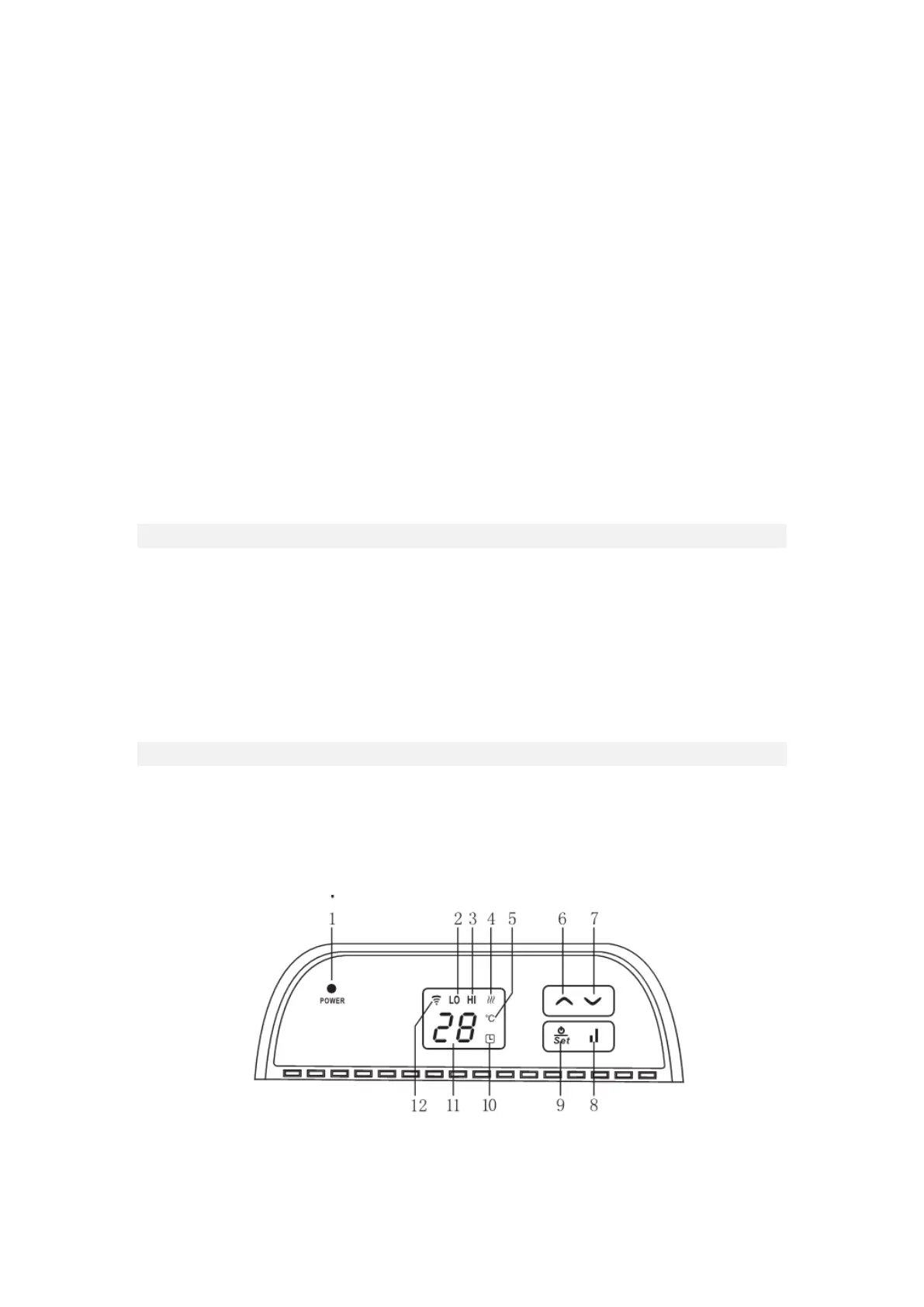
• Hold the heat capacity button (8) for 5 seconds to re-set the Wi-Fi.
Child Lock
1. When the unit is in operation, press the up (6) and down (7) buttons simultaneously for 3
seconds. The control panel will now be locked.
2. Press the up (6) and down (7) buttons simultaneously for 3 seconds to deactivate the child
lock.
Open Window Detection
• When the heater is in operation it is automatically in open window detection mode and will
shut down if the ambient temperature rapidly falls below 3 degrees or more.
Signal Sound
• An acoustic signal sounds each time a key is pressed on the unit. If a button is held
continuously the unit will only signal once.
Setting the Thermostat Temperature
• The unit of measure for the target temperature is ℃.
1. Press the Power/Set button (9) then you can select a target temperature using the up (6)
and down keys (7). The temperature setting range is between 5 and 45℃.
2. If no action is taken for 10 seconds after the setting is completed, the system
automatically saves the setting and exits the menu.
Setting the Timer – 24 Hour Shutdown
1. Press the Power/Set button (9) twice then use the up (6) and down keys (7) to select a
shutdown timer within 24 hours.
2. When a timer is set the Timer Indicator (10) will illuminate.



 To Next Page