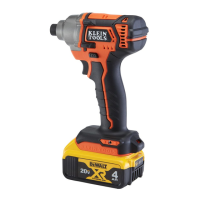
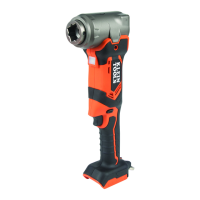
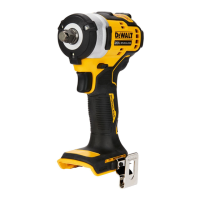
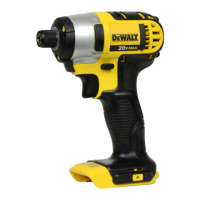
This document is an instruction manual for the Klein Tools BAT20-CW Compact Impact Wrench, a professional power tool designed for impact fastening applications. The impact function makes it particularly useful for installing and removing threaded fasteners.
Function Description:
The Klein Tools BAT20-CW is a compact impact wrench that operates on a 20V Lithium-Ion battery. It features a 1/2" square drive, making it suitable for a variety of fastening tasks. The tool is equipped with a variable speed trigger switch (A) that allows users to select the best speed for a particular application, ranging from 0 to 2200 RPM. The more the trigger is squeezed, the faster the tool operates. A forward/reverse control button (B) determines the direction of rotation and also serves as a lock-off button, preventing unintentional starting. The center position of this button locks the tool in the off position. The tool is designed to stop immediately when the trigger switch is fully released, thanks to an integrated brake. For moving the tool into difficult-to-reach areas, a lift ring (H) is provided, but it should not be used for tethering or securing the tool to a person or object during elevated use.
Important Technical Specifications:
- Power Source: 20V Li-Ion battery
- Drive Size: 1/2" Square Drive
- Speed: Variable, 0 – 2200 RPM
- Torque: Up to 210 ft-lbs (29 kg-m)
- RPM: Revolutions per minute
- BPM: Beats per minute
- IPM: Impacts per minute
- sfpm: Surface feet per minute
- Voltage: V
- Amperes: A
- Watts: W
- Hertz: Hz
- Minutes: min
- Direct Current: or DC
- Alternating Current: ~ or AC
- Alternating or Direct Current: ≈ or AC/DC
- No Load Speed: n₀
- Rated Speed: n
- Earthing Terminal:
- Safety Alert Symbol:
- Visible Radiation:
- Strokes per Minute: SPM
- Class I Construction: (grounded)
- Class II Construction: (double insulated)
- Per Minute: /min
Usage Features:
- Battery Pack (D): The tool uses a DeWALT 20V MAX Li-Ion battery pack. For optimal performance, the battery pack should be fully charged before use.
- Battery Release Button (E): Used to remove the battery pack from the tool.
- Fuel Gauge Button (F): Some DeWALT battery packs include a fuel gauge (G) with three green LED lights to indicate the remaining charge level. Pressing and holding this button illuminates the LEDs. The fuel gauge is an approximate indication and is subject to variation.
- 75 - 100% charged: All three LEDs illuminated.
- 51 - 74% charged: Two LEDs illuminated.
- <50% charged: One LED illuminated.
- Pack needs to be charged: No LEDs illuminated.
- Main Handle (C): Designed for proper hand position and secure grip during operation.
- Side Warning Label (G): Provides important safety information.
- LED (H): Illuminates the work area.
- Installing and Removing Battery Pack: To install, align the battery pack with the rails in the tool's handle and slide it in until firmly seated. To remove, press the release button (F) and pull the battery pack out. After removing the battery pack, squeezing the trigger for three seconds dissipates any residual electric charge.
- Fastening Operation: Place the accessory on the fastener head, keeping the tool pointed straight. Press the trigger switch (A) to start and release to stop. Always check torque with a torque wrench as fastening torque is affected by factors such as voltage, accessory size, bolt size, bolt condition, material type, and fastening time.
- Safety Precautions:
- Always use safety glasses (ANSI Z87.1 eye protection) and, if dusty, a face or dust mask.
- Wear certified safety equipment, including hearing protection (ANSI S12.6) and respiratory protection (NIOSH/OSHA/MSHA).
- Do not use under wet conditions or in the presence of flammable liquids or gases.
- Do not modify the power tool or any part of it.
- Keep children and bystanders away from the work area.
- Ensure the work area is clean and well lit.
- Avoid body contact with earthed or grounded surfaces.
- Do not abuse the cord; keep it away from heat, oil, sharp edges, or moving parts.
- Use an extension cord suitable for outdoor use when operating outdoors.
- If operating in a damp location, use a ground fault circuit interrupter (GFCI) protected supply.
- Stay alert and use common sense; do not operate while tired or under the influence of drugs, alcohol, or medication.
- Remove any adjusting key or wrench before turning the power tool on.
- Do not overreach; maintain proper footing and balance.
- Dress properly; avoid loose clothing, jewelry, and long hair near moving parts.
- Use dust extraction and collection facilities if provided.
- Power tool is not insulated; fasteners contacting a "live" wire can cause electric shock.
- Use clamps or other practical ways to secure the workpiece.
- Wear gloves when touching hot accessories and tools.
- Avoid operating the tool for long periods to prevent vibration-related harm to hands and arms.
- Be aware of dust containing chemicals that may cause cancer or reproductive harm.
- Avoid prolonged contact with dust and wear protective clothing.
- Always use NIOSH/OSHA approved respiratory protection.
- Always wear proper personal hearing protection.
- When not in use, place the tool on its side on a stable surface.
- Use only impact-rated accessories and inspect them for cracks before use.
- Ensure fasteners and systems can withstand the generated torque.
Maintenance Features:
- General Maintenance: The power tool should be serviced by a qualified repair person using only identical replacement parts to ensure safety. Contact Klein Tools for authorized service centers.
- Charger and Battery Pack: These components are NOT serviceable. Repairs, maintenance, and adjustments should be performed by a DeWALT factory service center, an authorized DeWALT service center, or other qualified service personnel using identical replacement parts.
- Cleaning:
- Impact Wrench: Blow dirt and dust out of all air vents with clean, dry air at least once a week. Always wear ANSI Z87.1 approved eye protection. Do not use solvents or harsh chemicals; use a cloth dampened with water and mild soap. Do not immerse the tool in liquid.
- Charger: Disconnect the charger from the AC outlet before cleaning. Remove dirt and grease from the exterior with a cloth or soft non-metallic brush. Do not use water or cleaning solutions.
- Storage:
- Store the tool in a cool, dry place, away from direct sunlight and excessive heat or cold.
- For long storage, it is recommended to store a fully charged battery pack in a cool, dry place out of the charger.
- Battery packs should not be stored completely depleted of charge and will need to be recharged before use.
- Battery Charging Instructions:
- The charger complies with Canadian ICES-003 and FCC Rules Part 15.
- Plug the charger into an appropriate outlet.
- Insert the battery pack into the charger; the red light will blink continuously, indicating charging.
- The red light remaining ON continuously indicates a full charge.
- Charge Indicators: Fast blinking red light indicates a problem; re-insert battery or try a different battery.
- Hot/Cold Delay: Chargers have a hot/cold delay feature. If the battery is too hot or cold, charging is suspended, and a yellow indicator light illuminates. Charging resumes automatically once the optimum temperature is reached.
- Leaving Battery Pack in Charger: The battery pack can be left connected to the charger after it's fully charged.
- Weak/Faulty Battery Packs: Weak batteries will function but with reduced performance. Faulty battery packs will not charge, indicated by the charger refusing to light.
- Wall Mounting: Chargers can be wall-mounted using drywall screws.
- Important Charging Notes:
- Charge battery packs between 65°F and 75°F (18°C-24°C). Do not charge below 40°F (4.5°C) or above 104°F (40°C) to prevent damage.
- The charger and battery pack may become warm during charging, which is normal.
- A cold battery pack charges at about half the rate of a warm one.
- If the battery pack does not charge properly, check the receptacle, light switch connection, and ambient temperature.
- Recharge the battery pack when it fails to produce sufficient power. Partially used packs can be charged without adverse effect.
- Keep foreign conductive materials away from charger cavities.
- Do not freeze or immerse the charger in water.
- Do not disassemble the charger; take it to an authorized service center for repair.
- Disconnect the charger from the outlet before cleaning.
- Never connect two chargers together.
- The charger is designed for standard 120 volt household electrical power.
- Do not use an extension cord unless absolutely necessary. If used, ensure it is suitable for outdoor use and has adequate wire size (AWG).
- Do not place objects on top of the charger or block ventilation slots.
- Do not operate the charger with a damaged cord or plug.
- Disposal: Do not place equipment and accessories in the trash. Dispose of them according to local regulations. The RBRC™ Seal on batteries indicates that recycling costs have been paid. Return spent batteries to an authorized DeWALT service center or local retailer for recycling. Do not incinerate battery packs due to explosion hazard.
- Impact Wrench: Klein Tools Battery Operated Tools are warranted to be free from defects in materials and workmanship.
- Motor, Housing, and Electronics: Three years from the date of purchase.
- Moving Parts (including interchangeable heads and jaws; excluding specialty consumables): One year from the date of purchase.
- The warranty does not cover damage from alterations, abuse, misuse, lack of maintenance, or normal wear and tear. Proof of purchase from an Authorized Klein Tools Distributor is required. Klein Tools is not liable for incidental or consequential damage.
- Chargers and Battery Packs: DeWALT chargers and battery packs are covered.
- DeWALT Chargers: Three-year limited warranty for defects due to faulty materials or workmanship. Does not cover part failure due to normal wear or tool abuse. Visit www.dewalt.com or call 1-800-4-DeWALT for details.
- DeWALT Battery Packs:
- Two years free service on Packs: DCB201, DCB203, DCB203BT, DCB207.
- Three years free service on Packs: DCB200, DCB204, DCB204BT, DCB205.
- Product warranty is voided if the battery pack is tampered with. DeWalt is not responsible for injuries caused by tampering and may prosecute warranty fraud.

 Need help?
 General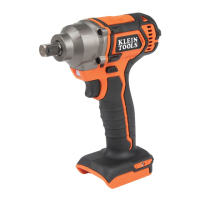

 To Next Page