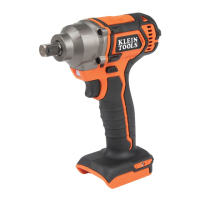
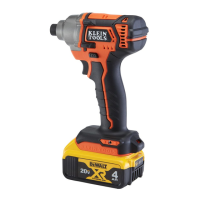
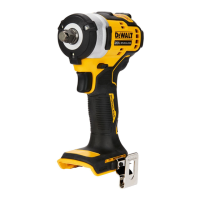
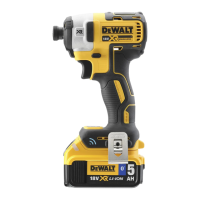
This document describes the Klein Tools BAT20-LW / BAT20-LW1 Right Angle Impact Wrench, a professional power tool designed for impact fastening and applications, particularly useful for installing and removing threaded fasteners. It is powered by a 20V Li-Ion battery and features variable speed control from 0 to 1800 RPM, delivering up to 300 ft-lbs (41.2 kg-m) of torque. The tool is equipped with 1 1/8", 1", 13/16", and 3/4" square drives.
Technical Specifications:
- Power Source: 20V Li-Ion battery
- Speed: Variable, 0 – 1800 RPM
- Torque: Up to 300 ft-lbs (41.2 kg-m)
- Drives: 1 1/8", 1", 13/16", 3/4" Square Drives
Feature Details:
The tool includes several key components:
- Trigger switch (A): Activates the tool.
- Forward/reverse/lock trigger button (B): Controls the direction of rotation and serves as a lock-off button.
- Removable socket (C): For attaching accessories.
- Main handle (D): Provides grip for operation.
- Battery pack (E): The power source for the tool.
- Battery release button (F): Used to remove the battery pack.
- Fuel gauge button (G): Displays the battery charge level.
- Lift ring (H): For moving the tool into difficult-to-reach areas.
- Side warning label (I): Contains important safety information.
- LED (J): Provides illumination.
Usage Features:
- Proper Hand Position: Requires one hand on the main handle (C). Always use proper hand position and hold securely in anticipation of a sudden reaction to reduce the risk of serious personal injury.
- Variable Speed Trigger Switch: Squeeze the trigger switch (A) to turn the tool on; release to turn off. The tool has a brake that stops rotation when the trigger is fully released. Variable speed allows selection of the best speed for specific applications. Continuous use in the variable speed range is not recommended as it may damage the switch.
- Forward/Reverse Button: The forward/reverse control button (B) determines the direction of rotation and acts as a lock-off button. To select forward rotation, release the trigger and depress the button on the right side. For reverse, depress the button on the left side. The center position locks the tool in the off position. Ensure the trigger is released when changing the control button position. A click may be heard on startup after changing rotation direction, which is normal.
- Insert Socket Accessory: Sockets fit into the large socket on the angle impact wrench. To install, insert the socket and press firmly until it clicks into place. To remove, push the release button on the side (D) of the large socket.
- Fastening Torque: Fastening torque is affected by voltage (low voltage reduces torque), accessory size (incorrect size reduces torque), bolt size (larger diameters require higher torque), and bolt condition (threads free of rust/debris allow proper torque). Material type and surface finish also affect torque. Longer fastening time increases torque, but excessive time can over-stress or damage fasteners.
- Lift Ring: The lift ring (H) is for moving the tool into difficult-to-reach areas. Securely fasten a lifting device to the ring before moving the tool. DO NOT use the lift ring for tethering or securing the tool to a person or object during use when elevated.
- Fuel Gauge Battery Packs: Some DeWALT battery packs include a fuel gauge with three green LED lights. Press and hold the fuel gauge button (G) to illuminate the charge level. If the charge is below the usable limit, the gauge will not illuminate, and the battery needs recharging. The fuel gauge is an approximate indication and is subject to variation.
- 75 – 100% charged: All three LEDs illuminated.
- 51 – 74% charged: Two LEDs illuminated.
- <50% charged: One LED illuminated.
- Pack needs to be charged: No LEDs illuminated.
Battery Charging Instructions (for DeWALT chargers):
- Charging Procedure: Plug the charger into an outlet, then insert the battery pack (E). The red light will blink continuously, indicating charging. A solid red light indicates a full charge.
- Charge Indicators: A fast-flashing red light indicates a problem. Re-insert the battery pack; if the problem persists, try a different battery pack. If the new pack charges, the original is defective. If both packs show trouble, the charger may be faulty.
- Hot/Cold Delay: Chargers have a hot/cold delay feature. If the battery is too hot or cold, charging is suspended, indicated by a blinking red light and an illuminated yellow indicator. Charging resumes automatically once the battery reaches an optimum temperature.
- Leaving Battery Pack in Charger: The charger and battery pack can remain connected after charging is complete.
- Weak/Faulty Battery Packs: Weak batteries will function but perform less work. Faulty battery packs will not charge, indicated by the charger refusing to light.
Maintenance Features:
- Service: Have the power tool serviced by a qualified repair person using identical replacement parts to ensure safety. Contact Klein Tools for authorized service centers.
- Charger and Battery Pack: These are NOT user-serviceable. Repairs, maintenance, and adjustments should be performed by a DeWALT factory service center or authorized personnel using identical replacement parts.
- Cleaning:
- Impact Wrench: Blow dirt and dust out of air vents with clean, dry air at least once a week. Always wear ANSI Z87.1 approved eye protection. Do not use solvents or harsh chemicals on non-metallic parts. Use a cloth dampened with water and mild soap. Do not immerse the tool in liquid.
- Charger: Disconnect from the AC outlet before cleaning. Remove dirt and grease from the exterior with a cloth or soft non-metallic brush. Do not use water or cleaning solutions.
- General Warnings:
- DO NOT use under wet conditions or in the presence of flammable liquids or gases.
- This is a professional power tool; DO NOT let children come into contact with it. Supervision is required for inexperienced operators.
- Never modify the power tool or any part of it.
- Work Area Safety: Keep the work area clean, well-lit, and free of clutter. Do not operate in explosive atmospheres. Keep children and bystanders away.
- Electrical Safety: Power tool plugs must match outlets. Never modify plugs. Avoid body contact with earthed surfaces. Do not expose to rain or wet conditions. Do not abuse the cord. Use an extension cord suitable for outdoor use when operating outdoors. Use a GFCI-protected supply in damp locations.
- Personal Safety: Stay alert, use common sense. Do not operate while tired or under the influence of drugs, alcohol, or medication. Use personal protective equipment, including eye protection, dust mask, non-skid shoes, hard hat, and hearing protection. Prevent unintentional starting by ensuring the switch is off before connecting to power or battery. Remove adjusting keys/wrenches before turning on. Do not overreach; maintain proper footing and balance.
- Additional Specific Safety Rules:
- ALWAYS use safety glasses (ANSI Z87.1 / CAN/CSA Z94.3), hearing protection (ANSI S12.6 / S3.19), and respiratory protection (NIOSH/OSHA/MSHA).
- The power tool is not insulated; fasteners contacting a "live" wire can cause electric shock.
- Secure the workpiece with clamps or other practical means.
- Wear safety goggles/eye protection during hammering/drilling operations due to flying chips.
- Accessories and tools get hot; wear gloves.
- Avoid air vents as they may cover moving parts.
- Avoid prolonged use; vibration can be harmful. Use gloves and take frequent rests.
- Dust created by power sanding, sawing, grinding, drilling, and construction activities may contain chemicals known to cause cancer, birth defects, or other reproductive harm (e.g., lead, crystalline silica, arsenic, chromium). Work in well-ventilated areas and use approved safety equipment. Avoid prolonged contact with dust.
- Use NIOSH/OSHA approved respiratory protection.
- Always wear proper personal hearing protection.
- When not in use, place the tool on its side on a stable surface to prevent tripping or falling.
- Battery Pack Safety:
- DO NOT charge or use in explosive atmospheres.
- NEVER force the battery pack into the charger or modify it.
- Charge only in designated DeWALT chargers.
- DO NOT splash or immerse in water.
- DO NOT store or use the tool/battery pack above 104°F (40°C). Store in a cool, dry location for best life.
- DO NOT store battery packs in a tool with the trigger switch locked on.
- FIRE HAZARD: Never attempt to open the battery pack. Do not crush, drop, or damage. Return damaged packs for recycling.
- FIRE HAZARD: Do not store or carry battery packs where metal objects can contact exposed terminals. Transporting batteries can cause fires if terminals contact conductive materials. Protect terminals from short circuits during transport.
- Lithium Ion (Li-Ion) Specific Safety: DO NOT incinerate battery packs; they can explode and release toxic fumes. If battery contents contact skin, wash with soap and water. If liquid gets into eyes, rinse with water for 15 minutes and seek medical help.
- Battery Charger Safety:
- Read all instructions and cautionary markings before use.
- SHOCK HAZARD: Do not allow liquid inside the charger.
- BURN HAZARD: Charge only DeWALT rechargeable battery packs.
- Keep foreign conductive materials away from charger cavities. Unplug before cleaning.
- DO NOT attempt to charge with non-specified chargers.
- DO NOT expose the charger to rain or snow.
- Pull by the plug, not the cord, when disconnecting.
- Position the cord to avoid being stepped on, tripped over, or damaged.
- DO NOT use an extension cord unless absolutely necessary. Use an appropriate gauge extension cord (refer to table for minimum gauge).
- DO NOT place objects on top of the charger or on soft surfaces that block ventilation.
- DO NOT operate the charger with a damaged cord or plug.
- DO NOT operate if the charger has received a sharp blow or is damaged.
- DO NOT disassemble the charger.
- Disconnect the charger from the outlet before cleaning.
- NEVER attempt to connect two chargers together.
- The charger operates on standard 120 volt household electrical power.
- Battery Tool Use and Care:
- Recharge only with the manufacturer-specified charger.
- Use power tools only with specifically designated battery packs.
- Keep battery packs away from other metal objects when not in use to prevent shorting.
- If liquid is ejected from the battery (under abusive conditions), avoid contact. If contact occurs, flush with water and seek medical help if necessary.
Disposal:
Do not place equipment and accessories in the trash. Dispose of according to local regulations. Refer to www.epa.gov or www.erecycle.org.
The RBRC™ (Rechargeable Battery Recycling Corporation) Seal indicates that recycling costs for nickel cadmium, nickel metal hydride, or lithium ion batteries have been paid. Return spent batteries to an authorized DeWALT service center or local retailer for recycling. DO NOT INCINERATE BATTERY PACKS.
Warranty:
- Impact Wrench (Klein Tools Battery Operated Tools):
- Three years: Motor, Housing, and Electronics.
- One year: Moving Parts (including interchangeable heads and jaws; excluding specialty consumables).
- Warranted to be free from defects in materials and workmanship under normal use and service. Does not cover damage from alterations, abuse, misuse, lack of maintenance, or normal wear and tear. Proof of purchase from an Authorized Klein Tools Distributor is required.
- Klein Tools is not liable for incidental or consequential damage.
- Chargers and Battery Packs (DeWALT):
- Three Year Limited Warranty (Chargers): Covers defects due to faulty materials or workmanship. Does not cover part failure due to normal wear or tool abuse. Visit www.dewalt.com or call 1-800-4-DeWALT for details.
- Two Years free service on Packs: DCB201, DCB203, DCB203BT, DCB207.
- Three Years free service on Packs: DCB200, DCB204, DCB204BT, DCB205.
- Product warranty is voided if the battery pack is tampered with. DeWalt is not responsible for injury caused by tampering and may prosecute warranty fraud.

 Need help?
 General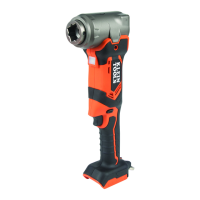

 To Next Page