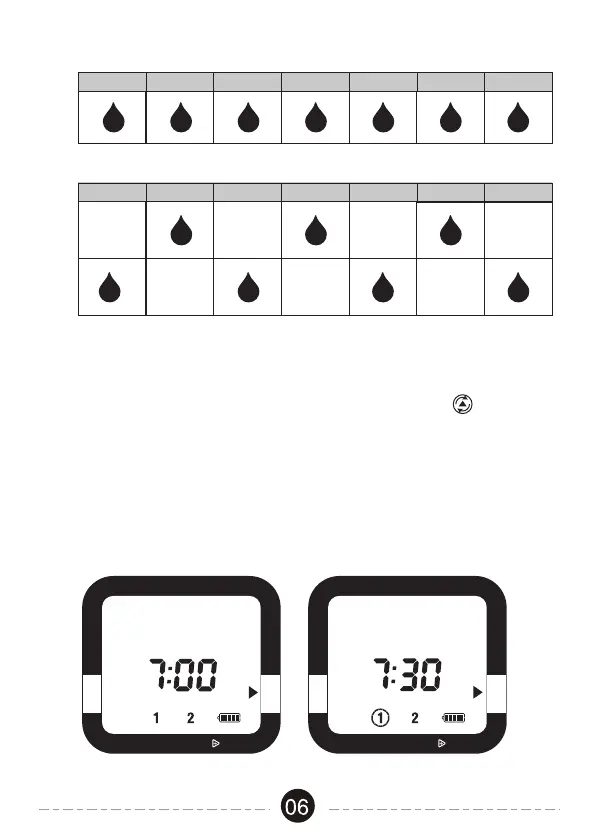
1. After programming, the timer will be in Auto mode.
2. If the timer is not in Auto mode, press the Cursor Button to switch to
Auto.
3. The screen display will alternate between the current TIME and the NEXT
START TIME for each zone. This will allow you to see at a glance what
will happen next.
4. If the next watering cycle is more than 24 hours away, the NEXT START
TIME will be displayed in days instead showing a time.
Auto Mode
RAIN DELAY, HOLD
OFF
START WATER HOW LONG
HOW OFTEN AUTO
SET CLOCK
RAIN DELAY, HOLD
OFF
START WATER HOW LONG
HOW OFTEN AUTO
SET CLOCK
SUNDAY MONDAY TUESDAY
WEDNESDAY
THURSDAY
EVERY 1 DAY
EVERY
WEEK
FRIDAY SATURDAY
SUNDAY MONDAY TUESDAY
WEDNESDAY
THURSDAY
FRIDAY SATURDAY
EVERY 2 DAY
EVERY
ONE
EVERY
TWO
ZONE
TIME
AM
ZONE
NEXT START TIME
AM


 To Next Page