This document describes the Dewenwils Automatic Water Timer, model SKU: HDWT02B, an instruction manual for a dual-zone automatic water timer designed for residential use.
Function Description
The Dewenwils Automatic Water Timer is a device that automates the watering of gardens or lawns through two independent zones. It allows users to set specific watering schedules, including start times, duration, and frequency, for each zone. The timer operates on AA alkaline batteries and features a clear LCD display for programming and status monitoring. It includes a manual watering mode for immediate watering needs and a rain delay function to temporarily pause scheduled watering. The device is designed to be connected to a hose faucet and can control water flow to two separate hoses or irrigation lines.
Important Technical Specifications
- Watering Duration: Adjustable from 1 minute to 360 minutes (6 hours).
- Max. Water Pressure: 120 psi.
- Battery: Requires 2 x AA alkaline batteries (not included).
- Zones: Two independent watering zones.
Usage Features
Battery Installation:
To install batteries, remove the battery holder from the back of the water timer, insert two AA alkaline batteries as indicated, and then firmly and securely replace the battery holder. The device recommends replacing batteries when the indicator reaches 20%.
Installation:
The timer is installed by screwing it onto a standard hose faucet. Ensure a secure connection to prevent leaks.
Setting the Clock:
- Press the Cursor Button to navigate to "SET CLOCK."
- Use the ◄ & ► buttons to adjust the clock to the current time.
- Press the Cursor Button again to confirm the time and move to the "Start Water" setting.
Select When To Water (Start Water):
- With the arrow pointing to "Start Water," use the ◄ & ► buttons to select the desired first watering time of the day. Subsequent watering cycles will be based on this initial time.
- Press the "ZONE 1 2" button to switch between Zone 1 and Zone 2. A start time must be entered for each zone before proceeding with other settings for that zone.
- Press the Cursor Button to move to the next setting.
Select How Long To Water (How Long):
- With the arrow pointing to "How Long," use the ◄ & ► buttons to select the duration for each watering cycle. Durations can be set up to 360 minutes (6 hours).
- Press the "ZONE 1 2" button to switch between zones. Ensure "How Long" is set for each zone before proceeding.
- Press the Cursor Button to move to the next setting.
Select How Often To Water (How Often):
- With the arrow pointing to "How Often," use the ◄ & ► buttons to select the watering frequency. Options range from every 1 hour to once every 7 days.
- Press the "ZONE 1 2" button to switch between zones or the Cursor Button to move to the next setting. "How Often" must be set for each zone.
Auto Mode:
After programming, the timer automatically enters Auto mode. If not in Auto mode, press the Cursor Button to switch to "AUTO." The screen will alternate between the current time and the next start time for each zone. If the next watering cycle is more than 24 hours away, the next start time will be displayed in days.
Rain Delay Mode:
- To activate, ensure the arrow is pointing to "AUTO."
- Hold the ► key for 3 seconds, then use the ◄ & ► buttons to select the desired delay period (up to 7 days).
- The screen will toggle between the current time and the remaining delay time. Delays greater than 12 hours will be shown in days.
- After the delay, the watering program resumes automatically.
Off Mode:
- To stop watering for an extended period, push the Cursor Button until the arrow points to "OFF." The timer will not water automatically, and "OFF" will be displayed.
- To resume automatic watering, press the Cursor Button until the arrow points to "AUTO." The program will begin at the next available start time.
- To disable a specific zone, navigate to "HOW LONG" using the Cursor Button, select the desired zone with the "ZONE 1 2" button, and adjust the "HOW LONG" setting to "0." To reactivate, set a duration greater than "0."
Manual Watering:
- Press the "MANUAL ON/OFF" button to start manual mode.
- Press the "ZONE 1 2" button to select the zone for manual watering.
- Use the ◄ or ► button to adjust the duration for which the valve will remain open.
- The valve will open after a few seconds and close automatically after the selected time. Note: Manual mode for both zones cannot be activated if any zone is already open.
Timer Reset:
To erase all settings and return the timer to its original state, press and hold the Cursor Button for 7 seconds. The screen will display "RESET" to confirm. All programming will be lost.
Maintenance Features
Battery Life:
- Use only fresh, long-lasting alkaline batteries.
- Do not use rechargeable batteries.
- Turn off the unit when not in use.
- Remove batteries before storage.
- Be aware that the moisture sensor (if applicable, though not explicitly mentioned as a feature in this manual) uses more energy.
- Frequent watering schedules can drain batteries faster.
Cleaning Your Timer:
The timer should be cleaned periodically to prevent sediment or dirt build-up.
- Turn off the water faucet and remove the timer from the faucet and hose connections.
- Inspect the filter washer at the faucet connection input for any built-up sediment.
- If the filter is dirty, remove it and clean it under running water.
Seasonal Storage:
- To prevent damage from cold or freezing temperatures, remove the timer from the faucet and store it indoors when frost is expected.
- Remove the batteries when the timer is placed in storage.
- Recycle used batteries; do not dispose of them in the garbage.
- To clear any clogs in the water flow, turn the timer upside down and activate manual mode. This will open the valves and allow water to run through the output connectors. Once clear, deactivate manual mode.

 Need help?
 General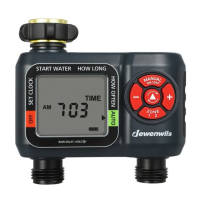

 To Next Page
