2
English
Information
Before using this telephone, please read “IMPORTANT SAFETY INFORMATION” on pages 16-17�
The PHONE-DEX is made for use in USA and Canada only�
The PHONE-DEX is a cordless phone that streams sound directly to your hearing aids�
It is incredibly easy to use – the only thing you need to do is hold the phone normally against
the ear using the hearing aid�
The PHONE-DEX works as a conventional phone as well� So family and friends can use it�
See “Operation” on page 9 for more information�
Parts checklist
Your package contains the following items� Save your sales receipt and original packaging in
case it is necessary to ship your telephone for warranty service�
• Battery compartment cover
• Battery
• Telephone line cord
• Telephone base
• Power adapter
• Handset
• User’s manual
Installation
Connection
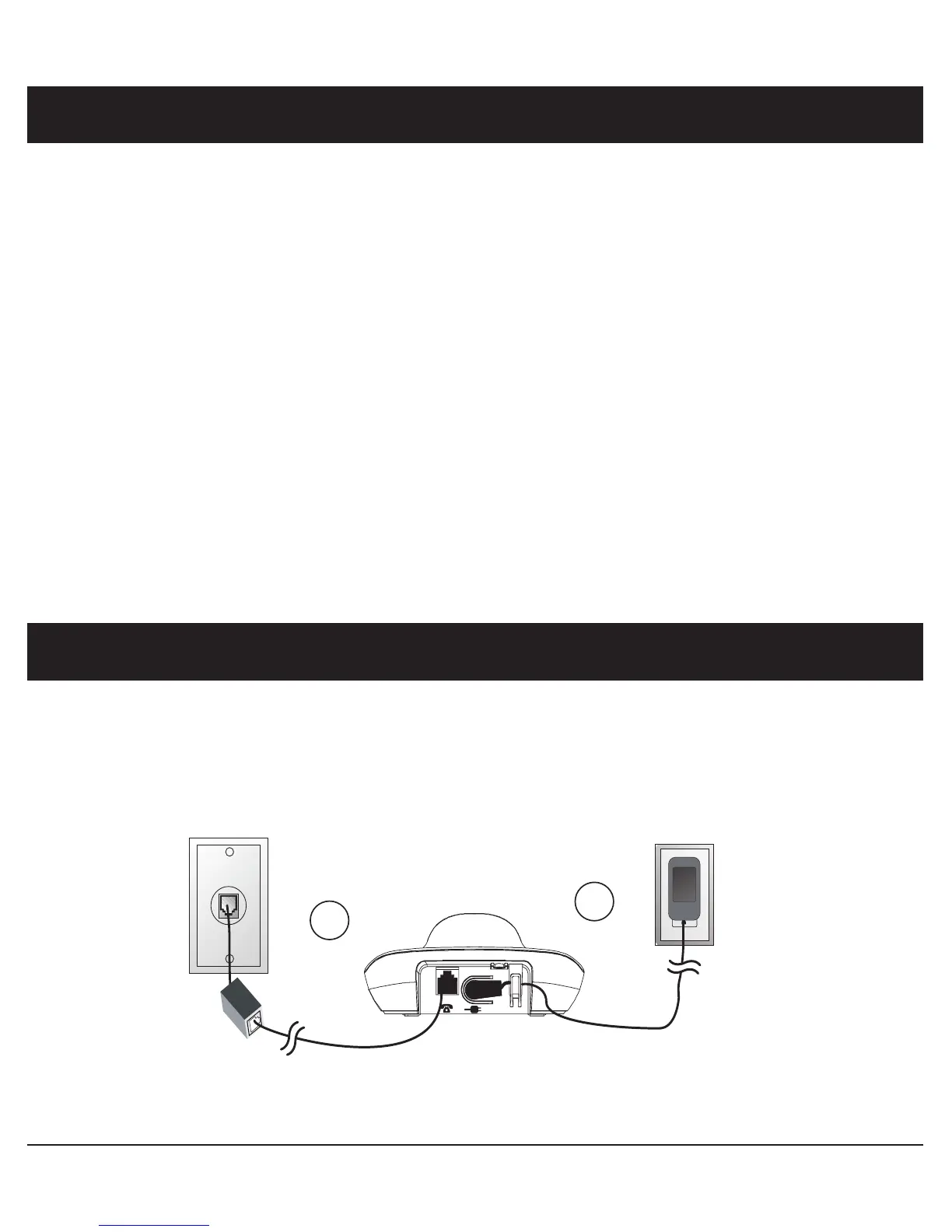
1� Connect the telephone line cord to the telephone wall jack and to the telephone base (T)�
Note! If you subscribe to digital subscriber line (DSL) high-speed Internet service through
your telephone line, you may need to install a DSL filter between the telephone line cord
and the telephone wall jack. Contact your DSL service provider for more information.
2� Connect the telephone base power adapter to an electrical outlet not controlled by a wall
switch and to the telephone base (Y)�
1
2



 To Next Page