-15-- 15 -
Using ButtonsUsing Buttons
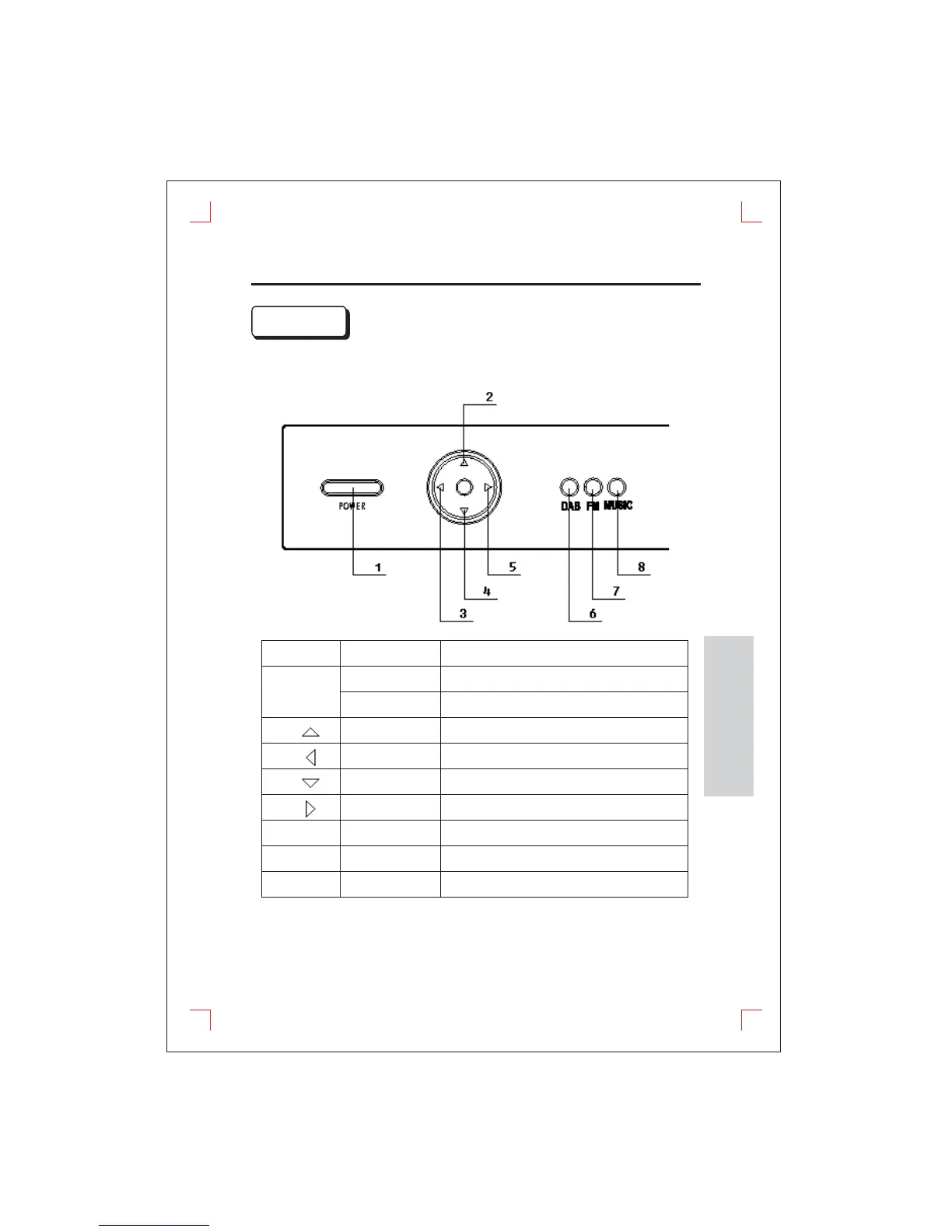
Front PanelFront Panel
Basic Function KeysBasic Function Keys
Icon
Key Action
Items
(1)
Short pressShort press
Power ON or Select file in browser mode.Power ON or Select file in browser mode.
Long pressLong press
Power OFF.Power OFF.
(2)
Short pressShort press
Navigate up.Navigate up.
(3)
Short pressShort press
Navigate left.Navigate left.
(4)
Short pressShort press
Navigate down.Navigate down.
(5)
Short pressShort press
Navigate right.Navigate right.
(6)
Short pressShort press
Go to Digital DAB+ mode.Go to Digital DAB+ mode.
(7)
Short pressShort press
Go to FM radio mode.Go to FM radio mode.
(8)
Short pressShort press
Go to MUSIC playback mode.Go to MUSIC playback mode.
POWER
DAB
FM
MUSIC
See the page7 and page8 for remote control usage.See the page7 and page8 for remote control usage.
FUNCTIONS


 To Next Page