12
11
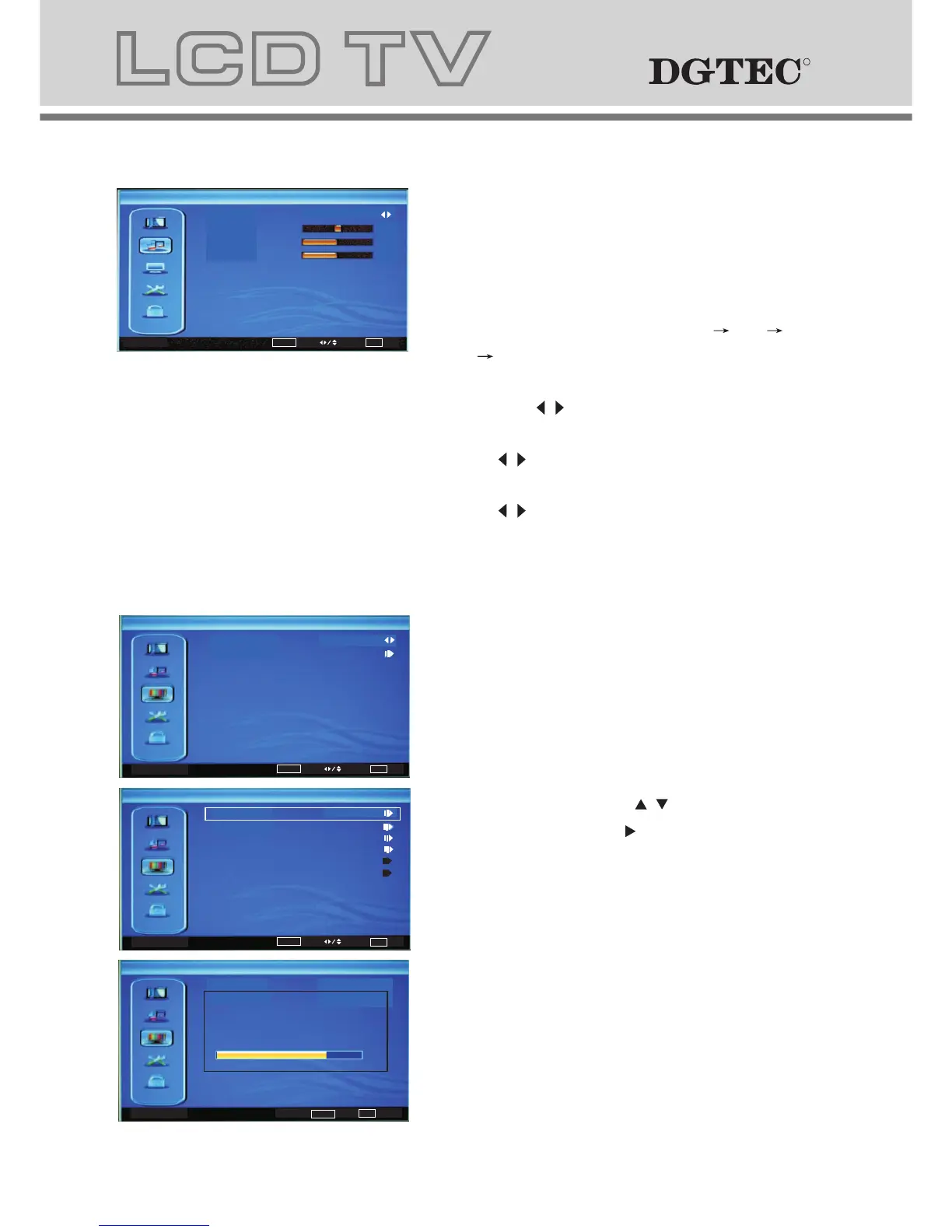
a. The image on the left depicts the
manual scan menu.
b. The definition of each option:
b-1. Country Region: Changes the country
in sequence as: VIC,QLD,SA,WA,TAS,
NT,NSW/ACT.
b-2. Channels: Press / key to this
position, Then press key to enter manual
search programs, Other menu options
include Auto Scan,Manual Scan,Channel
Skip,Channel Sort,ChannelEdit,
Analog Channel Fine Tune.
3 MANUAL SCAN MENU
2 AUDIO MENU
a. The image on the left depicts the audio
menu.
b. The definition of each option:
b-1. Sound Mode: Changes the Sound
Mode in sequence as: Standard Pop
Rock News.
b-2. Balance: Changes the value of Balance
with the key / in the range of -50 to +50.
b-3. Bass: Changes the value of Bass with
the key / in the range of 0 to 100.
b-4. Treble: Changes the value of Treble with
the key / in the range of 0 to 100.
Audio
OK
Adjust
Select
EXIT Exit
Balance
Bass
Treble
Sound Mode
Standard
0
50
50
Manual Scan
OK
Enter
Select
EXIT Exit
Channels
Country Region
NSW/ACT
Channels
OK
Scan
EXIT Exit
82%
Status:Scan Canel
Digital Channels:0
Analog Channels:0
Channels
OK
Scan
Select
EXIT Exit
Atuo Scan
Auto Scan:Press"OK"to enter Auto Scan
Manual Scan
Channel Skip
Channel Sort
Channel Edit
Analog Channel Fine Tune
RR
RR
1 VIDEO MENU
a. The image on the left depicts the OSD menu.
b. The definition of each option:
b-1. Picture Mode: Changes the picture mode
in sequence : Standard Mild Vivid
Hi-Bright User
b-2. Brightness: Changes the value of
brightness with the key / in the range
of 0 to 100.
b-3. Contrast: Changes the value of
contrast with the key / in the range of 0
to 100.
b-4. Saturation: Changes the value of
saturation with the key / in the range
of 0 to 100.
b-5. Sharpness: Changes the value of
sharpness with the key / in the range of
0 to 7.
b-6. Color Temperature: Changes the
color temperature in sequence as :
Standard Warm User Cool, also R Gain,
G Gain, B Gain included in each item.
b-7. DNR: Changes the DNR in sequence as :
Strong Auto Off Low Medium.
Menu Operation Under TV Input
Video
Picture Mode
Brightness
Contrast
Saturation
Sharpness
DNR
Color Temperature
Standard
Strong
50
52
55
3
OK
Enter
Select
EXIT Exit
Color Temperature
Select
EXIT Exit
Color Temperature
B Gain
G Gain
R Gain
Standard
3
-6
0



 To Next Page