19
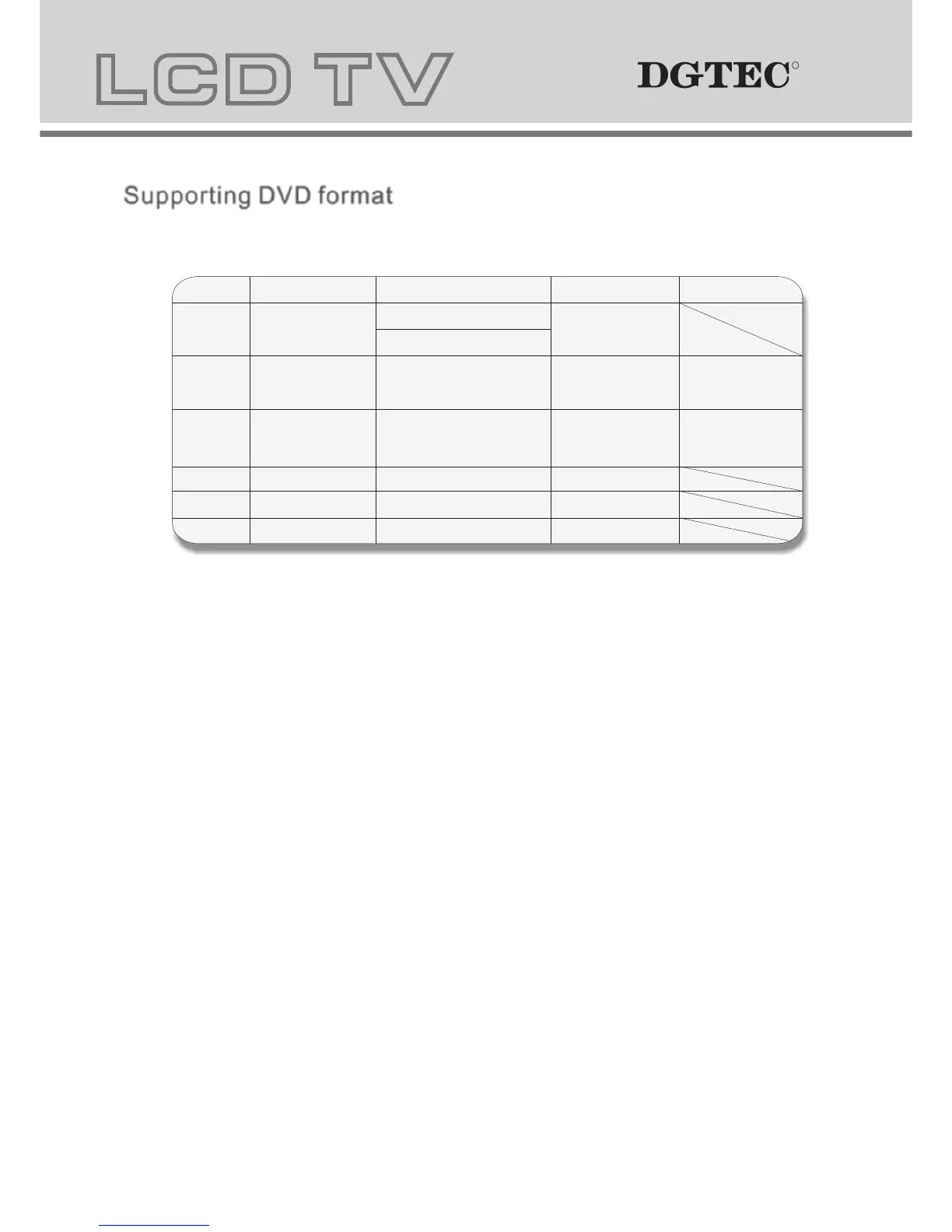
Supporting DVD format Supporting DVD format
This product can play the following DVD formats disc.
Remarks
Include SVCD
Include:
VCD2.0/ VCD1.1
VCD1.0/ DVCD
Disc Type
Recorded Content
DVD format:
Compressed digital
audio and video
MPEG2
Compressed digital
audio and video
MPEG1
Compressed digital
audio and video
CD-DA: Digital audio
HD-DA: Digital audio
Disc Size (Diameter) Recorded Time
DVD 12cm
Single side:120mins. Approx
Double side:240mins. Approx
Super VCD
12cm
45mins. Approx
VCD
12cm
74mins. Approx
CD
12cm
74mins. Approx
HD-CD
12cm
74mins. Approx
MP3/JPEG
12cm
600mins. Approx
Digital audio
NOTE: Also support DVD-R, CD-R, CD-RW playback.
202
1. Play (for DVD/ Super VCD/ VCD/ CD/ CD-G/HD-CD and Mp3/ JPEG discs)
- For DVD disc, press button from root or title menu; when playing the DVD, you may play your favourite title
directly with title selection by pressing the TITLE button.
- For Super VCD & VCD discs, you may play your favourite tracks by using the numeric buttons.
- For CD, CD-G & HD-CD discs, you may play your favourite tracks by using the numeric buttons.
- For MP3 / JPEG disc, you may play your favourite tracks by numeric buttons from the content menu.
- If input track number is not valid, it will not function.
NOTE: From track 1-10, use numeric buttons directly; For tracks over 10, press - / -- button first. (E.g. Track 15,
press - / -- then 5)
2. Previous/Next (for DVD/ Super VCD/ VCD/ CD/ CD-G/HD-CD and Mp3/ JPEG discs)
- While playing the disc;
Press button to play to the last Title / Chapter / track.
Press button to play to the next Title / Chapter / track
3. Forward/ Backward (for DVD/ Super VCD/ VCD/ CD/ CD-G/HD-CD and Mp3/ JPEG discs)
- While playing the disc, you may use forward or backward function.
- There are 4 speeds for forward. Press button to toggle between different speeds in sequence.
(FORWARDx2 / FORWARDx4 / FORWARDx8 / FORWARDx20 / Play).
While rewinding, you may press to resume normal speed.
For CD, HD-CD, MP3, rewind also has audio (and only for forwardx2).
4. ANGLE
Press to adjust picture for personal viewing.
NOTE: During Slow motion, the sound will be off.
5. Pause (for DVD/ Super VCD/ VCD/ CD/ CD-G/HD-CD and Mp3/ JPEG discs)
- FOR CD, CD-G, HD-CD & MP3/JPEG discs, press button to pause; press button to resume.
- FOR DVD, Super VCD, VCD discs, press button to pause; press SLOW/STEP button to playback frame
by frame; press button to resume.
6. Repeat (for DVD/ Super VCD/ VCD/ CD/ CD-G/HD-CD and Mp3/ JPEG discs)
- Press REPEAT button once to display the current visual file.
For Super VCD, VCD, CD, CD-G, HD-CD discs. While playing in sequence, you may use the repeat playback.
There are 2 repeat modes, press REPEAT to toggle between different modes in sequence. (REPEAT (OFF)/ REPEAT (1)
/REPEAT (ALL)).
For DVD discs, you may setup the repeat playback mode. There are 2 repeat modes, press REPEAT to toggle between
different modes in sequence. (REP: (OFF) / REP: (CHAPTER) / REP: (TITLE) / REP: (ALL)).
For MP3 / JPEG discs, you may use the repeat playback. There are 3 repeat modes, press
REPEAT to toggle between different modes in sequence. (REPEAT (OFF) / REPEAT (1) / REPEAT (DIR) / REPEAT (ALL)).
7. INFO (for DVD/ Super VCD/ VCD/ CD/ CD-G/HD-CD and Mp3/ JPEG discs)
- Press INFO button to activate the on screen roll-down menu for the current Title, Chapter, time and other
information
RR
RR



 To Next Page