3.1.2 Battery life
Four new batteries LR6 (AA) are sufficient for approx. 200
measurements, if the measurements will be taken once a day at
room temperature (23°C).
The batteries included in the kit will be only useful for
demonstration purposes. These batteries will probably not be
enough to complete 200 measurements.
You can check the battery status in the lower right corner of the
screen. If the low battery symbol is displayed, battery power is low
and they should be replaced with new ones.
3.2 Power adapter (optional)
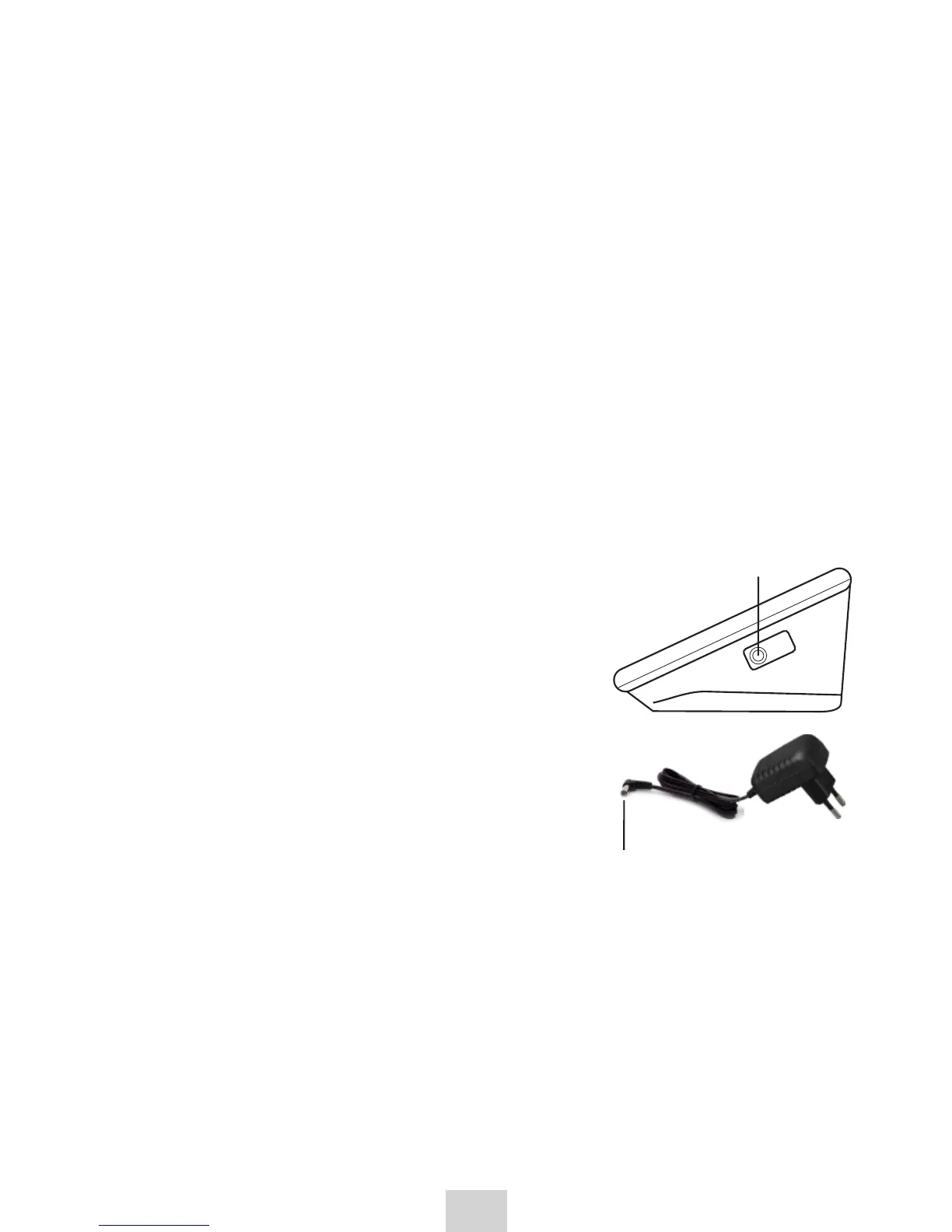
1. Connect the power supply plug into the power supply socket (right side
of the device).
2. Plug the power adapter unit into electrical outlet.
Use power adapter suitable for local mains
voltage (mains current 100~240 V)
Specification of power adapter:
input: 100-240 V, 50/60 Hz, 6V,
min. 400mA;
We recommend using only the power
adapter supplied by the manufacturer,
model Diagnostic ZID 6-1 (100~240 V,
50/60Hz, 6 V, 1000 mA (1 A))
If the device is defective, unplug the
power supply or the power cor.
Do not touch the power adapter with a wet
hand.
Do not tangle the wires during usage.
The power adapter is added to the set
optionally (charged additionally)
3.3 Settings
With the device powered off:
1. Press the SET button, the appliance enters the date setting mode.
a) Changing values
press the MEM button to go one digit up
if you press and hold the MEM button, the value will change
quickl
Air
plug
Power
supply
6


 To Next Page