1. Power ON/OFF
1) Power ON : Single-press to turn on camera
from OFF-mode, and enter into Preview Mode.
2) Power OFF : Press and hold to turn off
camera. Before shutting down, video being recorded
will be saved.
04
GETTING STARTED
2. Turn ON/OFF Screen Light
Single-press “Power Button” to turn on/off screen
light and save power.
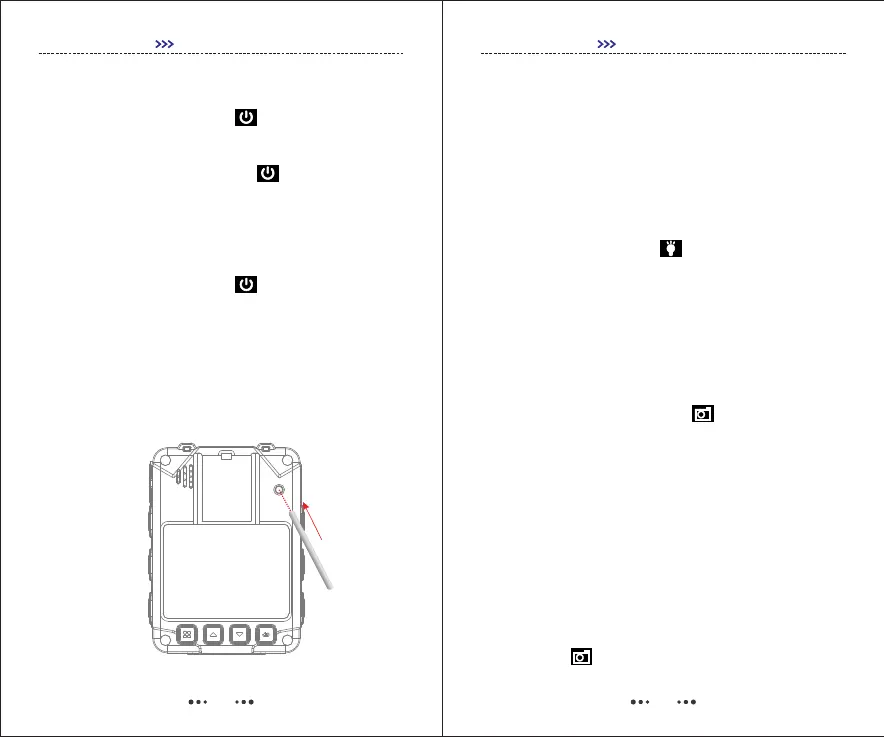
3. Reset
Resetting camera will power off the camera forcely, it
helps when the camera is down.
05
4. Infrared Light
In low-light environment (At night or in the dark),
turning on IR can help user to record more details, and
images recorded will be black and white.
In Preview Mode, press Menu button to enter Menus,
and go to SETUP, find IR CUT in SETUP-Settings
[SETUP-Video, SETUP-Photo, SETUP-Settings].
1) Manual : Single-press to turn on/off Infrared
Light.
2) Auto : At night or in the dark, when photoresistor
senses the low-light environment, Infrared Light will be
turned on/off automatically.
GETTING STARTED
5. Photograph Feature
In Preview Mode, single-press , and the unit will
start taking pictures similar to a digital camera.
In SETUP menu, user can set image resolution,
quality, burst capture and auto exposure.
6. Burst Mode
Burst Capture means to capture a continuous
sequence of photos.
7. Screenshot
To capture picture while video is being recorded, just
single-press .


 To Next Page