10
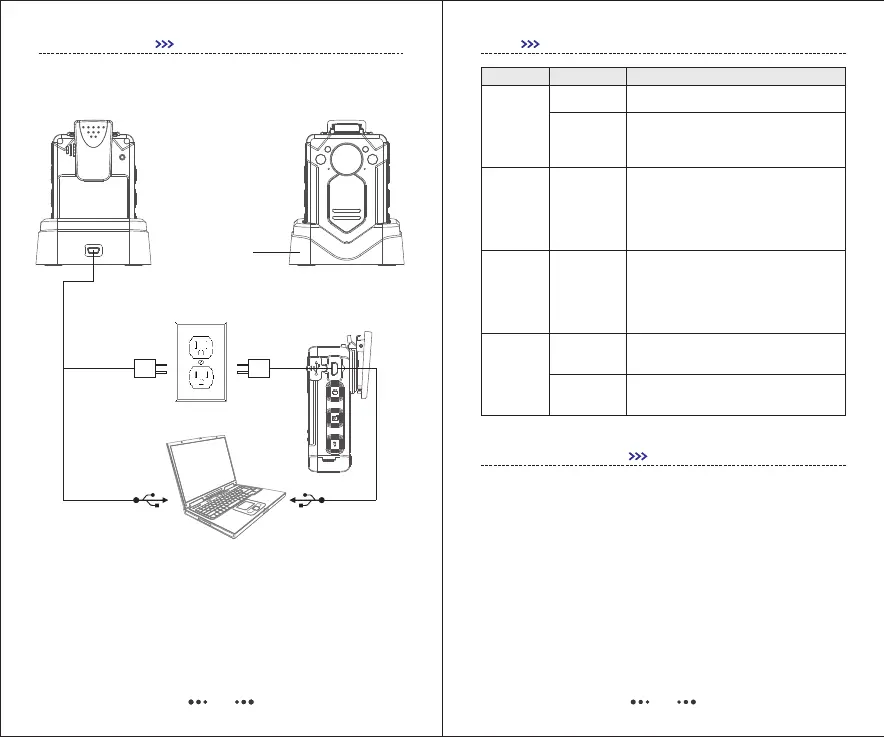
Drop-in Dock
GETTING STARTED
22. Charging
23. Connect with External Camera
Connect with external camera, the unit will record
video via external camera, not the main camera.
11
Q & A
Even if within the warranty period, if the
following occurs, certain maintenance costs
will be charged.
1) The malfunction and damaged caused by incorrect
use, the unauthorized repairs and alteration.
2) The damage caused by fire, flood, abnormal
voltage, other natural disasters and secondary product
damage.
Question
Analysis
Answer
Out of battery
Mainboard
Protection
Charge for 3.5 hours.
Use Reset button
Camera
can’t be
powered
on
Working
time of
camera
is short
Camera was
not fully
charged
Charging time should not be less than
3.5 hours.
Data
Uploading
Interrupted
frequently
Front panel
of mainframe
can’t supply
enough
power
Use the USB port of back panel.
Camera
can’t be
recognized
by PC
USB cable
issue
Change USB cable.
Wrong driver
Reinstall driver.
N O T I C E F O R U S E R
Electrical Outlet
PC
Charging
Data Transferring
Charging
Data Transferring


 To Next Page