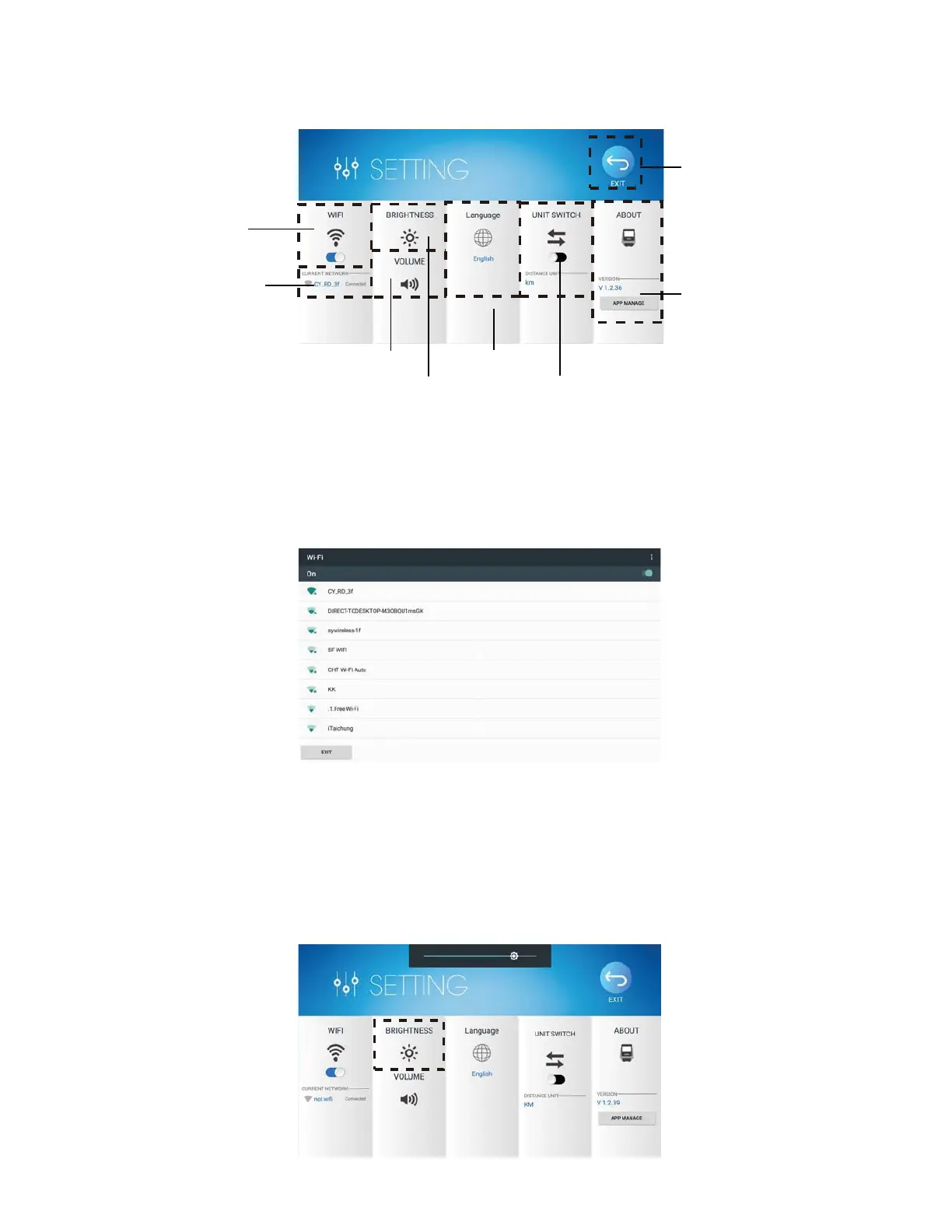
¾ SETTING MODE
Press the icon on the upper left corner of the home screen. (Fig.3)
You can enter the SETTING MODE. Please check Figure 6.
Fig.6 SETTING MODE
WIFI CONNECTION
Please check Figure 7 for demonstration.
BRIGHTNESS AND VOLUME
Press the icon of Brightness and Volume to adjust them with the sliding bar.
Please check Figure 8.
Fig. 8 Brightness Adjustment
screen brightness metric switching
exit
WIFI select
WIFI ON / OFF
volume
image 4
updates
LANGUAGE
Fig.7 WiFi Selection (You can also turn on Wifi by )
13
1. Turn on the Wifi, then press the Wifi icon. (Fig.6)
2. Choose the available network you would like to connect to.
3. After connection, press the exit function at the left bottom corner of the screen.
Check the WiFi name to make sure that it is the one you would like to connect to. Fig.6)



 To Next Page