2. While using TARGET H. RATE
After setting up the information, press to start the training.
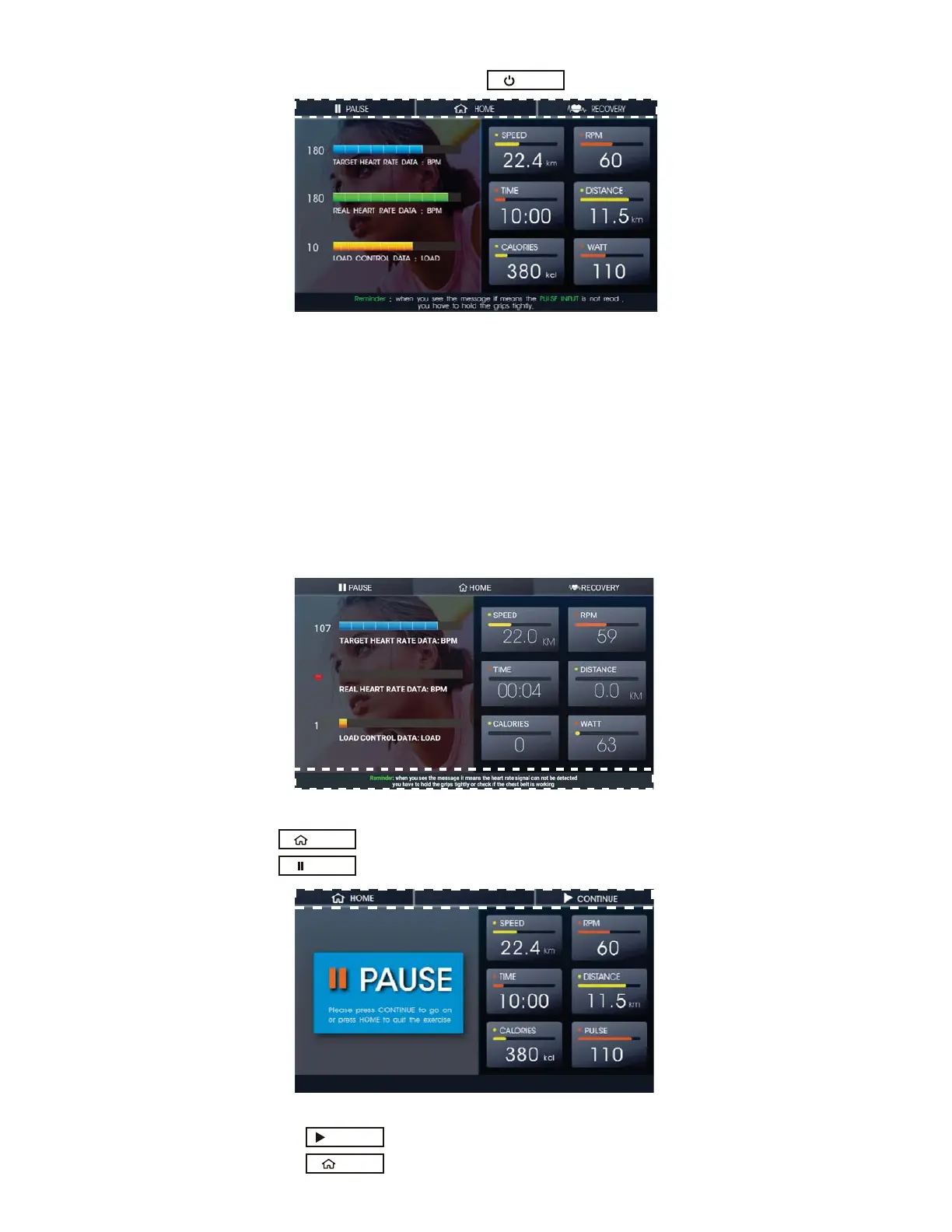
Fig. 22 TARGET H.RATE TRAINING
Į
Į
Į
Į
Į
Fig.23 Reminder Without Heart Rate Signal
Į Press to stop the training and go back to the Home Screen
Į Press to pause the training.
Fig.24 Paused Training
Press to continue (Fig.24)
Press to stop the training and go back to the Home Screen
CONTINUE
HOME
PAUSE
START
HOME
20
During the training, it will show the SPEED, RPM, TIME, DISTANCE, CALORIES and
Watts on the right side of the screen. Please check Figure 21
The Target H. Rate you set and real time H. Rate will be shown on the left side of the screen.
You do not need to change the resistance. The console will automatically adjust the
resistance in order to let your H. Rate stay close to your target heart rate.
I
f the heart rate is not close to the target rate for more than 30 seconds, it will
stop the training and return to the home screen.
If there is no the heart rate received after START, a message will be shown
immediately. Please check figure 23.



 To Next Page