7 8
Product Operation
Product Operation
(3)(1) (2)
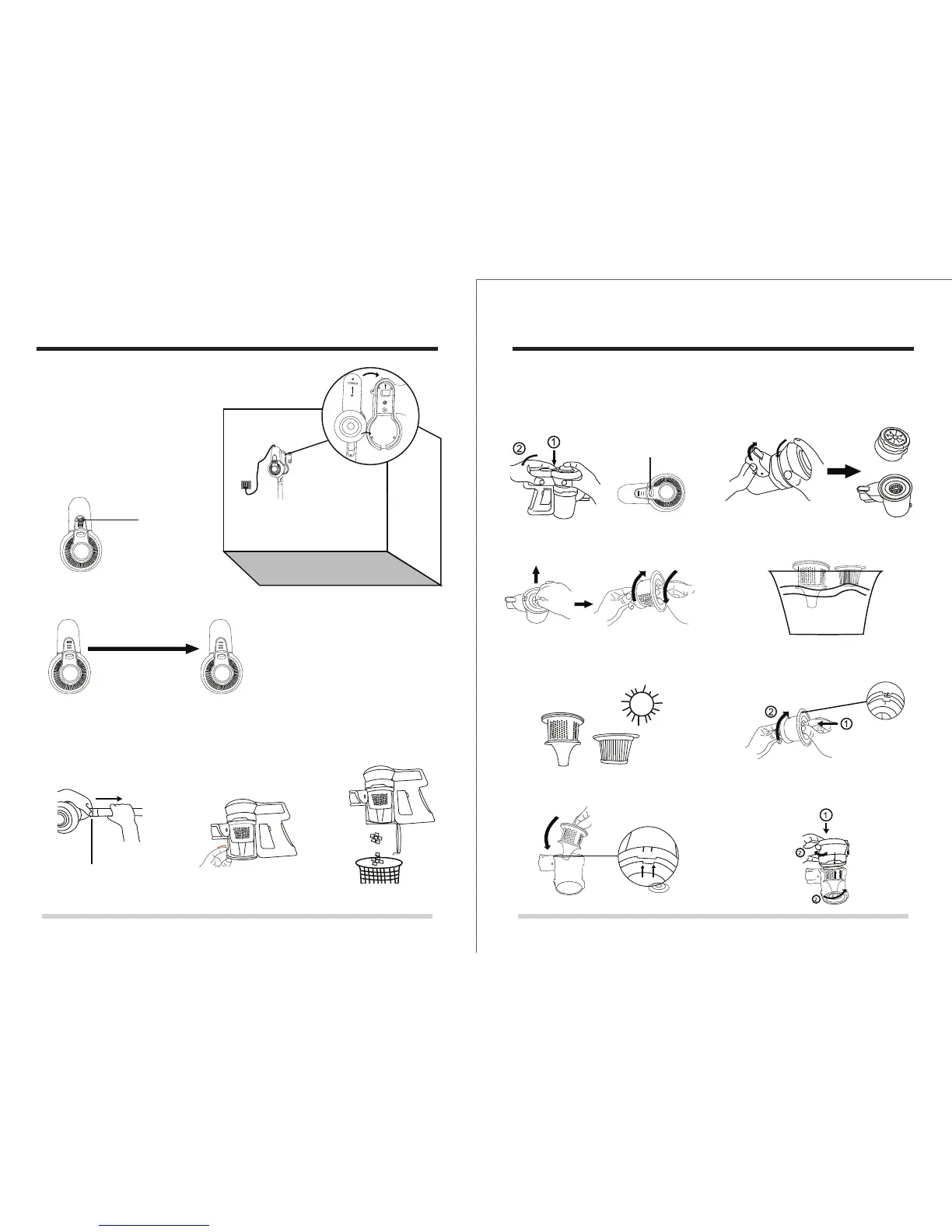
III. Battery charging
When the battery power indictor is
blinking, please turn off the appliance.
Then put it back to charge base for
charging as showed.
Wall
Lower power
Blinking
It will be self cutting off when battery is full.
Full (3 green lights)
IV. How to empty the dust cup
Press the metal tube locker,
then take out the metal tube
Unlock the dust cup locker Empty the dust cup.
Metal tuble locker
V.How to maintain the filter
1. Press the battery locker to remove
the battery from dust cup
2. Open the dust cup as below showedt
3. Take out the filter case , then take
out the filter
4. Wash the filter case and HEPA filter
5. Please dry the HEPA filter and filter
case completely before assembling
back
6. After drying , assemble the filter to the
case
7. Put the filter case back to the dust cup 8. Assemble the dust cover into the dust
cup as below
Battery locker



 To Next Page