6 7
Ⅳ. How to charge:
1) When only one indicator light is blinking, please turn off the appliance, put it back to
the charging base, then make sure the plug of the charger has been inserted into the
socket. When charging, the indicate lights will become flashing green.
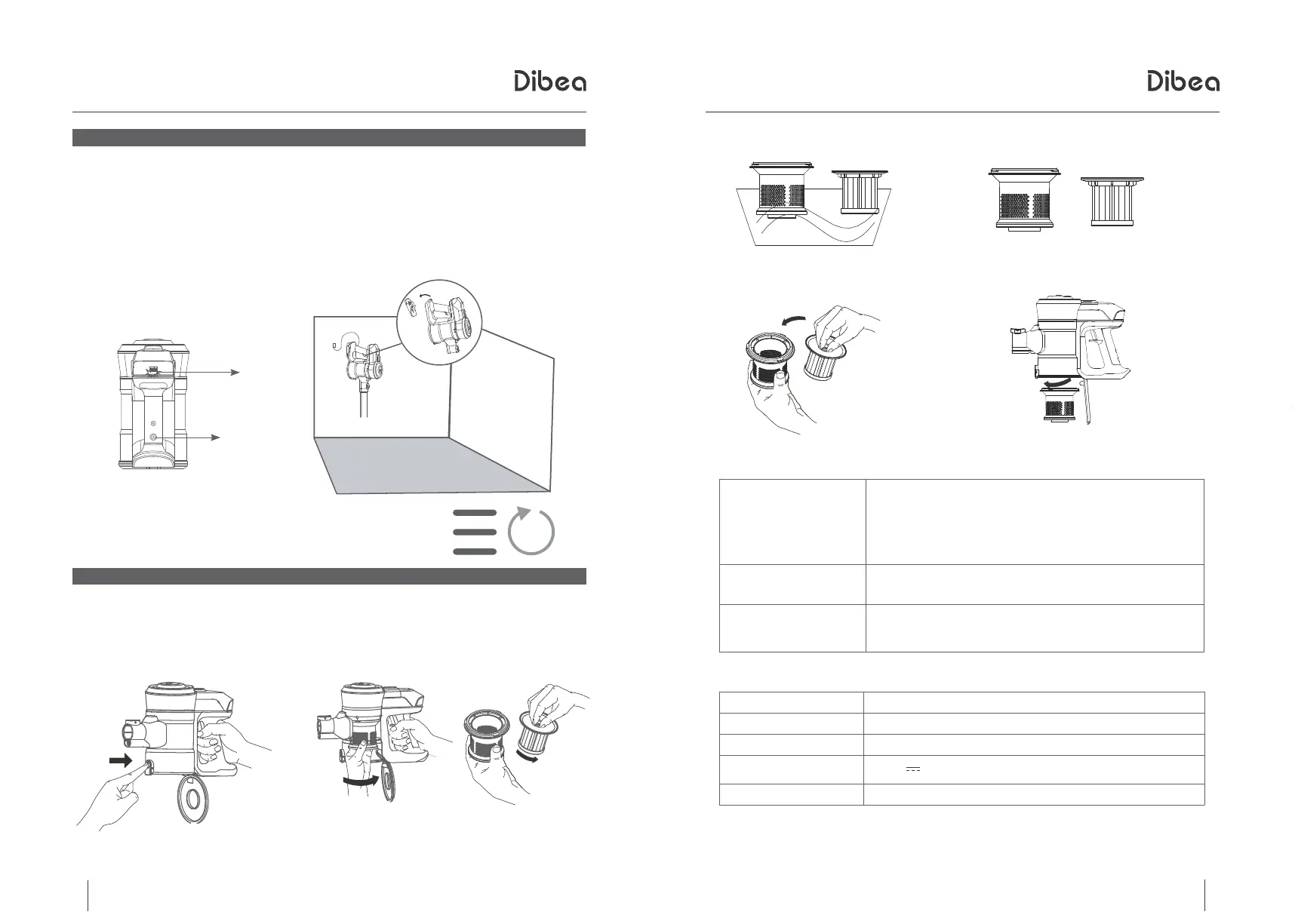
Note: How to use the wall bracket
1. Hang it on the wall with screws
2. Use 3M stickers to make the bracket glued to the wall, for storing the vacuum cleaner
(make sure the height is the same as the vacuum cleaner itself, totally hanging away
from floor is not acceptable)
2) It will have 3 green lights on after fully charged.
V. How to Maintain the Hepa:
How To Use
Troubleshooting
3)Wash the filter and clean HEPA
5)Install the filter and HEPA according
to the direction shown
※Troubleshooting:
※Technical Specification:
6)Assemble the top cover to the dust cup.
4)Dry the filter and HEPA after cleaning
Suction gets weak
1, Empty the dust cup
2, Check if the dust cup is installed correctly
3, Check if the filter case and the filter are installed
correctly
4, Clean the HEPA
Stop working
1, Charge the vacuum
2, Clean the roller brush and the bearing thoroughly
Battery doesn’t hold
a charger
1, Check if the plug has been inserted already
2, Check if the socket is useful
Battery 22.2V/2200mAh
Charging time 4-5 hours
Battery charger input 100-240V ~ 50/60Hz
Battery charger
output
26V 0.45A
Power 320W
4-5
hours
Blinking
Charging port
Wall
1)Press and hold the release button of
the dust barrel bottom cover to open the
dust cup.
2)Rotate the filter assembly according to the
position in picture and take out the hepa. Do
not reverse the machine while rotating the filter.



 To Next Page