Need help?
Do you have a question about the DIG 400A and is the answer not in the manual?
Provides an overview of the 400A irrigation controller's features and power source.
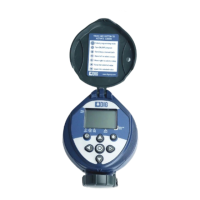
Identifies the controller's protective cover and quick reference label.
Details the LCD display and the 7-button keypad for operation and programming.
Locates battery compartment, rain sensor connection, and solenoid wire.
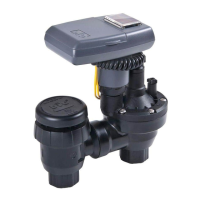
Identifies the anti-siphon valve, air vent, flow control, bleed screw, and pipe fittings.
Explains the meaning of various icons displayed on the controller's screen.
Describes the function of each button used for operation.
Essential steps to set the current time and date for accurate operation.
Options for specific days, even/odd days, cyclical intervals, and every X days.
Configuring up to four distinct start times for daily irrigation.
Defining the length of time the valve remains open for each watering cycle.
Temporarily suspending irrigation for a specified number of days.
How to start and stop a watering cycle manually.
Procedure for replacing the controller's batteries when needed.
Addresses problems like no watering, manual mode only, blank display, and valve issues.
Provides contact information for customer support and troubleshooting.
Guidance on how to order spare parts for the controller.
The DIG 400A is a battery-powered, single-station anti-siphon valve irrigation controller designed for residential and light commercial irrigation systems. It offers comprehensive programming features, a compact and waterproof housing, and is powered by two AA alkaline batteries, providing up to 3 years of operation with name-brand batteries.
The 400A controller manages irrigation schedules by opening and closing a 3/4 inch anti-siphon valve. It allows users to set watering days, start times, and durations, offering flexibility for various irrigation needs. The controller can be programmed for specific days of the week, odd/even days, or cyclical watering from every 1 hour up to every 30 days. It supports up to four independent start times per day (or one start time if set to water every X hours) and watering durations ranging from 1 minute to 5 hours and 59 minutes. An optional rain delay feature allows temporary suspension of irrigation for 1 to 99 days, automatically resuming the schedule afterward. The device also includes a manual watering mode for testing the system or performing unscheduled irrigation, which bypasses the sensor condition. A key safety feature is its anti-siphon design, requiring installation at least 6 inches higher than the highest sprinkler head to prevent back-drainage.
 General
| Brand | DIG |
|---|---|
| Model | 400A |
| Category | Irrigation System |
| Language | English |

 To Next Page