12 ;
th
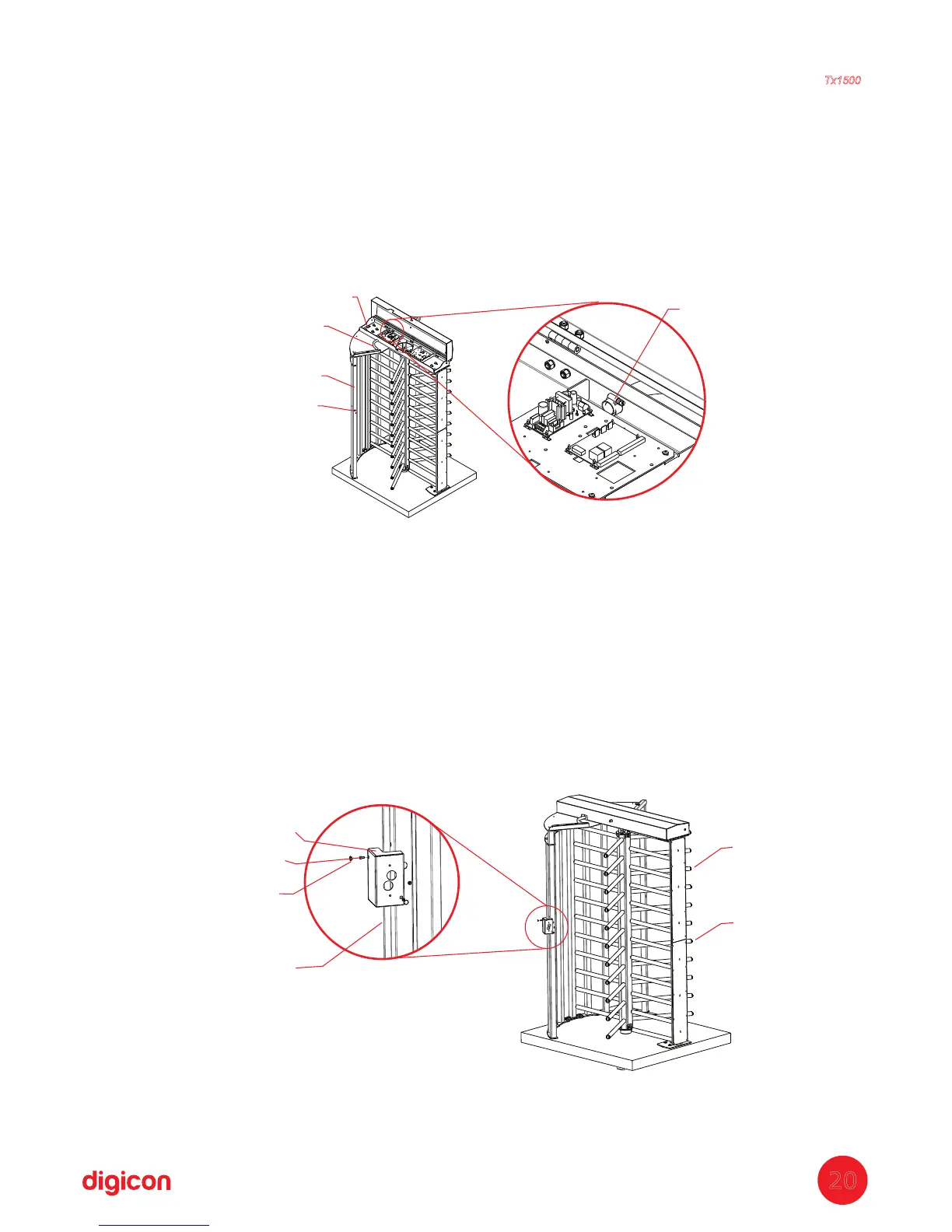
Step: Cable passage
a. Pass the power and network cables through a hose (P33);
b. Put one of the hose's ends (P33) inside the coverage (P27) and the other end
inside the side structure (P23 or P48);
c. Inside the coverage (P27), place the clamp (P34) on the hose's end (P33) to avoid
it being torn;
d. Repeat the procedure above on both sides (entrance and exit) of the turnstile.
Quantity of parts used in this stage:
P33
= 2x - Hose
P34 = 2x - Clamp
13
th
tep: Assembling the card reader bracketS
a. Fix the card reader bracket (P35) with a screw (P36); repeat on both sides;
b. Place the cowl cover (P37) in all holes, 4x in each bracket;
c. Place the arms cover (P38) in the arms assembly (P28).
Quantity of parts used in this stage:
P35=
2x - Reader bracket
P36=
4x - M4x12mmAllen screw
P37=
8x Cowl cover
P38
P28
The holes of the bracket always
have to stay in the inner side
of the turnstile on both sides
P35
P36
P37
P34
P27
P33
P23
Cable output
for readers
Torniquete
Tx1500
20


 To Next Page