Expanded Systems Guide12
3 If using a Pro Tools 24 system, install the re-
maining cards in successive chassis slots in the
following order:
• d24 card (additional)
• MIX Farm cards
• DSP Farm cards
• SampleCell cards
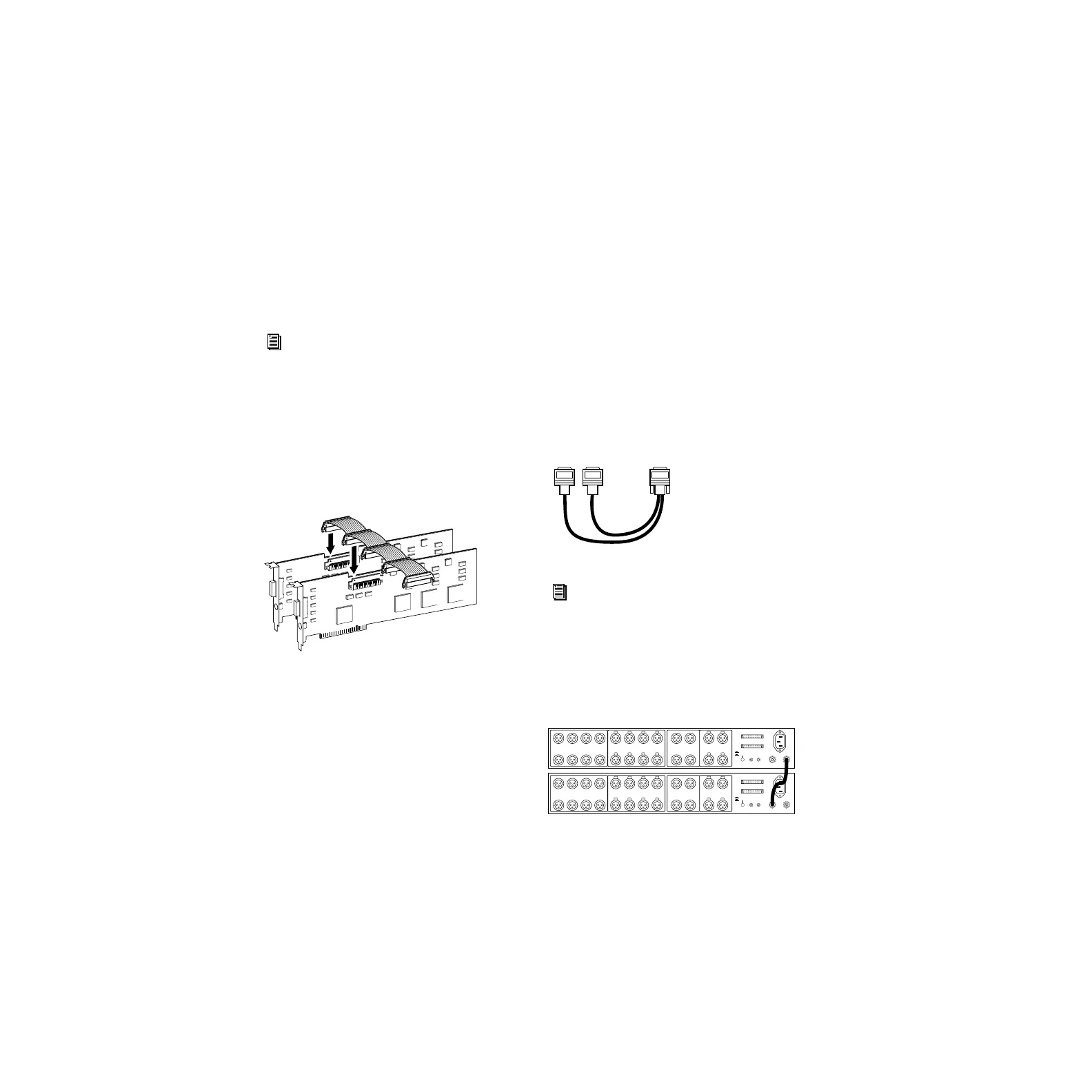
Connect all TDM-equipped cards with a TDM
ribbon cable:
1 Connect the first node of the TDM ribbon ca-
ble to the first Digidesign card. Make sure the
TDM cable is facing the right direction—align
the white triangle on the cable plug with the tri-
angle on the card.
2 Push down gently but firmly until the node is
fully connected to the card. When the plug is
properly seated, the two tabs on the side of the
cable’s TDM connector click shut. To detach the
ribbon cable, squeeze the tabs on the TDM con-
nector inward.
3 Attach the remaining nodes on the TDM cable
to subsequent cards. Unused nodes, if any,
should reside after the last TDM card.
Connecting Audio Interfaces
Connect the Digidesign audio interfaces:
1 Connect the primary audio interface to the
primary Core card with the provided interface
cable. The primary audio interface functions as
the clock master.
2 Connect additional audio interfaces to subse-
quent Digidesign audio cards.
You can use Digidesign’s 16-channel peripheral
cable adapter (optional) to connect two audio
interfaces to a MIX Core, MIX I/O, d24, or Mix
Farm card.
3 If using multiple audio interfaces, connect the
Slave Clock Out of the primary interface to the
Slave Clock In of the second interface with the
provided BNC cable.
4 Connect the Slave Clock Out of the second in-
terface to the Slave Clock In of the next audio
interface (and so forth).
See “Example 2, Magma 13-Slot” on
page 13.
Attaching a TDM ribbon cable
16-channel peripheral cable adapter
See “Example 1, Magma 13-Slot” on
page 13 and “Example 2, Magma 13-Slot”
on page 13.
Connecting multiple audio interfaces
to Pro Tools card
to Audio
Interface
cable
to Audio
Interface
cable
Computer 1
ANALOG OUTPUT ANALOG INPUT AES/EBU OUTPUT AES/EBU INPUT
Computer 2
8 CH Mode
2 x 4 CH Mode
S/PDIF
IN
S/PDIF
OUT
SLAVE CLOCK
IN
SLAVE CLOCK
OUT
7
8
5
6
3
4
1
2
7
8
5
6
3
4
1
2
5/6
7/8
1/2
3/4
5/6
7/8
1/2
3/4
Computer 1
ANALOG OUTPUT ANALOG INPUT AES/EBU OUTPUT AES/EBU INPUT
Computer 2
8 CH Mode
2 x 4 CH Mode
S/PDIF
IN
S/PDIF
OUT
SLAVE CLOCK
IN
SLAVE CLOCK
OUT
7
8
5
6
3
4
1
2
7
8
5
6
3
4
1
2
5/6
7/8
1/2
3/4
5/6
7/8
1/2
3/4
Artisan Technology Group - Quality Instrumentation ... Guaranteed | (888) 88-SOURCE | www.artisantg.com



 To Next Page