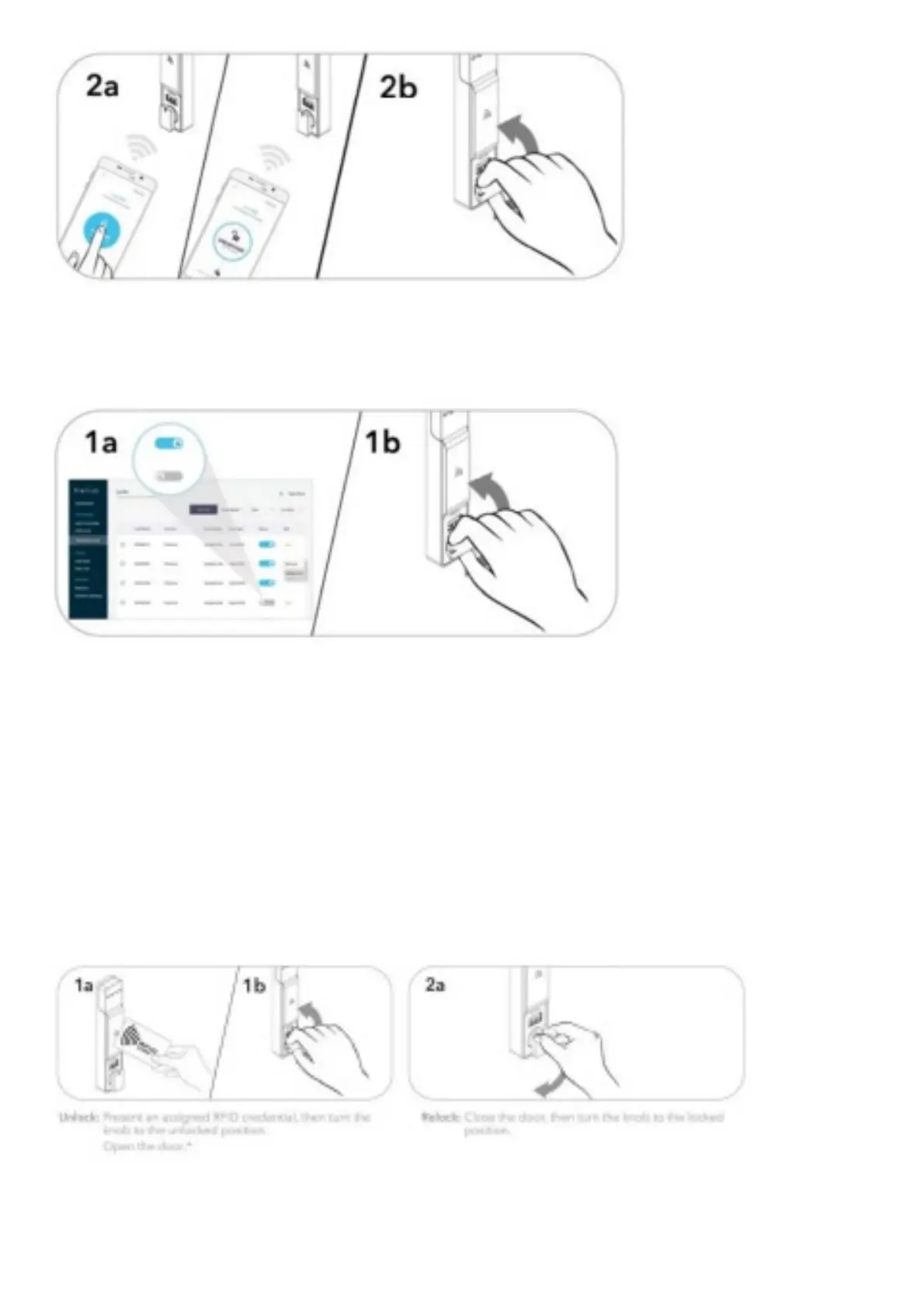
Unlock: Present a valid Admin or Manager Mobile ID credential and press the locked icon within the Mobile ID app to
unlock, then turn the knob to the unlocked position.
NOTE: Mobile ID app will show current status of the lock.
Unlock: Admin must locate the specific lock to be unlocked on the hardware list within the Digilink app then toggle the
switch next to the lock name to the unlocked posrtion.
Once toggled, User presents hand to the lock interface until the mo or engages, then urns the knob to the unlocked
position.*•
*If an Admin or Manager credential or Mobile ID credential is used to relock, the previous user credential will
continue to operate the lock.
**Digilink app cannot be used to relock. Refer to operation instructions above to relock.
OPERATING INSTRUCTIONS – IN ASSIGNED USE FUNCTIONALITY
In assigned use functionality, users operate the loc with therr assigned user creden ial(s, either an RFID credential or
Mobile ID credential).
Operate with an Assigned RFID Credential
Operate with an Assigned Mobile ID Credential



 To Next Page