
 Need help?
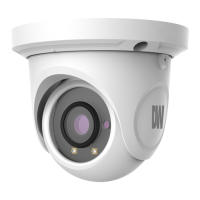
Do you have a question about the Digital Watchdog DWC-MTT4Wi36 and is the answer not in the manual?
Provides precautions for operating, handling, and installing the camera to prevent damage or injury.
Instructions for the proper disposal of old electrical and electronic products according to European Directive.
Provides the default username and password for accessing the camera system.
Lists all the items included in the product package, such as manuals, screws, and tools.
Illustrates the different cable connections for the camera, including network, CVBS, and power.
Details the steps for connecting the LAN cable and assembling waterproof wiring for the camera.
Explains how to connect the camera using a PoE switch or a non-PoE switch with a power adapter.
Details the steps to log in to the camera via Internet Explorer, including downloading ActiveX control.
Covers system settings like date/time and image adjustments like brightness, contrast, and video/audio.
Details alarm types (motion, exception, line crossing) and event configurations (object removal, intrusion).
Covers network settings (TCP/IP, ports, DDNS) and security features like user management and IP filtering.
Covers system maintenance (backup, reboot, upgrade) and operation log management.
Guides on searching and playing back local video records using date, time, and playback controls.
Answers common questions about password, connection issues, and ActiveX setup.
Provides solutions for common issues like IE ActiveX setup and audio problems.
Provides visual representation and measurements of the camera's physical dimensions.
Outlines the warranty period for labor and parts, and how to obtain service.
Specifies limitations on damages, express/implied warranties, and liability.
 General
| Model | DWC-MTT4Wi36 |
|---|---|
| Audio | Built-in microphone |
| Weatherproof Rating | IP67 |
| Type | IP Camera |
| Resolution | 4MP |
| Lens | 2.8mm fixed lens |
| Night Vision | Yes, up to 30m (98ft) |
| Power Supply | PoE (IEEE 802.3af) or 12VDC |
| WDR | Yes |
| Operating Temperature | -40°C to 60°C (-40°F to 140°F) |

 To Next Page