The information contained here are property of DIGITAX AutomotiveElectronics Italy, and extremely confidential. Any disclosure, copying, distribution to third
partyisstrictlyprohibited.
13
TimeandDateSetting
HowToSetTheTaximeter’sTimeAndDate
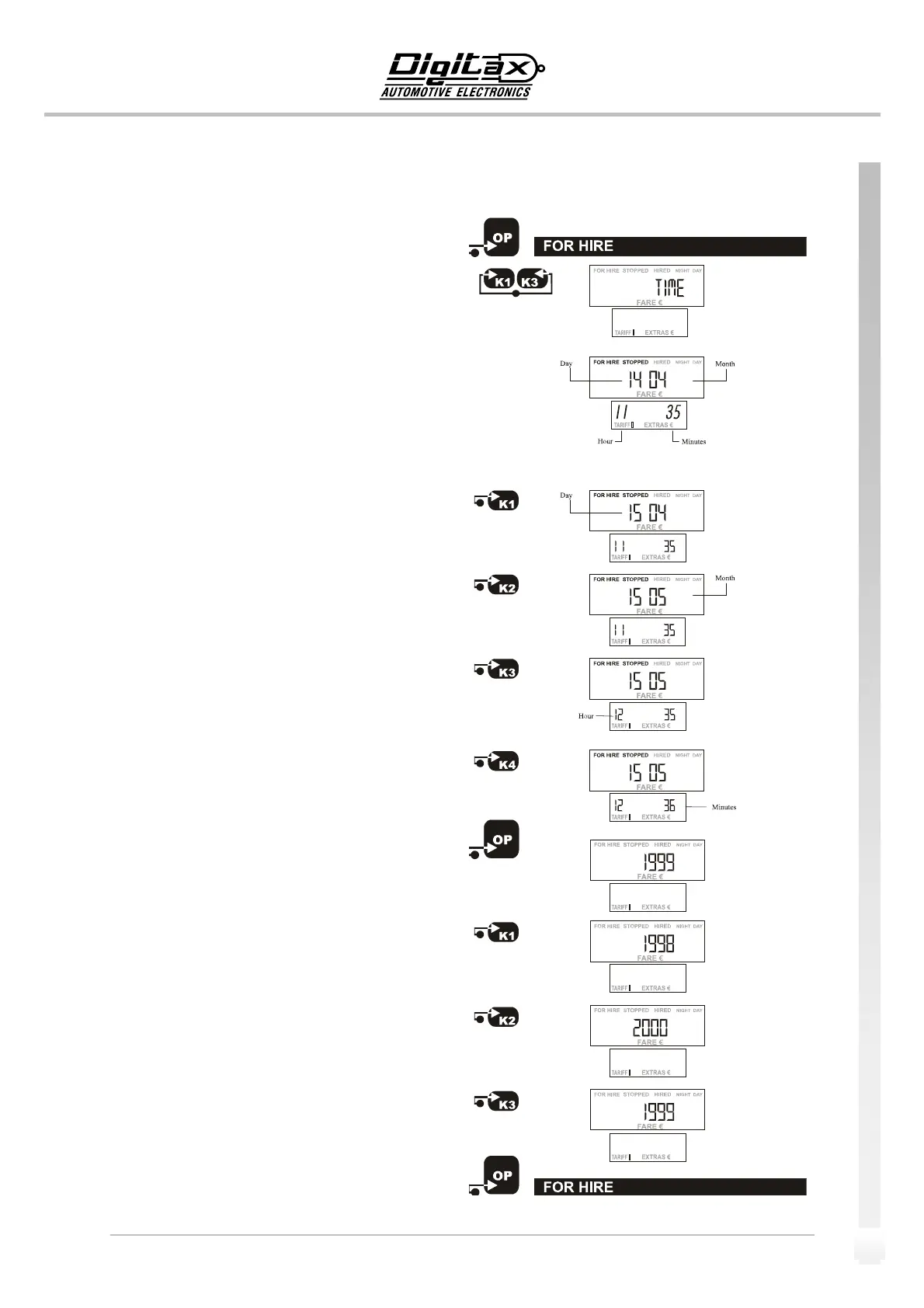
SelectForHireposition.
PressK1andK3atthesametime.
Thebigdisplaywillshow“Time”forafewseconds.
Nowthesigns“FORHIRE”and“STOPPED”startsblinking.
Thebigdisplayshowsintheleftdigitsthedaynumberandin
rightdigitsthemonth.
The
smalldisplayshows:totheleftthehoursandtotheright
theminutes.
TosettheDaynumberpressK1button.
TosettheMonthnumberpressK2button.
TosettheHourpressK3button.
TosettheMinutespressK4button.
Press
OPbuttontoenterintheYearprogramming.
TodecreasetheYearnumberpressK1button.
ToincreasetheYearnumberpressK2button.
PressK3buttontosetthetaximetermanufacturingyear.
PressOPbuttontoendtheprogramminprocedureandgo
backtoFor
Hireposition


 To Next Page