The information contained here are property of DIGITAX AutomotiveElectronics Italy, and extremely confidential. Any disclosure, copying, distribution to third
partyisstrictlyprohibited.
17
StatisticalMemory
HowtoPrinttheLocationMemoryContent
Thetaximeterrecordsandkeepsdatain2MemoryBlocks,eachonedividedin45locations.
ThecontentofbothBlock1andBlock2canbeprintedout.
HowtoPrinttheStatisticalMemoryInformation
PrintOutLocationsList
Loc. Block MemoryContent
1 1 OverSpeedReport(last50)
2 1 “TripbyTrip”reportofallEventsStored
3 1 “TripbyTrip”reportstartingfromtheLastPrintedEvents(Thisoptionworksonlyifthe“Tripby
Trip”memoryisprintedallwaysinindexn.2)
8 1 StatisticalMemories‐Blocks1and2
16 1 PrintsMemoriesbytaxidriveroralldrivers‐Blocks1and2
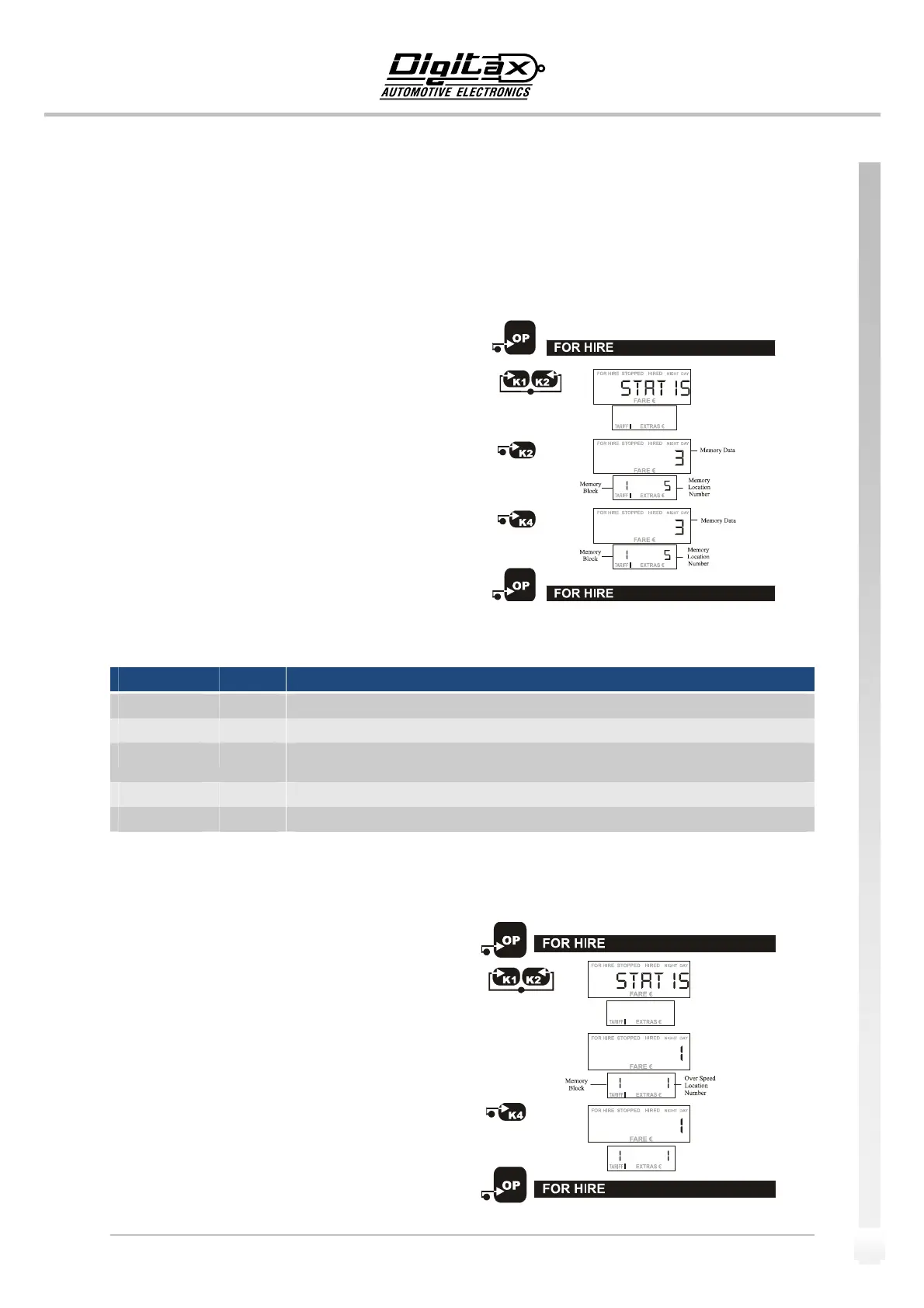
Example:HowtoprintouttheOverSpeedReport
SelectForHireposition.
PressK1andK2atthesametimetoenterinthe“Statistical
Reading“mode.
Thebigdisplaywillshow“Statis”forafewseconds.
Nowthesign“FORHIRE”startsblinking.
Reachthememorylocationn.5bypressingK2button.
Reachinglocationn.
5,pressK4buttontoprintoutthe
contentsofbothBlock1andBlock2.
ForHiresignstopsblinkingandtheprinterwillstart.
PressOPbuttontoendtheprintingprocedureandgo backto
ForHireposition.
SelectForHireposition.
PressK1andK2
atthesametimetoenterinthe“Statistical
Reading“mode.
Thebigdisplaywillshow“Statis”forafewseconds.
Nowthesign“FORHIRE”startsblinking.
Thesmalldisplayshowsintherightdigitsthelocationn.1
(relative to the Over Speed memory location) and in
its left
digitstheBlocknumber.
PressK4buttontoprintouttheOverSpeedevents.
ForHiresignstopsblinkingandtheprinterwillstart.
PressOPbuttontoendtheprintingprocedureandgo backto
ForHireposition.


 To Next Page