
 Need help?
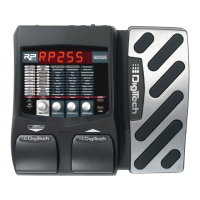
Do you have a question about the DigiTech RP255 and is the answer not in the manual?
An overview of the RP255 and its included components to begin setup.
Explains operation modes (Performance, Bypass, Tuner) and core control knobs (Tone, Effects, Level, Master) and software.
Details preset management and provides a visual guide to the RP255 front panel controls.
Step-by-step guide to editing and creating custom guitar presets on the RP255.
Procedure for saving, copying, and naming custom presets on the RP255.
Explains the signal flow and order of amp and effect models within the RP255.
Detailed descriptions of Pickup, Wah, Compressor, Distortion, EQ, and Noise Gate effect models and parameters.
Explains modulation effects (Chorus, Flanger, Phaser, Vibrato) and time-based effects (Tremolo, Panner).
Details special effects like Envelope Filter, Auto Ya, YaYa, Step Filter, Whammy, Pitch Shift, Detune, Harmony.
Comprehensive guide to Delay and Reverb models, their parameters, and settings.
Guide to using the built-in 20-second phrase looper for performance.
How to use the RP255's built-in drum machine with patterns and tempo.
Connecting external audio sources like MP3 or CD players for practice.
Assigning and controlling parameters with the Expression Pedal.
Restoring factory settings and recalibrating the Expression Pedal.
Technical details and specifications of the RP255 guitar processor.
System requirements for Windows and Mac operating systems to use RP255 software.
List of parameters that can be controlled by the Expression Pedal.
 General
| Type | Guitar Multi-Effects Processor |
|---|---|
| USB Connectivity | Yes |
| Expression Pedal | Yes |
| Tuner | Yes |
| Power Supply | 9V DC Adapter (Included) |
| A/D Resolution | 24-bit |
| Sampling Frequency | 44.1 kHz |
| Display | LCD |
| Effects Types | Chorus, Flanger, Phaser, Delay, Reverb, Wah |
| Inputs | 1 x 1/4" Instrument |
| Outputs | Headphone Output |
| Presets | 40 User, 40 Factory |


 To Next Page