© 2020 Digitrax, Inc. www.digitrax.com
6
6
The DT602 has two independent Left and Right throttles. At the HOME screen
use the soft key to choose the focus or display active throttle side you want
to use. Put a locomotive on the tracks that has a known decoder address, sim-
ply restart at step 4 above, and enter the known decoder address to operate that
locomotive. Note that the soft meanings will change as the screens and con-
texts change, and the current key control is indicated by the adjacent screen
text.
The following sections provide additional information beyond the built in
scrolling HELP prompts. Check the Digitrax Web site for the latest DT602
information. The DT602 software can be updated in the eld and so the operat-
ing screens may change slightly over time.
2.1 DT602 LCD screen
The DT602 Display is a 2.4 inch color LCD screen. The screen provides a
variety of information and input prompts to assist in running locomotives and
system setup. This section outlines the Home Operations Screen, other menu
displays will be covered in following sections.
NOTE: The display is best viewed from directly above, viewing the screen at
some angles may distort the perceived screen colors and actions.
2.1.1 Home Operations Screen
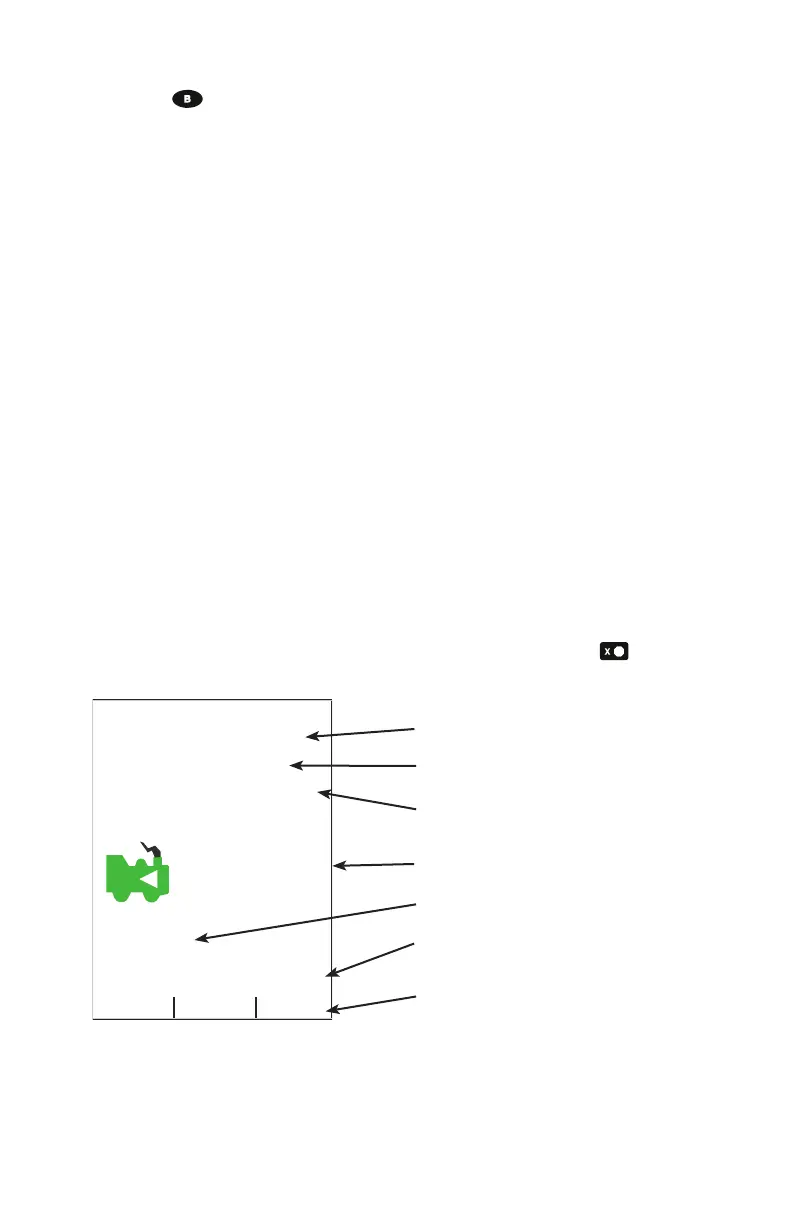
Figure 2 shows the primary or HOME operations screen for the DT602. This is
the screen you will see most often when operating trains. The Home Operations
Screen and it’s items are shown below. This example is shown with a locomo-
tive selected. If you ever get lost you can always quick press the key to
return to this Home screen. A long press will begin emergency stop.
R
Right Throttle Active
sp 0 %
0003
Trk
LN
0 1 2 3 4 5 6 7 8 9
Fn+00
L<=>R Info+
Press Loco Key then number
Left : 0002
<Rev sp0 %
Figure 2: DT602 Home screen layout
2. Status Bar
3. Switch/Fn Info + Area
1. Focus Loco Info Area
4.Function Bar
5. Second Throttle Area
6. Scrolling Help Text
7. A/B/C Soft Key Bar



 To Next Page