EasyManua.ls Logo

Dimplex DX360CF - User Manual

Dimplex DX360CF
8 pages
Print Icon
To Next Page IconTo Next Page
Loading...
DX360CF
08/54646/0 Issue 3
This product complies with all the required European Product Safety, Electromagnetic Compatibility and Environmental
Standards. They are fully compliant with the LVD, EMC, RoHS and Eco Design Directives
As with all portable appliances: This product is suitable only for well insulated spaces or occasional use.

Other manuals for Dimplex DX360CF

Question and Answer IconNeed help?

Do you have a question about the Dimplex DX360CF and is the answer not in the manual?

Summary

Important Safety Advice

Part Diagrams

Product Structure

Diagram illustrating the physical components of the fan unit.

Remote Control

Diagram and labels for the remote control buttons and functions.

Control Panel

Installation Instruction

Steps for setting up the product after unpacking and removing materials.

Operating Instructions

Standby

Procedure for activating and deactivating standby mode.

Mode

Explanation of different operating modes: Natural, Sleep, and Normal.

Runback Timer

Instructions on how to set the automatic shut-off timer intervals.

Oscillation

How to activate and select oscillation angles for the fan.

Remote Control Use

Guidance on installing the battery and operating the remote control.

Technical Specification

Cleaning and Maintenance

Guidelines for cleaning the appliance and essential safety precautions.

Recycling

Information on the proper disposal of electrical products.

Guarantee

What does a Dimplex Guarantee cover?

Details of what the product warranty covers and for how long.

What is not covered by a Dimplex Guarantee?

Exclusions and limitations of the Dimplex product warranty.

Terms and Conditions

Specific conditions for validating and utilizing the product guarantee.

Contact Dimplex

Contact information for customer support and inquiries.

Summary

Important Safety Advice

Part Diagrams

Product Structure

Diagram illustrating the physical components of the fan unit.

Remote Control

Diagram and labels for the remote control buttons and functions.

Control Panel

Installation Instruction

Steps for setting up the product after unpacking and removing materials.

Operating Instructions

Standby

Procedure for activating and deactivating standby mode.

Mode

Explanation of different operating modes: Natural, Sleep, and Normal.

Runback Timer

Instructions on how to set the automatic shut-off timer intervals.

Oscillation

How to activate and select oscillation angles for the fan.

Remote Control Use

Guidance on installing the battery and operating the remote control.

Technical Specification

Cleaning and Maintenance

Guidelines for cleaning the appliance and essential safety precautions.

Recycling

Information on the proper disposal of electrical products.

Guarantee

What does a Dimplex Guarantee cover?

Details of what the product warranty covers and for how long.

What is not covered by a Dimplex Guarantee?

Exclusions and limitations of the Dimplex product warranty.

Terms and Conditions

Specific conditions for validating and utilizing the product guarantee.

Contact Dimplex

Contact information for customer support and inquiries.

Overview

This document outlines the operation, features, and maintenance of the Dimplex DX360CF air circulating fan, a portable appliance designed for use in well-insulated spaces or for occasional use. The product complies with European Product Safety, Electromagnetic Compatibility, and Environmental Standards, including LVD, EMC, RoHS, and Eco Design Directives.

Function Description

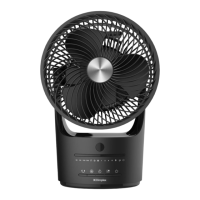
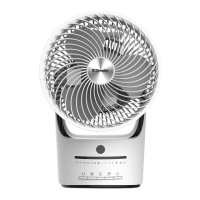
The Dimplex DX360CF is an air circulating fan designed to provide cooling and air movement within a room. It operates by drawing in air and expelling it to create a breeze, offering various modes and settings to customize the user experience. The fan can be controlled both via an on-board control panel and a remote control, providing flexibility in operation.

Usage Features

The fan offers several usage features to enhance comfort and convenience:

  • Standby Mode: Upon plugging in, the fan will emit two beeps and enter standby mode, indicated by an active LED. To start the product, the standby button must be pressed. It defaults to Normal mode at Low speed, with the corresponding LED lights illuminated. Pressing the standby button again will return the product to standby mode. The fan remembers its last fan speed and oscillation setting when switched back on in Normal Mode. After one minute of inactivity, product indication lights will turn off, but will reactivate when any button is pressed.

  • Multiple Operating Modes: The fan features different operating modes that can be cycled through using the Mode button:

    • Normal Mode: In this mode, users can manually select Low, Medium, or High fan speeds using the Fan Speed button. The selected speed is indicated by an LED light.
    • Natural Mode: This mode simulates a natural breeze by automatically varying the fan speed. Users can still select between low, medium, and strong breeze variations using the Speed Selection button. If the fan speed varies randomly, it indicates Natural mode is active, which is not a fault. To return to Normal mode, cycle through the modes using the Mode button.
    • Sleep Mode: Designed for nighttime use, this mode continuously varies the fan speed to assist in keeping cool while sleeping. Three different running patterns can be selected using the Speed Selection button:
      • Varies between high, medium, and low speed.
      • Varies between medium and low speed.
      • Operates at a consistent low speed.
  • Runback Timer: The fan includes a timer function that allows it to operate for a set duration before automatically turning off and entering standby mode. Time intervals of 1 hour, 2 hours, 4 hours, or 8 hours can be selected using the Timer button. The chosen period is indicated by an LED light.

  • Oscillation Function: To provide a wider cooling effect, the fan can oscillate. The oscillation button activates this feature, allowing the fan to sweep back and forth through selected angles. Available oscillation angles are 30°, 90°, 180°, or 360°. The selected angle is indicated by the illumination of the relevant LED. When 360° is selected, the fan will continuously rotate clockwise.

  • Control Options: The fan can be operated via:

    • Control Panel: Located on the unit, the control panel includes buttons for Standby, Mode, Oscillation, Fan Speed, and Timer, along with LED indicators for oscillation angles, fan speeds, runback timer intervals, and standby mode. An IR receiving window is also present for remote control signals.
    • Remote Control: A dedicated remote control provides convenient access to all fan functions, including Standby, Fan speed, Mode, Timer, and Oscillation. The remote control requires a 3V CR2032 button battery, which needs to be installed correctly, ensuring positive and negative poles are aligned as indicated. The remote control operates within a direct line of sight and up to 6 meters from the product.
  • Portability: The fan is designed with a handle in the rear housing, making it easy to lift and carry. This handle also serves as a storage location for the remote control when not in use.

Maintenance Features

Proper maintenance ensures the longevity and optimal performance of the Dimplex DX360CF fan:

  • Cleaning:

    • Frequency: The fan should be cleaned at least once every two months, as dust accumulation on the rear grill cover and wind wheel can affect performance.
    • Procedure: Always disconnect the fan from the power supply before cleaning. Do not use detergents, abrasive cleaning products, or polish of any kind. Use a dry cloth to remove dust and a damp (not wet) cloth to clean off stains. It is crucial to prevent moisture from entering the appliance. A vacuum cleaner can be used to remove any accumulated fluff.
  • Battery Replacement (Remote Control): If the remote control fails to operate under normal conditions after extended use, check if the battery is depleted. To replace the battery, slide out the battery holder from the bottom back of the remote control handset, install a new 3V CR2032 button battery, ensuring correct polarity, and then reinsert the battery holder.

  • Cord Care: Keep the power cord out of heavy traffic areas to prevent fire hazards and avoid placing it near heat registers, radiators, stoves, or heaters. Do not cover the cord with carpeting, throw rugs, runners, or similar coverings. Do not route the cord under furniture or appliances. Ensure the cord is positioned away from traffic areas to prevent trip hazards.

  • General Safety:

    • Never operate the appliance with a damaged cord or plug, or if the motor fan fails to rotate, or if the appliance malfunctions, or if it has been dropped or damaged. In such cases, contact the customer service team.
    • Do not attempt to repair or adjust any electrical or mechanical functions on the unit, as this will void the warranty. The unit contains no user-serviceable parts.
    • If the supply cord is damaged, it must be replaced by the manufacturer, its service agent, or similarly qualified persons to avoid a hazard.
  • Packaging Disposal: All packaging materials, especially plastic and EPS, should be removed carefully and kept away from vulnerable people, children, and babies to avoid the danger of suffocation.

  • End-of-Life Recycling: For electrical products sold within the European Community, the appliance should not be disposed of with household waste at the end of its useful life. It should be recycled where facilities exist. Consult your Local Authority or retailer for recycling advice.

Dimplex DX360CF Specifications

General IconGeneral
ModelDX360CF
Speeds3
ThermostatNo
Safety FeaturesOverheat protection
TimerNo
Warranty1 Year

Related product manuals