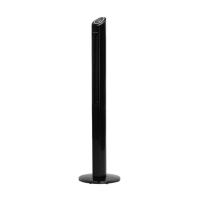
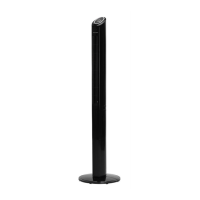
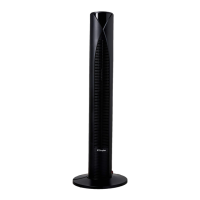
The Dimplex DXIONCF is a tower fan designed for portable heating and suitable for well-insulated spaces or occasional use. It complies with European Product Safety, Electromagnetic Compatibility, Environmental Standards, LVD, EMC, RoHS, and Eco Design Directives.
Function Description:
The DXIONCF is a tower fan that provides air circulation with various modes and speed settings. It features an ionizer function to combat airborne impurities and create fresher air. The fan can be operated using manual controls on the top of the unit or via a remote control. It also includes an oscillation function to distribute air across a wider area and a timer for scheduled operation.
Important Technical Specifications:
- Model: DXIONCF
- Maximum Fan Flow Rate (F): 22.45 m³/min
- Fan Power Input (P): 36.52 W
- Service Value (SV): 0.67 (m³/min)/W
- Standby Power Consumption (PSB): 0.584 W
- Fan Sound Power Level (LWA): 59 dB(A)
- Maximum Air Velocity (c): 2.646 m/s
- Rated Voltage (V): 220 - 240 V
- Rated Frequency (Hz): 50 Hz
- Measurement Standard for Service Value: IEC 60879:1986
- Remote Control Battery: CR2025 3V
Usage Features:
Assembly:
The base of the tower fan comes in two parts that interlock around the oscillation base.
- Attach the back half of the base, aligning holes with screw holes on the oscillation base. Feed the power cord under the two hooks and through the edge hole.
- Align bosses on the front half with holes on the back half and slide them together against the bottom of the tower.
- Secure the base to the bottom of the tower with four supplied wing head screws (two through the front half, two through the back half).
- Once assembled, the product can be stood upright, with the cable exiting flush with the standing surface.
Operation:
Place the fan on a stable, flat surface and plug it into a 220-240V~A.C. electrical outlet. The display panel will show the current room temperature when plugged in.
Controls:
The fan can be operated using manual controls on the top of the unit (Figure 3) or the remote control (Figure 2).
Remote Control:
The remote control comes with a CR2025 3V battery. Before use, pull out the plastic insulation tab. To replace the battery, unclip and remove the battery cover, replace the battery, and refit the cover.
STANDBY:
Press the 'STANDBY' button on the remote or control panel to turn the fan on/off.
SPEED:
Adjust fan speed (low (I), medium (II), or high (III)) by repeatedly pressing the 'SPEED' button until the desired speed is shown on the LED panel.
MODE:
Pressing the 'MODE' (M) button changes the fan's operation between NORMAL, NATURAL, SLEEP, and CHILD modes. The selected mode's symbol will appear on the LED display.
- NORMAL Mode (): Fan runs continuously at the selected speed.
- NATURAL Mode (=): Fan cycles through high speed (15s), medium speed (15s), and low speed (15s) automatically, simulating natural breeze conditions. This is not a fault. To deselect, press MODE (M) until NORMAL mode (**) is lit, then use the SPEED button to select desired speed.
- SLEEP Mode (O):
- If selected at high speed: Runs at high speed for 30 mins, then medium speed for 30 mins, then low speed until manually switched off.
- If selected at medium speed: Runs at medium speed for 30 mins, then low speed until manually switched off.
- If selected at low speed: Runs at low speed until manually switched off.
- Note: The display turns off after 30s in SLEEP mode.
- EASY Mode (O): Fan starts oscillating, the ionizer switches on, and the runback timer auto-sets to 3 hours. Fan runs at high speed for 15 minutes, then medium speed for 15 minutes, then low speed until manually switched off. Oscillation can be switched off by pressing the OSC button.
TIMER:
The fan has a runback timer (L) that allows setting operation from 1 to 12 hours.
OSCILLATION:
Pressing the 'OSC' button (~) starts the oscillation function. The symbol is displayed on the LED panel. Press again to stop.
IONISER:
The ionizer function is only selectable by pressing the 'ION' button on the remote control. The "ION" symbol is displayed on the LED panel. Press again to stop. The ionizer discharges negative ions to combat airborne impurities and create fresher air.
Adjusting the Angle of Air Output:
The Tower Fan's air output direction can be manually adjusted.
- With the Tower vertical, air comes out horizontally.
- Apply backward pressure at the top of the Tower to change the angle up to approximately 30° from vertical, directing air upwards.
- Apply forward pressure to the top of the Tower to readjust it back to its vertical position.
Display LED:
The display can be temporarily switched off by pressing the DISPLAY button on the remote or by pressing and holding the SPEED button on the control panel for more than 3 seconds. The display will light up again once any control button is activated.
Important Safety Advice:
- DO NOT COVER or obstruct air inlet/outlet openings.
- If the mains lead is damaged, it must be replaced by the manufacturer, service agent, or qualified person.
- Plug the appliance directly into a standard polarized 13Amp electrical outlet.
- Supervise children near the unit. Children aged 3+ and persons with reduced capabilities can use the appliance if supervised and instructed safely. Children shall not play with the appliance or perform maintenance without supervision.
- Children aged 3-8 years shall only switch on/off the appliance if installed in its intended position and supervised. They shall not plug in, regulate, clean, or perform maintenance.
- Remove all packaging materials (plastic, EPS) and keep them away from vulnerable people, children, and babies to avoid suffocation.
- Supervise children and vulnerable people near the supply cord to avoid accidental strangulation.
- The socket-outlet must be accessible for quick disconnection.
- Keep the instruction leaflet in a safe place and surrender it to a new owner if applicable.
- ALWAYS unplug the tower fan before moving or cleaning it, pulling by the plug, not the cord.
- NEVER drop or insert objects into openings.
- DO NOT use the appliance until the base is properly assembled and it is standing upright.
- DO NOT immerse in water/other liquids or use near water.
- Keep the cord out of heavy traffic areas and away from heat sources (radiators, stoves, heaters).
- DO NOT cover the cord with carpeting, throw rugs, runners, or similar coverings, and DO NOT route it under furniture or appliances.
- Use the appliance only for intended household use as described in the manual.
- DO NOT operate with a damaged cord or plug, if the motor fan fails, after malfunctions, or if it has been dropped/damaged. Contact Customer Service.
- DO NOT use outdoors.
- DO NOT place anything on top of the unit.
- DO NOT attempt to repair or adjust electrical/mechanical functions; doing so voids the warranty. Servicing should be performed by qualified personnel only.
- DO NOT use this fan with any solid-state speed control device.
- Keep batteries out of reach of children; dispose of used button batteries immediately and safely.
- The remote control contains a small battery. Keep it away from children to avoid choking. Seek medical advice if swallowed.
- DO NOT pull, carry, or move the appliance using the power cable.
Maintenance Features:
Cleaning:
- ALWAYS DISCONNECT FROM THE POWER SUPPLY BEFORE CLEANING.
- Clean the fan at least once every two months as dust may accumulate on the rear grill cover and wind wheel, affecting performance.
- DO NOT use detergents, abrasive cleaning products, or polish.
- Wipe with a dry cloth to remove dust and a damp (not wet) cloth to clean stains.
- Be careful not to allow moisture into the appliance.
- Use a vacuum cleaner to remove any accumulated fluff.
Recycling:
- For electrical products sold within the European Community, at the end of their useful life, they should not be disposed of with household waste.
- Recycle where facilities exist. Check with your Local Authority or retailer for recycling advice.
Guarantee:
- Dimplex products are individually tested and deliver reliable service for normal household use.
- The guarantee covers repair or replacement for defects due to faulty materials or workmanship within the Guarantee Period.
- Initial guarantee is 1 year from purchase/delivery date.
- Extended by an additional 2 years if registered online at http://register.dimplex.co.uk within 28 days of purchase. (Extended guarantee available only in UK and Ireland).
- Proof of purchase (original receipt) is required.
- Contact Helpline: +44 [0]344 879 3588 or https://www.dimplex.co.uk/support (ROI: serviceireland@glendimplex.com or +353(0)18424833).
- Not covered: Faults outside Guarantee Period, normal wear and tear (including filters), pre-owned products, accidental damage, external damage (transit, weather, electrical outages), faults not due to materials/workmanship or outside Dimplex's control, use for non-domestic purposes, misuse/abuse/negligent use, failure to use according to instructions, failure to assemble/install/clean/maintain according to instructions (unless by Dimplex/authorized dealers), repairs/alterations not by Dimplex/authorized dealers, use of non-Dimplex specified consumables/spare parts.
- The guarantee is valid for 1 calendar year (+2 if registered) from purchase/delivery, provided the original receipt is retained.
- Any repairs under guarantee will be carried out by Dimplex/authorized dealers, and replaced parts become Dimplex property. Repairs do not extend the Guarantee Period.
- Replacement products during the Guarantee Period start a new 3-year Guarantee Period from the delivery date of the replacement product.
- The guarantee does not cover indirect or consequential loss/damage.
- The Dimplex Guarantee is in addition to statutory consumer rights.
- Contact Dimplex Heating & Ventilation, Grange Drive, Hedge End, Southampton SO30 2DF; Telephone: 0344 879 3588; Website: www.dimplex.co.uk.

 Need help?

 To Next Page
 General