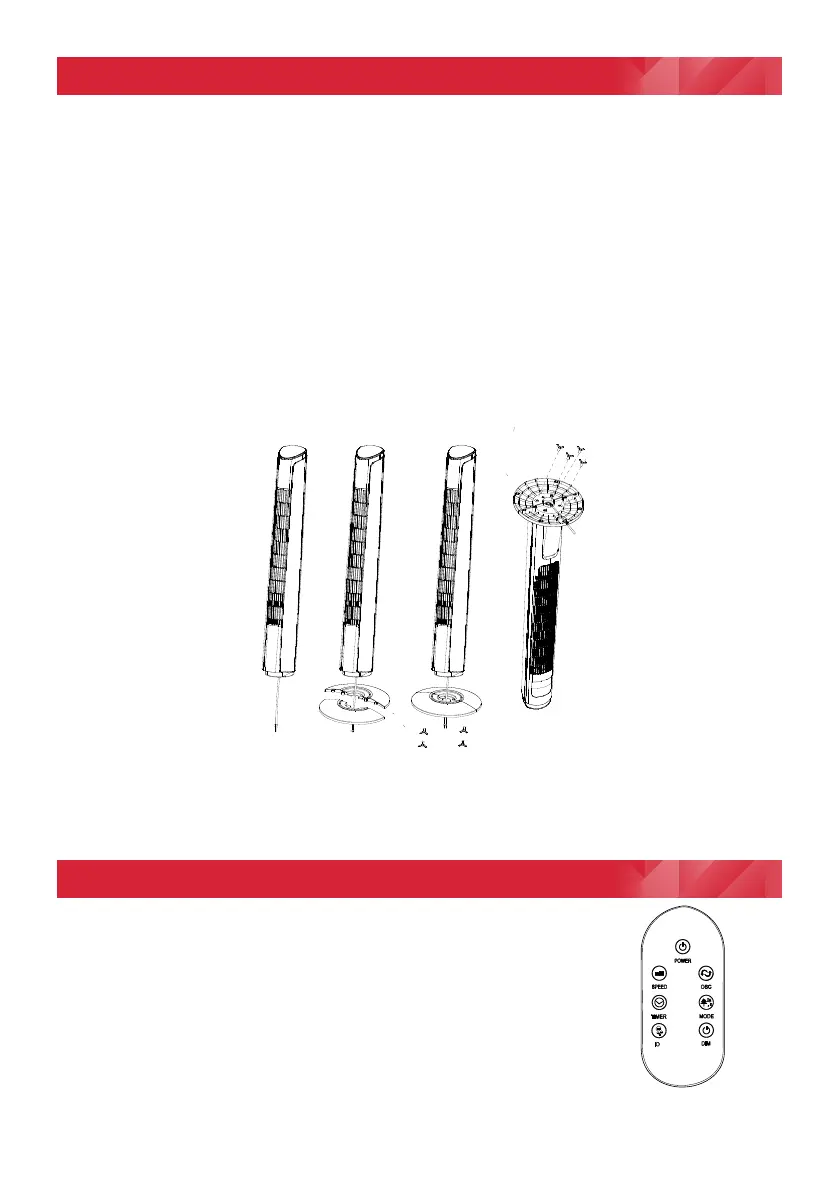
How to assemble the base
The base of the tower fan comes in two parts, each part joins together and ts around
the oscillation base of the tower. The two parts have interlocking holes and bosses
which easily slide/t into each other when aligned. The back half has cable hooks and
a cut-out on the edge to allow the power supply cord to exit ush with the bottom of the
base.
1. First attach the back half of the base, aligning the holes in the base with the screw
holes in the back side of the oscillation base of the tower, feed the power cord
under the two hooks and through the hole at the edge.
2. Then align the bosses on the front half of the base with the holes on the back half
and slide them together against the bottom of the tower.
3. Secure the base to the bottom of the tower with the four wing head screws sup-
plied, two through the front half and two through the back half.
4. The product can now be stood upright on its secured base with the cable passing
out the rim at the back ush with the standing surface.
Remote Control
The remote control for the appliance comes complete with a
CR2025 3V battery tted. Before using the remote, please
pull out the plastic insulation tab to connect the battery to the
remotes circuit. To replace the battery simply unclip and
remove the battery cover on the back and replace the
battery, then carefully ret the cover and snap it into place.
1
LED
N
(Figure 2)
(Figure 1)


 To Next Page