This document describes the Dimplex DXRCF portable fan, a device designed for use in well-insulated spaces or for occasional use. It complies with all required European and UK Product Safety, Electromagnetic Compatibility, and Environmental Standards, including LVD, EMC, RoHS, and Eco Design Directives and Regulations.
Function Description
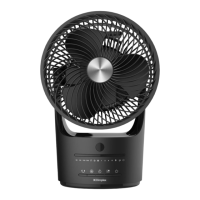
The Dimplex DXRCF is a portable fan designed to provide airflow. It features multiple speed modes (Quiet, Low, Medium, High) and can operate either unplugged using its internal lithium battery or while connected to a charging port (though high speed mode may still discharge the battery when connected). The fan head can be manually adjusted 90° vertically to direct airflow.
Important Technical Specifications
- Model: DXRCF
- Rated Voltage: DC5V
- Rated Power: 5W
- Noise Level: ≤45dB
- Product Size: 180mm × 150.5mm × 273.5mm
- Net Weight: 0.445Kg
- Battery: Internal lithium battery
- Charging Input: 5V/1A (maximum) USB charging unit (not supplied)
- Charging Time: Approximately 7 hours for a fully discharged battery using a 5V/1A adaptor.
- Working Duration (unplugged): From 4 hours (High speed mode) to 15 hours (Quiet speed mode).
Usage Features
The fan comes fully assembled and should be fully charged before first use. It can be operated free-standing once the battery is charged. When connected to a charging port, it should only be operated in Quiet, Low, or Medium speed modes to prevent battery discharge.
Controls and Indicators:
The fan has one electronic push button on the front, positioned near the LED lights, which controls power and speed settings.
LED Display Light Indication:
- Charging Mode (fan off, connected to charging port):
- ≤ 25% charge: Light 1 flashes slowly.
- 25-50% charge: Light 1 stays on, Light 2 flashes slowly.
- 50-75% charge: Lights 1 & 2 stay on, Light 3 flashes slowly.
- 75-100% charge: Lights 1, 2 & 3 stay on, Light 4 flashes slowly.
- 100% (fully charged): Lights 1, 2, 3 & 4 stay on.
- Operating Mode (fan on, disconnected from charging port, fully charged battery):
- Quiet Speed: Light 1 on, Lights 2, 3 & 4 off.
- Low Speed: Lights 1 & 2 on, Lights 3 & 4 off.
- Medium Speed: Lights 1, 2 & 3 on, Light 4 off.
- High Speed: Lights 1, 2, 3 & 4 on.
- Low Battery Indication (disconnected from charging port):
- If battery charge is too low to switch on: LED lights flash 5 times quickly, then turn off.
- If battery charge runs low during operation: The LED lights corresponding to the current speed mode will flash 5 times, and the product will switch off.
- Checking Battery Power (fan off, disconnected from charging port):
- Press and hold the button for 1.5 seconds or more.
- < 25% charge: Light 1 lights up.
- 25-50% charge: Lights 1 & 2 light up.
- 50-75% charge: Lights 1, 2 & 3 light up.
- 75-100% charge: Lights 1, 2, 3 & 4 light up.
Operation Sequence (Short Press, disconnected from charging cable):
- Press once: Switches on in Quiet mode (Light 1 on).
- Press again: Switches to Low speed mode (Light 2 on).
- Press again: Switches to Medium speed mode (Light 3 on).
- Press again: Switches to High speed mode (Light 4 on).
- Press again: Switches Off (all lights go out).
Long Press Operation:
Press and hold the button for 1.5 seconds or more while the product is running at any speed to immediately turn off the appliance, bypassing the short press sequence.
Safety Warnings:
- DO NOT COVER or obstruct air inlet/outlet.
- If mains lead is damaged, it must be replaced by the manufacturer, service agent, or similarly qualified person.
- Children aged 8+ and persons with reduced capabilities can use the appliance with supervision and instruction. Children should not play with or clean the appliance without supervision.
- Remove all packaging materials (especially plastic and EPS) and keep away from vulnerable people, children, and babies to avoid suffocation.
- Supervise children and vulnerable people near the product to avoid accidental strangulation from the supply cord.
- The socket-outlet must be accessible for quick disconnection.
- DO NOT use until the base is properly assembled and it is standing upright on its base only.
- DO NOT use lying down or at an angle.
- The output voltage for the battery charger must not exceed 5V(1A). Using the wrong voltage will damage the unit.
- Very young children/babies should not be allowed near or within reach due to openings in the enclosure and the fan head swivel point potentially catching fingers.
- DO NOT put fingers or any other object into the grill when operating.
- Place the fan on a flat, firm, safe surface.
- Disconnect the USB cable from the charging unit when not in use and when not charging.
- Ensure the fan does not touch obstructions during operation. Keep hair, net curtains, materials, clothes, etc., away from fan openings.
- DO NOT use outside; it is for indoor use only.
- DO NOT use in damp areas (e.g., bathroom) or wet areas (e.g., sink, bath, shower, swimming pool).
- DO NOT use in direct sunlight or near heat sources (radiator, cooker, heater) to avoid damage or battery overheating.
- DO NOT operate where gasoline, paint, or flammable liquids are used or stocked.
- DO NOT attempt to repair or adjust electrical or mechanical functions; this will void the warranty. Internal parts are not user-serviceable. Servicing must be performed by qualified personnel. The battery can only be replaced by a professional electrician.
- Unplug the USB cable before moving, cleaning, or storing.
- DO NOT use in High Speed mode while connected to a charging port.
- If the product is damaged or the fan is obstructed, turn it off immediately to prevent damage to the internal controller chip and motor.
Maintenance Features
Cleaning:
- Clean the fan at least once a month when in use, as dust accumulation affects performance.
- Turn off the fan and unplug it from the USB cable before cleaning to avoid electric shock.
- Clean the surface with a damp cloth, avoiding direct contact with water.
- DO NOT use detergents, sprays, or chemicals, as these can damage the appliance.
- DO NOT immerse in liquid or expose to liquid splashes or drops.
Storage:
- When not in use for extended periods, unplug the fan and store it in an enclosed space to prevent dust buildup.
- Store in a dry and cool space, away from heat sources.
Repairing the fan:
- This product is not designed for user maintenance.
- If the appliance is not working well or is damaged, unplug the USB cable or turn off the unit immediately.
- Contact the Service Center or send the appliance to a professional for repair.
Recycling:
- For electrical products sold within the European Community, do not dispose of with household waste at the end of its useful life. Recycle where facilities exist.
- Batteries should be disposed of or recycled in accordance with WEEE Directive 2012/19/EU.
- Packaging should be recycled where possible.
Guarantee:
Dimplex products are individually tested and come with a 1-year guarantee from the date of purchase or delivery. This guarantee can be extended for an additional 2 years by registering the product online within 28 days of purchase (UK and Ireland only). The guarantee covers defects due to faulty materials or workmanship. Proof of purchase (original receipt) is required. The guarantee does not cover normal wear and tear, accidental damage, misuse, or repairs by unauthorized personnel. Any repairs under guarantee will not extend the guarantee period. Replacement products will start a new 3-year guarantee period. The Dimplex Guarantee is in addition to statutory consumer rights.

 Need help?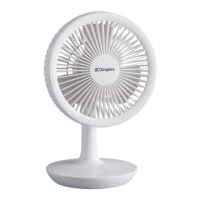

 To Next Page
 General