RESETTING THE TEMPERATURE CUTOFF SWITCH
Should the heater overheat, an automatic cut out will turn the heater off and it will not come
back on without being reset. It can be reset by switching the MAIN ON/OFF SWITCH to OFF
and waiting 5 minutes before switching the unit back on.
CAUTION
If you need to continuously reset the heater, unplug the unit and call Dimplex North America
Limited at 1-800-668-6663.
REMOTE CONTROL USAGE
1. Plug the stove into the outlet located on the side of the receiver.
2. Plug the receiver into the wall outlet.
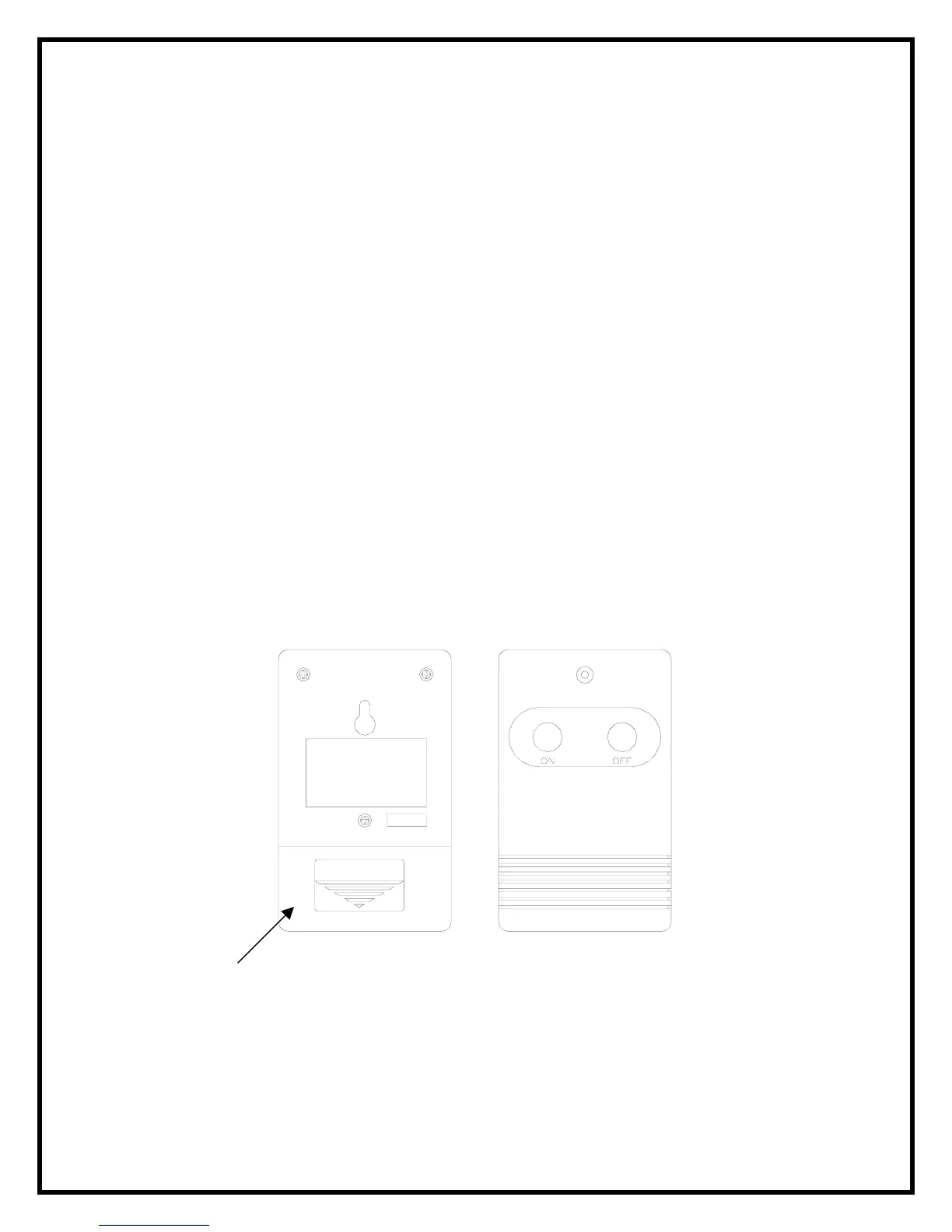
3. Install a 9 volt battery into the transmitter.
4. Turn the stove main power switch to the on position prior to using the remote contol.
5. The remote control works up to 50 feet away.
6. Push the ON button to turn stove on, push the OFF button to turn the stove off.
NOTE:
To prevent the risk of fire, the stove plug must be inserted fully into the receiver.
NOTE:
The remote control and receiver use one of 243 independent frequencies. When replacing the
remote control or the receiver they must be replaced as a set to ensure proper operation. The
frequency of the remote is located on the back of the remote on a label. (Figure 1)
4
Figure 1
OPEN


 To Next Page