OPERATION
Electric Fireplace Manual Control
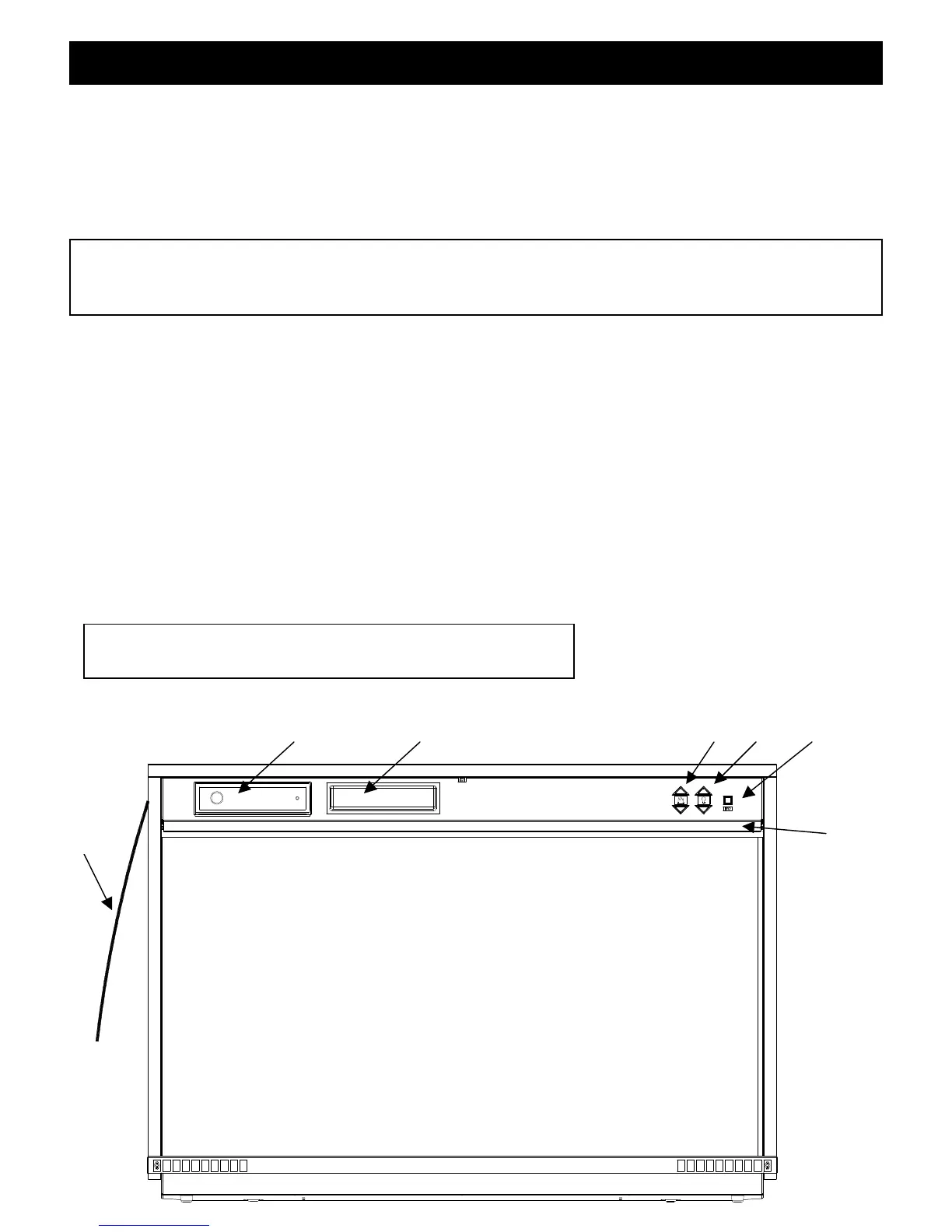
The manual controls for the firebox are located in the upper right hand corner behind the
access panel. To access the controls, open the upper access panel by pulling forward and
down.
To locate controls refer to Figure 5.
NOTE
The main on/off switch, flame action and flame brightness controls are always illuminated
when the unit is plugged in.
A. Main On/Off Switch
The ON/OFF SWITCH supplies power to all fireplace functions (Flames/Flame speed
Control/Dimmer Control).
B. Flame Action Control
Press the up or down arrow to adjust the flame speed to the desired level.
C. Flame Brightness Control
Press the up or down arrow to increase or decrease the brightness of the overhead lights.
D. Storage Compartment
A convenient location to place your CD’s or MP3 player.
E. Stereo/MP3/CD Player
This fireplace is equipped with a built-in stereo (refer to page 8 for operation)
Figure 5
Panel
open)
This unit does not have a heat option
Radio
Antenna



 To Next Page