EN-7 1810/C www.dimplex.de/en
English PLX 050E - PLX 300E
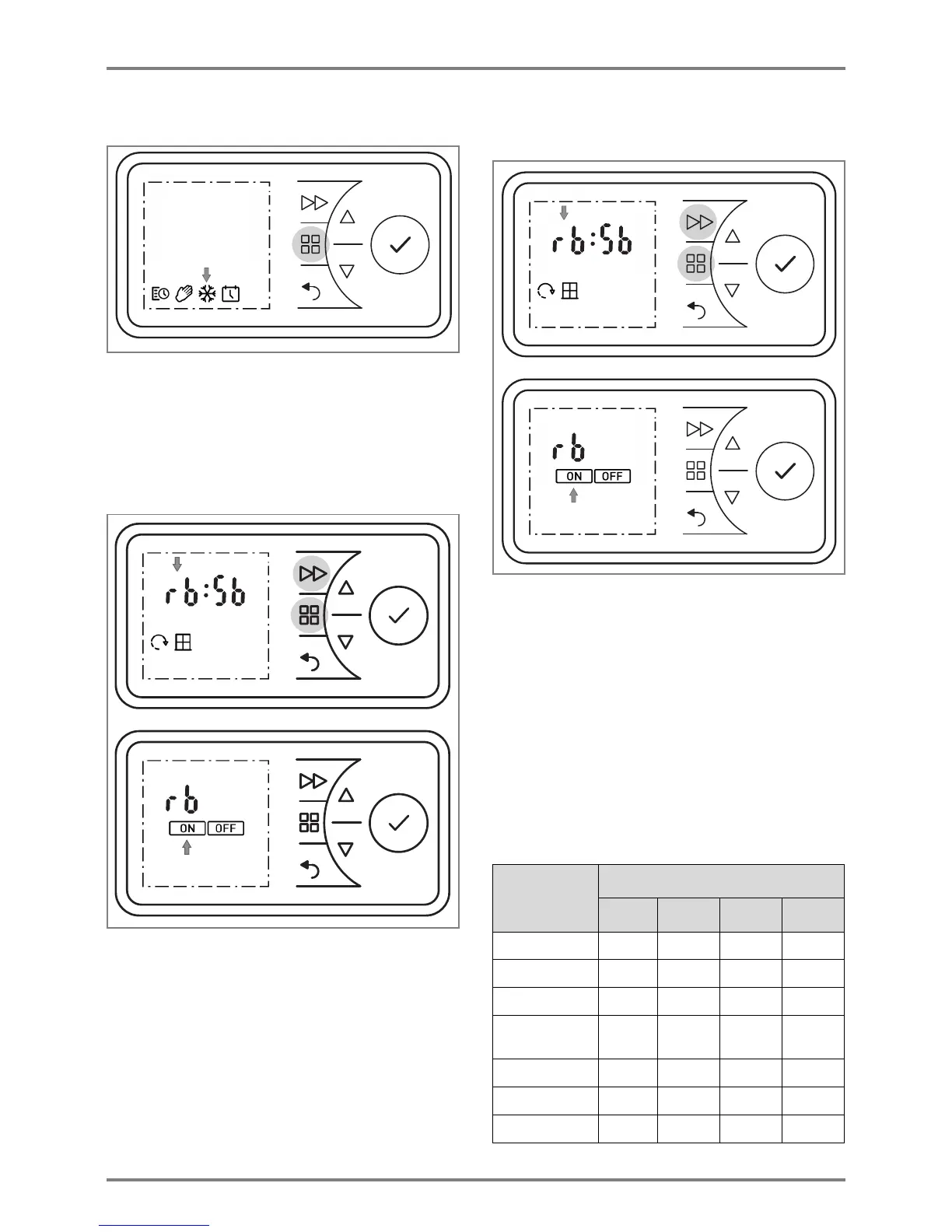
9.4 Frost protection
Specification of a frost protection temperature of 7° C
for the following 24 hours.
Press the MENU key.
Press or to select the FROST symbol. The
FROST symbol flashes. Press the ENTER key.
FROST symbol and temperature 7° C are
displayed.
9.5 Runback timer
The runback timer enables the user to activate a one-
off, time-limited heating program.
Press the MENU key. The TIMER symbol flashes.
Press the ENTER key. The ON symbol flashes.
Press or to select the OFF symbol. The OFF
symbol flashes.
Press the ENTER key =>Heating operation off.
Press the FORWARD key. Heating operation takes
place for 30 minutes (factory setting).
Where necessary, change the room temperature
with
or .
To end prematurely, switch off the heating device.
Heating duration runback timer
The maximum heating duration, limited to 2 hours at
the factory and adjustable in four stages of 30 minutes
each, can be changed as shown in the table.
Press and hold the MENU key and the FORWARD
key for five seconds.
rb display flashes.
Press the ENTER key. The ON symbol flashes.
Press the ENTER key. The heating duration
program flashes. For variants, see table, left
column (factory setting 2 h).
Press or to select the desired heating
duration program. Press the ENTER key. The room
temperature flashes.
Use or to set the room temperature and
confirm with ENTER.
Confirm the BACK key to return to the standard
display.
Heating
duration
program
Press the FORWARD key:
1 time 2 times 3 times 4 times
30 minutes 00:15 00:20 00:25 00:30
01:00 h 00:15 00:30 00:45 01:00
01:30 h 00:15 00:30 01:00 01:30
02:00 h
(factory)
00:30 01:00 01:30 02:00
04:00 h 01:00 02:00 03:00 04:00
06:00 h 01:30 03:00 04:30 06:00
08:00 h 02:00 04:00 06:00 08:00




 To Next Page