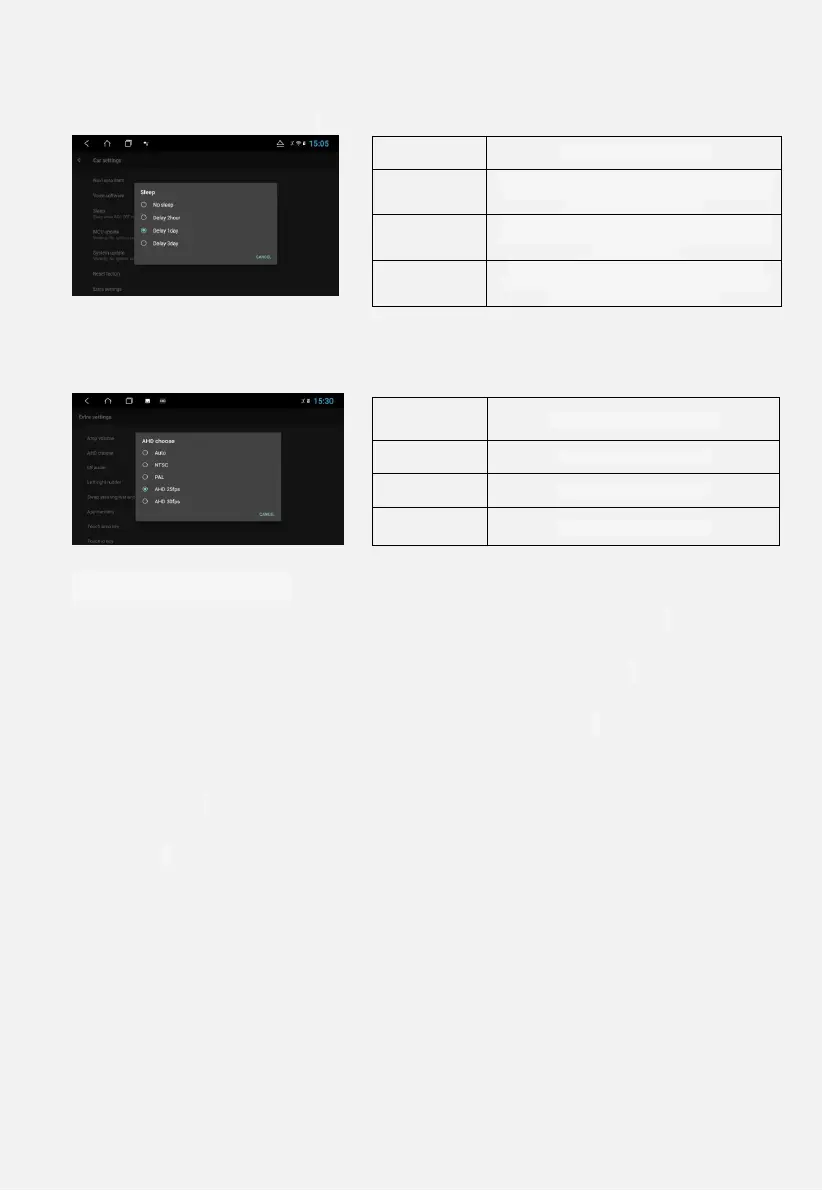
Car settings - sleep aging. Four options, as shown in Figure 3.2
3.3 AHD
Settings - car settings - expansion settings - HD selection, HD and
ordinary CVBS camera selection, as shown in Figure 3.3
3.4 Basic settings
3.4.1 Reversing mute: sound effect setting - reversing the car. Check to
have no sound output when reversing.
3.4.2 Device Ringtone: Sound Settings - Device Ringtone. After setting,
the corresponding ringtone will ring when Bluetooth calls.
3.4.3 Voice Software: Car Settings - Voice Software. Select the voice
software you want to use.
3.4.4 Navigation Startup: Settings → Car Settings → Navigation
Memory Start. Set to open.
3.4.5 Navigation Software: Settings - Car Settings - Navigation
Software. Select the app associated with the main interface navigation
icon
3.5 Date and time
The machine can automatically determine the date and time (network
connection required), or manually set the date, time, time zone, and
format.
Set → date and time, turn off automatic date and time, you can set
Do not support hibernation
The car was turned off 2 hours before the sleep
state was performed, and after 2 hours, it was
normally powered down.
The car was turned off one day ago to perform
the sleep state, and after 1 day, it was normally
powered down.
The car was turned off for 3 days before the
sleep state was performed, and after 3 days, it
was normally powered down.
NTSC ordinary CVBS camera


 To Next Page