Voice Search: When the screen is open, say "OK Google" access. Use
requires speech recognition.
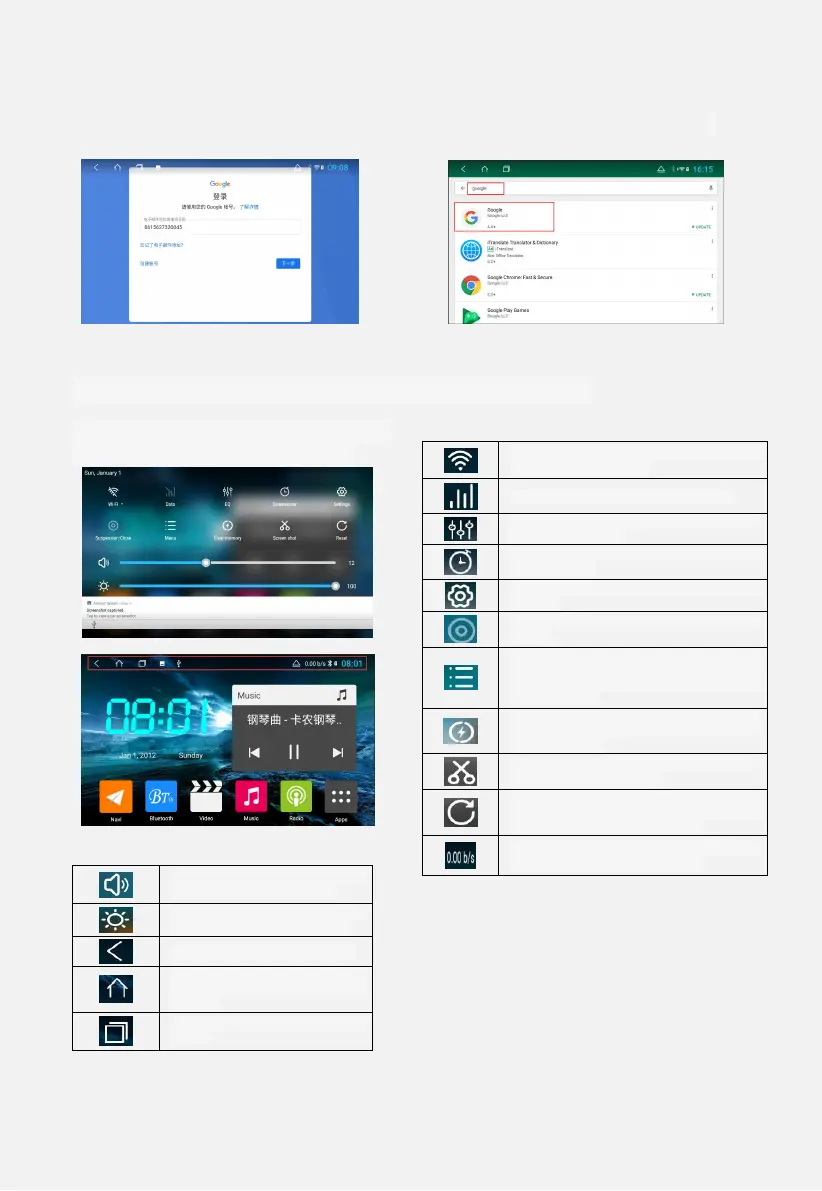
Figure 1.10 Figure 1.11
1.6 Status Bar and Drop-Down Menu Interface
The car status bar and drop down
menu functions are as follows:
Figure 1.12
Figure 1.13
There are two ways to set the
wallpaper:
1 Long press in the blank space of the
main interface, the “Select wallpaper
source” box will pop up.
2 Settings → Display → Wallpaper.
WiFi, long press to enter the WiFi interface,
short press to open WiFi
Data button, click to open network data
Equalizer, click to enter the sound
adjustment interface
Screen saver, click to enter the screen
saver interface
Settings, click to enter the settings
interface
Hover, click to open the floating icon will
appear
More features, the bottom right corner of
the main interface shows the replacement
wallpaper, management application,
system settings
Accelerator button, the machine
automatically ends running memory, speed
up the operation
Screenshot, save the screenshot
automatically after clicking
Restart, click to confirm whether the box
will restart, click the confirmation and the
machine will restart automatically.
Speed display, can be displayed or not
displayed in the extended settings
Volume button, touch to the left to
the right to adjust the volume
Brightness button, touch left and
right to adjust screen brightness
Return, exit the current interface
HOME button, click on any
interface, will return to the main
interface
History, click to show all apps
running


 To Next Page