DFW series indicators DFW_03_12.07_EN_U
27
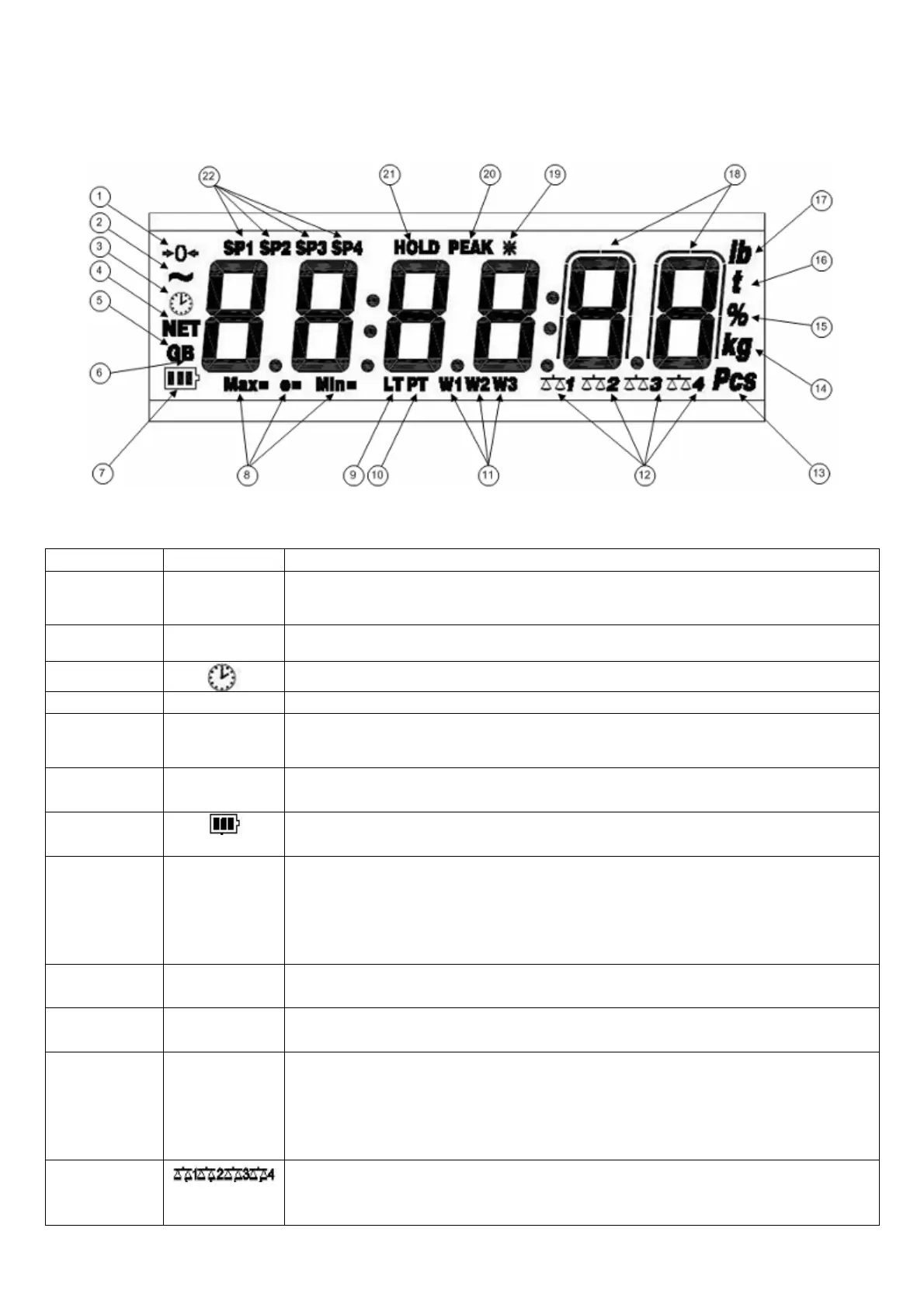
8. SYMBOLS ON THE LCD DISPLAY
The LCD display has symbols which show the indicator’s functioning status; you will find the description for each symbol
below.
LCD DISPLAY
0
The weight detected on the weighing system is near zero, within the interval of –1/4
÷ +1/4 of the division.
~
The weight is unstable.
The time is being shown on the display, in the “HH:MM:SS” format.
he displayed weight is a net
The displayed value is a gross weight, if the Italian or English language is selected in
the print configuration.
he displayed value is a gross weight, if the German
selected in the print configuration.
Indicates the battery charge level: see
MIN=
e=
When viewing the metric information, it identifies the indicated capacity range.
When viewing the metric information, it identifies the indicated minimum weigh range.
When viewing the metric information, it identifies the indicated division range
The locked tare is enabled
The manual tare is active.
W2
W3
The instrument is in the first weighing range.
The instrument is in the second weighing range.
The instrument is in the third weighing range.
Indicate the number of the slave being
REPEATER functioning mode. In the other functioning modes scale nr. 1 is always
shown.







 To Next Page